





Best Raspberry Pi Alternatives
Last Updated: May 2026 with current Raspberry Pi 5 alternatives and latest SBC recommendations
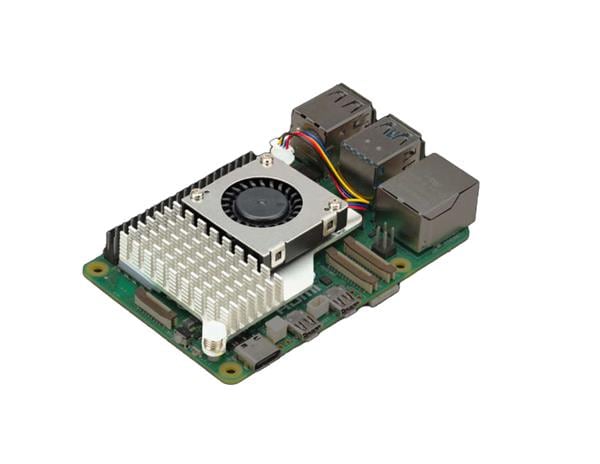
Raspberry Pi 5 still sets the reference point for maker-friendly single-board computers. You get a Broadcom BCM2712 quad-core Arm Cortex-A76 CPU at 2.4GHz, VideoCore VII graphics, Raspberry Pi OS, strong documentation, a 40-pin header, dual-band Wi-Fi, Bluetooth 5.0, Gigabit Ethernet, and a PCIe 2.0 x1 interface for fast storage through an add-on board.
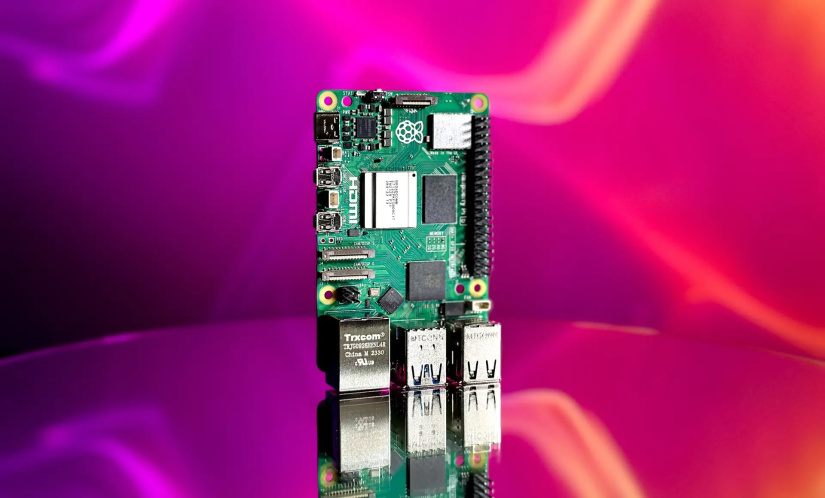
This mix keeps Raspberry Pi 5 at the top for beginners, classrooms, and projects where tutorials matter more than raw hardware. The alternatives below make sense when your build needs more CPU threads, faster NVMe, 2.5GbE, dual Ethernet, x86 software, stronger AI acceleration, HDMI input, or a cleaner route into product deployment.
The best Raspberry Pi 5 alternative in 2026 is not one board. The market now splits into three groups: RK3588 ARM boards for speed and ports, AI-first boards for local inference, and compact x86 boards for Windows, Proxmox, NAS, and PC Linux workflows.
Please note: We still have lots of Raspberry Pi 5 16 GB boards available. Order now to ship today.

Best Raspberry Pi 5 Alternatives in 2026
Use this quick list before you compare every spec.
- Best overall ARM upgrade: Radxa ROCK 5B+
- Best Orange Pi upgrade: Orange Pi 5 Ultra
- Best machine vision and embedded AI board: BeagleY-AI
- Best AI board: NVIDIA Jetson Orin Nano Super Developer Kit
- Best Pi-sized x86 board: Radxa X4
- Best industrial edge AI route: Toradex Luna SL1680
- Best networking SBC: FriendlyElec NanoPi R6S
- Best x86 NAS and home-lab board: ODROID-H4
- Best premium RK3588S2 media board: Khadas Edge2
Raspberry Pi 5 Alternatives Comparison Table
| Board | Best fit | Main reason over Raspberry Pi 5 | Main trade-off |
|---|---|---|---|
| Radxa ROCK 5B+ | All-round ARM upgrade | RK3588, up to 32GB LPDDR5, dual M.2, 2.5GbE, Wi-Fi 6, 6 TOPS NPU | Vendor and community images matter more than Raspberry Pi OS |
| Orange Pi 5 Ultra | Camera, media, and vision builds | RK3588, LPDDR5, Wi-Fi 6E, HDMI input, 6 TOPS NPU | Software resources feel less unified than Raspberry Pi |
| BeagleY-AI | Machine vision and embedded AI | TI AM67A SoC, dual C7x DSPs, AI acceleration, multi-camera support, real-time MCU cores | Lower general CPU performance than Raspberry Pi 5 and a more specialized software stack |
| Orange Pi 5 Plus | Ports, networking, and video input | Dual 2.5GbE, HDMI input, dual HDMI output, NVMe, 6 TOPS NPU | Higher-RAM pricing varies by region |
| NVIDIA Jetson Orin Nano Super | Robotics and local AI | 67 INT8 TOPS, CUDA, TensorRT, JetPack ecosystem | Higher price and a steeper setup path |
| Toradex Luna SL1680 | Product teams and industrial edge AI | 7.9+ TOPS NPU, HDMI input, eMMC, Torizon, lifecycle focus | Less of a raw CPU upgrade than RK3588 boards |
| FriendlyElec NanoPi R6S | Router, gateway, and firewall projects | Two 2.5GbE ports plus one Gigabit Ethernet port, RK3588S, FriendlyWrt | Less suited to GPIO-heavy maker builds |
| Radxa X4 | Windows, Proxmox, and x86 Linux | Intel N100, NVMe PCIe 3.0 x4, 2.5G Ethernet, RP2040 co-processor | Higher power draw than most Arm boards |
| ODROID-H4 | NAS, thin client, and home server | Intel N97, DDR5 SO-DIMM, NVMe, SATA options across the H4 family | Check stock, Hardkernel lists H4 series sales as suspended during CPU supply issues |
| Khadas Edge2 | Premium media and compact AI demos | RK3588S2, Wi-Fi 6, up to 16GB RAM, 8K media, OOWOW tools | No full-size Ethernet on the main board |
| Orange Pi AIpro 20T | Ascend AI experiments | 20 TOPS AI compute, 12GB or 24GB LPDDR4X, Ubuntu and openEuler images | Weak general CPU performance versus Raspberry Pi 5 |
Price and Software Support Matter More in 2026
Old Raspberry Pi alternative lists often treated every board as a cheap Pi clone. This view no longer works. RAM and storage price pressure changed SBC value during late 2025 and 2026, and higher-memory boards now swing hard between regions and sellers.
Software support also needs a sober check. RK3588 boards deliver strong hardware, but full HDMI, camera, NPU, and multimedia support often works best on vendor kernels and official images. Mainline Linux support keeps improving, with Collabora documenting progress across Ethernet, USB, GPU, display, video, and NPU work, but upstream support still trails the most polished vendor images for some features.
This is the main Raspberry Pi 5 advantage. Raspberry Pi OS, accessories, tutorials, and community answers reduce friction. The boards below beat Pi 5 when your project has a clear need beyond the default Raspberry Pi path.
Radxa ROCK 5B+: Best Overall Raspberry Pi 5 alternative
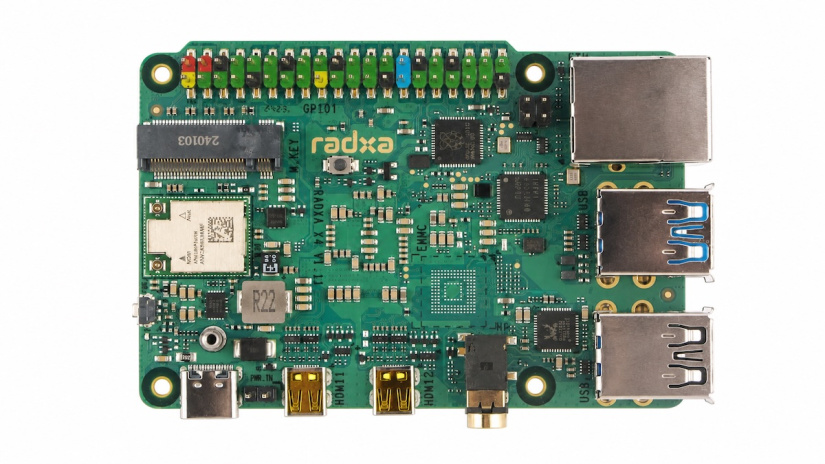
The Radxa ROCK 5B+ is the strongest all-round ARM alternative to Raspberry Pi 5. Radxa positions the board as the upgrade to ROCK 5B, with a move from one M.2 M-Key connector to two M.2 M-Key connectors, on-board eMMC up to 128GB, a dedicated USB-C PD power input, full-size HDMI input, extra camera lanes, on-board Wi-Fi 6 and Bluetooth 5.2, and an M.2 B-Key slot for cellular expansion.
The RK3588 gives you four Cortex-A76 cores at 2.2 to 2.4GHz plus four Cortex-A55 cores at 1.8GHz. The board also brings a Mali-G610 MC4 GPU, a 6 TOPS NPU, dual M.2 storage, microSD, 2.5 Gigabit Ethernet, and PoE support through an add-on HAT.
What to expect from this board
Expect more multicore CPU headroom than Raspberry Pi 5, much better storage flexibility, and a far stronger I/O story. The ROCK 5B+ suits desktops, edge compute nodes, robotics, media ingest, and local AI experiments.
The trade-off is software polish. Start with official Radxa images when you need HDMI input, camera support, graphics, or the NPU. Move to Armbian, DietPi, or mainline-focused images only after you know which features your build needs.
How to get started
- Use a USB-C PD supply rated for the board and attached NVMe drives.
- Flash the official Debian or Android image to microSD first.
- Boot, update packages, then move the root filesystem to eMMC or NVMe if your bootloader path supports your storage layout.
- Add a heatsink before sustained compiles, AI inference, or 8K video tests.
- Use the Radxa docs and pinout before attaching HATs, cameras, or cellular modules.
Project ideas
- Dual-NVMe home server with containers and local backups.
- HDMI capture box for streams, signage testing, or lab video ingest.
- Robot controller with camera input, local object detection, and 2.5GbE uplink.
- Small desktop for Linux development with NVMe and 32GB RAM.
Orange Pi 5 Ultra: Best Current Orange Pi 5 Upgrade
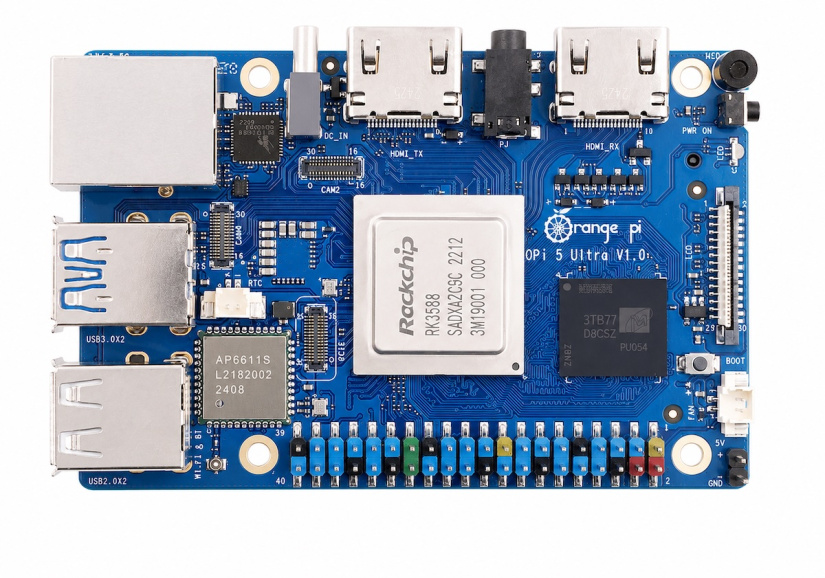
The Orange Pi 5 Ultra is the cleanest modern Orange Pi pick for many readers. The official Orange Pi summary lists Rockchip RK3588, a 6 TOPS NPU, 4GB, 8GB, or 16GB LPDDR5, HDMI 2.0 input up to 4K at 60FPS, 2.5G networking, M.2 M-Key storage, USB, GPIO, and broad official image resources.
What to expect from this board
Compared with the older Orange Pi 5, the 5 Ultra feels more suited to media, camera, and vision work. LPDDR5 helps memory bandwidth. Wi-Fi 6E and Bluetooth 5.3 reduce dongle clutter. HDMI input gives the board a role in capture and inspection projects.
Compared with Raspberry Pi 5, the hardware looks richer. The software path needs more care. Pick an official image first, then test cameras, HDMI input, GPU, and NPU before building the final filesystem.
How to get started
- Download the Orange Pi 5 Ultra image from the official resources page.
- Flash Ubuntu, Debian, Android, OpenWrt, or Orange Pi OS to microSD.
- Boot from microSD, expand storage, then move to NVMe after the board boots cleanly.
- Use the official image for HDMI input, camera, and AI features.
- Install a heatsink before video encode, computer vision, or AI workloads.
Project ideas
- HDMI video capture tool for bench testing.
- Edge vision node for people counting, package detection, or small object classification.
- Smart camera hub with local recording on NVMe.
- Android media box with GPIO control for signage buttons.
BeagleY-AI: Best Raspberry Pi 5 alternative for machine vision and industrial AI
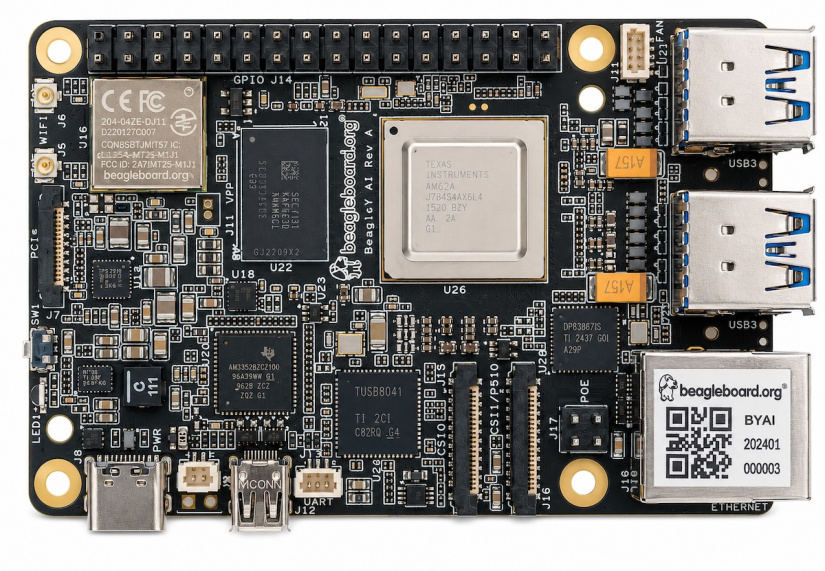
The BeagleY-AI takes a different path from most Raspberry Pi 5 alternatives. Instead of chasing raw desktop performance, it focuses on machine vision, robotics, industrial edge AI, and real-time processing using the Texas Instruments AM67A SoC.
The board combines four Cortex-A53 cores running at up to 1.4GHz, dual C7x DSPs with matrix multiply accelerators, an Imagination BXS-4-64 GPU, dedicated video acceleration, and real-time Cortex-R5F MCU cores. BeagleBoard positions the AM67A platform for AI vision, robotics, industrial automation, smart HMI systems, and edge computer vision workloads.
On the hardware side, you get 4GB LPDDR4 memory, four USB 3.0 ports, Gigabit Ethernet, Wi-Fi 6 and BLE 5.4 through the BM3301 wireless module, PCIe Gen3 x1 support, Raspberry Pi-compatible GPIO and fan headers, HDMI output, dual CSI camera connectivity, and support for up to eight cameras through virtual channels and V3Link.
What to expect from this board
Expect a board built for embedded vision and AI pipelines rather than general desktop Linux workloads. The BeagleY-AI stands out when you need camera input, AI acceleration, deterministic real-time control, or industrial connectivity.
The TI Edge AI stack adds hardware-accelerated object detection, OpenVX pipelines, TensorFlow Lite support, image signal processing, and GStreamer-based computer vision workflows. The board can drive multiple displays while also handling multi-camera AI inference.
The trade-off is software maturity and raw CPU speed. The Cortex-A53 cluster is weaker than Raspberry Pi 5 for desktop tasks, compiling, or heavy multitasking. Some Linux features and drivers are still evolving, especially around USB and Wi-Fi performance in newer Edge AI releases.
How to get started
- Use a reliable USB-C power supply rated for at least 5V at 3A.
- Flash the latest BeagleBoard Debian or TI Edge AI image to a 32GB or larger microSD card.
- Edit the username and password inside the sysconf.txt file before first boot.
- Start with Ethernet during setup if possible, especially for Edge AI development.
- Add active cooling before running sustained AI inference or multi-camera workloads.
- Use the official BeagleY-AI pinout and camera documentation before attaching HATs or CSI devices.
Project ideas
- Multi-camera object detection system using TensorFlow Lite and CSI cameras.
- Industrial robot controller with real-time motor control and local vision processing.
- Smart security camera with on-device inference and PoE networking.
- Factory monitoring dashboard with HDMI display output and edge analytics.
- Autonomous robotics platform using AI acceleration and camera pipelines.
- Embedded machine vision system using OpenVX and GStreamer workflows.
Orange Pi 5 Plus: Best Raspberry Pi 5 Alternative For Ports
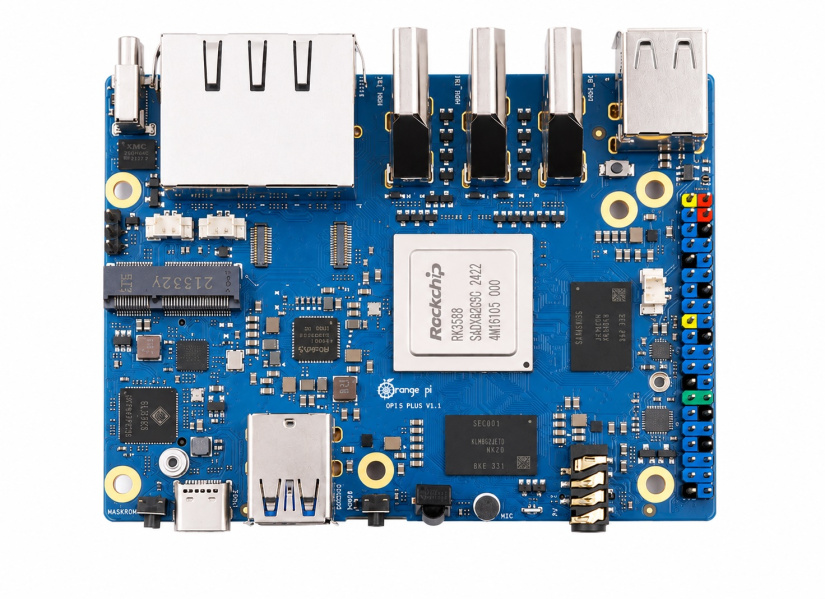
The Orange Pi 5 Plus remains a strong port-heavy alternative. Official material lists two HDMI outputs, one HDMI input, two PCIe 2.5G Ethernet ports, an M.2 M-Key slot for NVMe SSDs, an M.2 E-Key slot for Wi-Fi 6 and Bluetooth modules, two USB 3.0 ports, two USB 2.0 ports, and support for Orange Pi OS, Android 12, Debian 11, Ubuntu 22.04, and other systems.
What to expect from this board
Choose Orange Pi 5 Plus when your Raspberry Pi 5 project needs more network ports, HDMI input, or a cleaner NVMe layout. The dual 2.5GbE ports make sense for a router, NAS-lite board, traffic monitor, or lab gateway.
The board is less tidy than Raspberry Pi 5 for beginners. Expect more image testing and more forum reading, especially for GPU, NPU, camera, and HDMI input work.
How to get started
- Flash the official Ubuntu or Debian image to microSD first.
- Use one Ethernet port for initial SSH access and leave the second free for testing.
- Add an NVMe SSD only after the first boot passes.
- Use the M.2 E-Key slot for Wi-Fi 6 and Bluetooth only with a supported module.
- Record the working image version before updating kernels.
Project ideas
- Dual-2.5GbE firewall or OpenWrt gateway.
- NAS-lite board with NVMe storage and USB backup drive.
- HDMI input recorder for lab setups.
- Compact server for Home Assistant, MQTT, and Grafana.
NVIDIA Jetson Orin Nano Super Developer Kit: Best Raspberry Pi 5 Alternative for AI
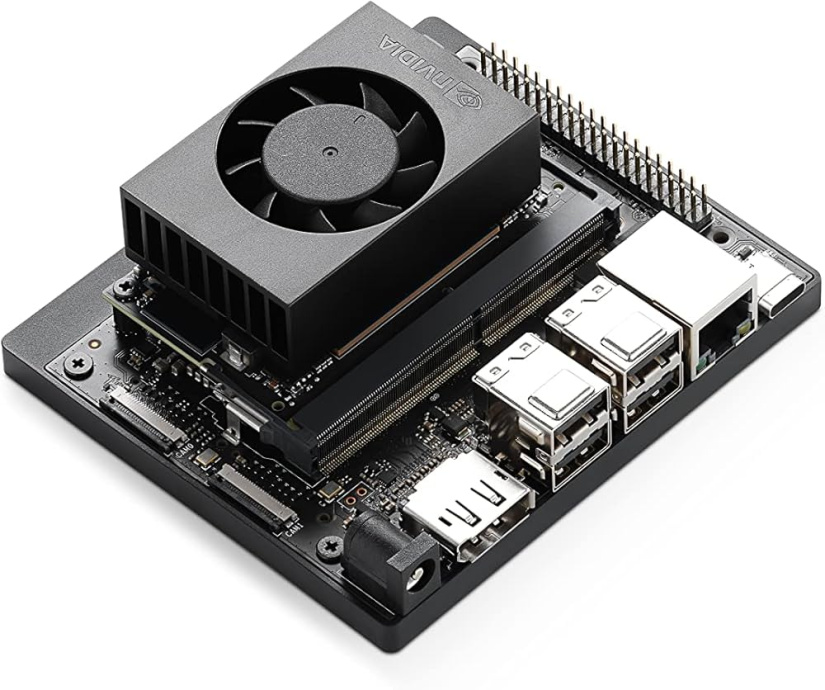
The NVIDIA Jetson Orin Nano Super Developer Kit is the clearest choice when AI matters more than Pi compatibility. NVIDIA lists 67 INT8 TOPS, an Ampere GPU with 1024 CUDA cores and 32 Tensor cores, a 6-core Arm Cortex-A78AE CPU, 8GB LPDDR5, 102GB/s memory bandwidth, microSD plus external NVMe support, and a 7W to 25W power range.
What to expect from this board
Compared with Raspberry Pi 5, Jetson Orin Nano Super is not a simple Linux desktop swap. Jetson is for CUDA, TensorRT, Isaac ROS, robotics, vision transformers, vision-language models, and local inference projects.
Existing Jetson Orin Nano Developer Kit owners also get the Super performance uplift through a software update, according to NVIDIA. This makes the upgrade path unusual: the same hardware family gains more performance through the current software stack.
How to get started
- Use NVIDIA’s current JetPack route through the official SDK download.
- Flash the microSD image or use SDK Manager from an Ubuntu host.
- Add NVMe storage for datasets, models, and container images.
- Install active cooling before training, transformer inference, or robotics demos.
- Start with NVIDIA examples before moving to your own ONNX or TensorRT model.e
Project ideas
- ROS 2 robot with real-time object detection.
- Local vision-language assistant for a workbench camera.
- Smart wildlife camera with local species classification.
- Autonomous rover with Isaac ROS perception.
Toradex Luna SL1680: Best Industrial Edge AI Raspberry Pi 5 Alternative
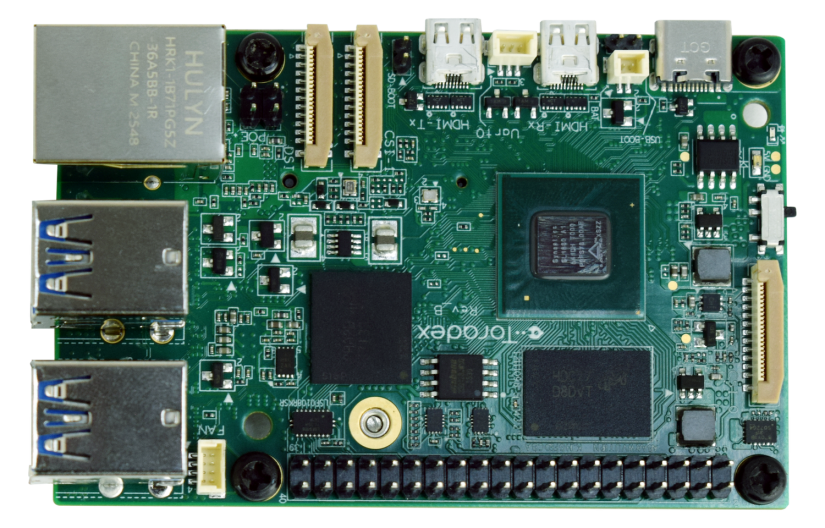
The Toradex Luna SL1680 is the most interesting new entrant for product teams. Luna is built around the Synaptics SL1680, with a quad-core Cortex-A73 CPU up to 2.1GHz, an Imagination PowerVR Series9XE GE9920 GPU, a 7.9+ TOPS NPU, eMMC storage up to 256GB, microSD, Gigabit Ethernet, HDMI input, HDMI output, MIPI camera and display interfaces, and Torizon support.
What to expect from this board
Do not treat Luna as a raw CPU upgrade over Raspberry Pi 5. The CPU cores are older than Pi 5’s Cortex-A76 cores. Luna’s advantage is product deployment: Torizon, containers, OTA-friendly workflows, Yocto routes, built-in eMMC, edge inference, HDMI input, and a more commercial posture.
This makes Luna a good fit for smart displays, kiosks, PoS systems, inspection cameras, industrial panels, and products where long-term software maintenance matters.
How to get started
- Start with Toradex Torizon rather than a random Linux image.
- Use the Toradex setup flow and VS Code tooling for containers.
- Create a small container first, then add camera, display, and AI dependencies.
- Use eMMC for production-style testing and microSD for early experiments.
- Check operating temperature, enclosure airflow, and power budget early.
Project ideas
- Industrial display with local anomaly detection.
- PoS terminal with camera-based item recognition.
- HDMI inspection device for production line screens.
- Smart kiosk with offline voice or vision inference.
FriendlyElec NanoPi R6S: Best Networking SBC Alternative
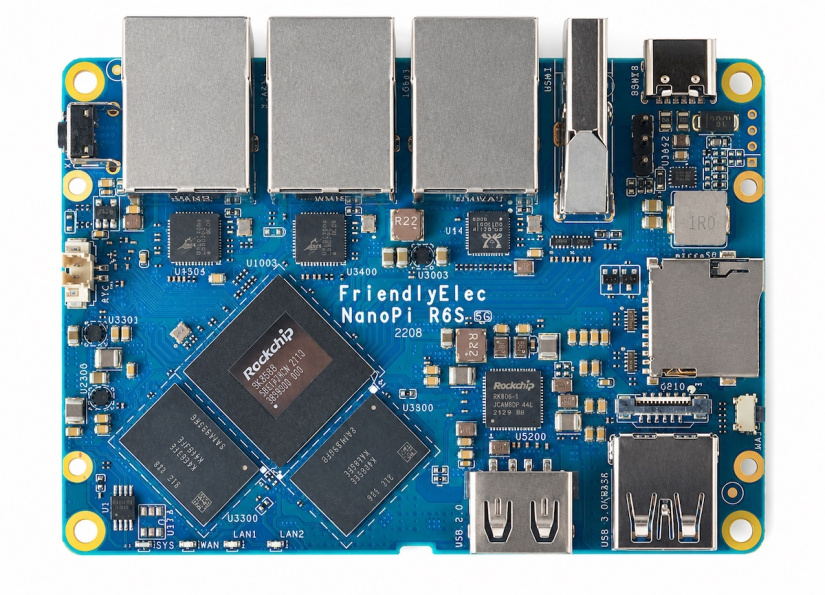
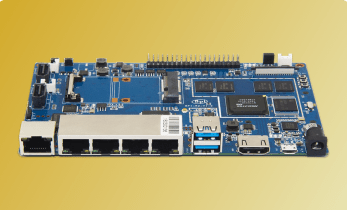
The FriendlyElec NanoPi R6S is not a general Raspberry Pi replacement. The board is a compact network appliance with RK3588S, four Cortex-A76 cores up to 2.4GHz, four Cortex-A55 cores up to 1.8GHz, Mali-G610 MP4 graphics, a 6 TOPS NPU, 8GB LPDDR4X, 32GB eMMC, one Gigabit Ethernet port, two 2.5G Ethernet ports, USB-C PD input, and official images including FriendlyWrt, Debian, Ubuntu, OpenMediaVault, Android, Proxmox VE, and Alpine Linux.
What to expect from the upgrade
Compared with Raspberry Pi 5, the R6S gives you a better network appliance foundation. The metal case option, triple Ethernet layout, eMMC, and FriendlyWrt support make router and gateway projects feel natural.
The trade-off is maker flexibility. GPIO exists through a small FPC connector, not a full Raspberry Pi-style ecosystem of HATs and tutorials.
How to get started
- Choose FriendlyWrt for routing and firewall work.
- Choose OpenMediaVault for storage appliance tests.
- Flash the image to microSD first, then write eMMC after validation.
- Use the MASK button and FriendlyElec guide for eMMC recovery.
- Use a strong USB-C PD supply, especially under full load.
Project ideas
- OpenWrt firewall with dual 2.5GbE LAN links.
- Small office VPN gateway.
- Network traffic monitor with Grafana.
- Edge node with local metrics and remote management.
Radxa X4: Best Pi-sized x86 Raspberry Pi 5 Alternative
The Radxa X4 takes a different route. Instead of another Arm SBC, Radxa uses an Intel N100 with four cores and four threads, Intel UHD Graphics, LPDDR5, a 2.5G Ethernet port with PoE header support, Wi-Fi 5 or Wi-Fi 6 options, dual 4K output, an M.2 M-Key connector with PCIe 3.0 four-lane storage, USB 3.2, BIOS features such as Wake-on-LAN, PXE, RTC wake, and an integrated RP2040 co-processor for peripheral control.
What to expect from this board
Choose Radxa X4 when your project needs x86 compatibility more than Raspberry Pi tradition. Windows 11, standard Linux distributions, UEFI workflows, Proxmox, PXE, and NVMe boot make the X4 feel closer to a tiny PC than a maker SBC.
The compromise is power and heat. Expect a more PC-like thermal plan, especially with NVMe, USB devices, and sustained CPU load.
How to get started
- Install an NVMe SSD before OS setup.
- Flash a Linux or Windows installer to a USB drive.
- Enter BIOS, choose the USB installer, then install to NVMe.
- Install Wi-Fi, Bluetooth, and graphics drivers from Radxa or the OS vendor.
- Use the RP2040 side only after reading the Radxa pinout and firmware guide.
Project ideas
- Pi-sized Proxmox lab host.
- Windows controller for USB lab equipment.
- Small x86 Home Assistant server with NVMe.
- PXE boot test node for network labs.
ODROID-H4: Best x86 Home-Lab And NAS Raspberry Pi 5 Alternative
The ODROID-H4 is less Pi-like than Radxa X4, but stronger for storage and home-lab work. Hardkernel lists an Intel N97 for the base H4, DDR5 SO-DIMM support up to 48GB, PCIe Gen 3 x4 NVMe, USB 3.0, DisplayPort, HDMI, 2.5GbE, a 60W recommended power supply, and a wider H4 family with H4+ and H4 Ultra variants adding more Ethernet, SATA, dual BIOS, and higher CPU options.
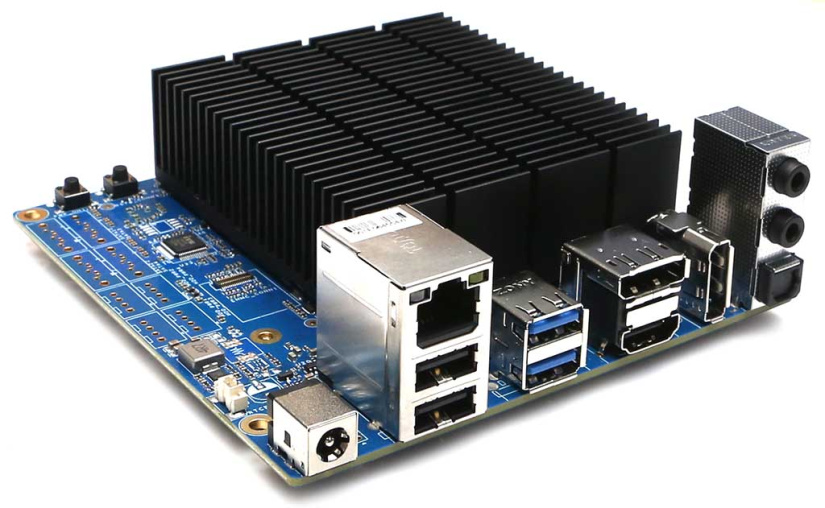
One major 2026 caveat matters: Hardkernel currently lists ODROID-H4 series production and sales as suspended for now because of Intel CPU supply issues, with expected supply resumption in 2026 not yet confirmed on the product page.
What to expect from this board
Compared with Raspberry Pi 5, ODROID-H4 is a tiny motherboard for people who care about PC software, RAM, NVMe, SATA across higher models, and 24/7 server builds. The base H4 suits thin clients, small servers, and embedded x86 work. H4+ and H4 Ultra suit NAS and routing far better.
How to get started
- Install DDR5 SO-DIMM memory and NVMe storage.
- Use a 60W power supply for normal builds, or the higher power route when 3.5-inch drives are attached.
- Flash Ubuntu Server, Debian, Proxmox, TrueNAS, or Windows to a USB installer.
- Boot from USB, install to NVMe, then update BIOS if Hardkernel recommends a newer build.
- Choose H4+ or H4 Ultra for SATA-heavy NAS use.
Project ideas
- Quiet x86 NAS with ZFS on an H4+ or H4 Ultra.
- Proxmox node for low-power lab VMs.
- Thin client for remote desktop.
- Industrial signage player with standard PC Linux.
Khadas Edge2: Best Premium RK3588S2 Alternative
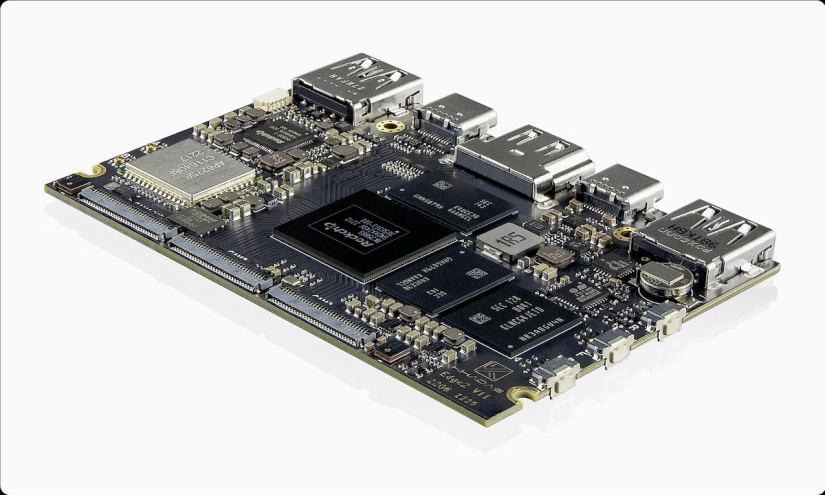
The Khadas Edge2 is a premium, compact RK3588S2 board. Khadas lists an 8-core CPU with four Cortex-A76 cores up to 2.25GHz and four Cortex-A55 cores at 1.8GHz, Mali-G610 MC4 graphics, a 6 TOPS NPU, Wi-Fi 6, up to 16GB RAM, eMMC 5.1 storage, HDMI 2.1, USB-C, MIPI-CSI, MIPI-DSI, and the Khadas OOWOW and Fenix tooling.
What to expect from this board
Compared with Raspberry Pi 5, Edge2 gives you a more premium board for media, multi-display, Android, Ubuntu, camera, and compact AI demos. The hardware finish and tooling feel more polished than many low-cost RK3588 boards.
The main catch is Ethernet. The main board focuses on Wi-Fi 6 and compact I/O rather than a built-in full-size Ethernet port, so wired network projects need another board.
How to get started
- Use OOWOW for OS download and installation where supported.
- Choose Ubuntu for Linux development or Android for media and UI work.
- Use the Maker Kit if your project needs MIPI and FPC access.
- Add active cooling for 8K media, AI demos, or sustained desktop use.
- Use official Khadas docs before connecting cameras or displays.
Project ideas
- Premium Android media box.
- Digital signage player with 8K decode support.
- Compact AI camera demo with MIPI sensors.
- Touchscreen kiosk using Khadas accessories.
Orange Pi AIpro 20T: Best Ascend-Based AI Experiment Board
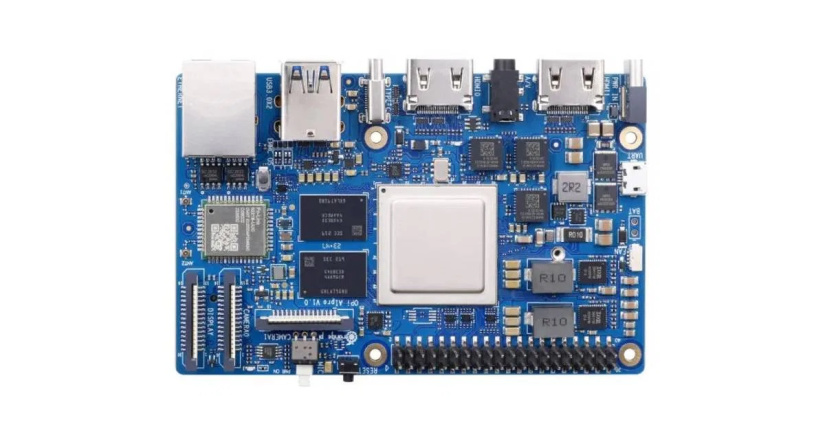
The Orange Pi AIpro 20T is different from the RK3588 Orange Pi boards. Orange Pi lists a 4-core 64-bit processor plus AI processor, 20 TOPS of AI compute, 12GB or 24GB LPDDR4X, external eMMC module options, dual 4K output, and official resources for Orange Pi OS, Ubuntu, and openEuler.
What to expect from this board
Do not buy AIpro 20T as a faster Raspberry Pi 5 desktop. Buy the board for the Ascend AI ecosystem and 20 TOPS accelerator. CPU benchmarks from the research set place the board far behind Raspberry Pi 5 on general CPU work, while the accelerator tells a different story for supported AI models.
How to get started
- Download the official Ubuntu or openEuler image from Orange Pi resources.
- Flash to the supported boot medium and use the official manual for first boot.
- Install the matching Ascend runtime and model tools for your image.
- Start with Orange Pi or Ascend examples before converting your own model.
- Track every version: OS image, runtime, model converter, and Python package set.
Project ideas
- AI education lab for Ascend workflows.
- Vision inference box with local 4K display output.
- Robotics perception test bench.
- Model conversion lab comparing CPU and accelerator paths.
Which Raspberry Pi 5 alternative should you buy?
Pick the board based on the job, not the biggest spec sheet.
- Choose Radxa ROCK 5B+ when you want the best all-round ARM SBC upgrade with strong CPU, storage, networking, and AI headroom.
- Choose Orange Pi 5 Ultra when your build leans into HDMI input, camera work, media, and current Orange Pi hardware.
- Choose BeagleY-AI when your project depends on machine vision, multi-camera AI pipelines, robotics, or real-time industrial edge processing using the TI Edge AI ecosystem.
- Choose Orange Pi 5 Plus when dual 2.5GbE and extra display ports matter more than Raspberry Pi ecosystem depth.
- Choose Jetson Orin Nano Super when CUDA, TensorRT, robotics, and local AI are the main reason for the board.
- Choose Toradex Luna SL1680 when you are moving from a prototype toward a maintained edge AI product.
- Choose NanoPi R6S when the project is a router, gateway, firewall, VPN box, or network monitor.
- Choose Radxa X4 when you need x86 software, Windows, Proxmox, PXE, or a PC-style workflow in a tiny board.
- Choose ODROID-H4 when NAS, SATA, DDR5, and home-lab use matter, after stock checks.
- Choose Khadas Edge2 when compact design, OOWOW, Wi-Fi 6, and premium media hardware matter more than Ethernet.
- Choose Orange Pi AIpro 20T only when the Ascend AI stack is part of your plan.
Raspberry Pi 5 remains the easier recommendation for a first SBC, a classroom kit, or a weekend project based on existing tutorials. The alternatives win when your requirements are specific: faster multicore ARM, better networking, local AI, HDMI input, x86 compatibility, or a route toward product deployment.
Resources for getting started
Start with the official product pages, then move to vendor docs and images before third-party builds.
- Raspberry Pi 5 product page
- Radxa ROCK 5B+ product page
- Orange Pi 5 Ultra product page
- BeagleY-AI product page
- Orange Pi 5 Plus product page
- NVIDIA Jetson Orin Nano Super Developer Kit
- Toradex Luna SL1680 product page
- FriendlyElec NanoPi R6S product page
- Radxa X4 product page
- ODROID-H4 product page
- Khadas Edge2 product page
- Orange Pi AIpro 20T product page

Residing on the south coast of England, Rich has spent the last few years building Electomaker.io from the ground up. He is usually found behind a laptop coordinating the rest of the EM team and occasionally finding time to contribute articles to the blog. When not tapping away at a laptop, he can be found either paddleboarding, at the beach, playing golf (badly), or camping with his family.










Leave your feedback...