





Nordic nRF54L15 Tag: Sensors, Setup, and Channel Sounding
The Nordic Semiconductor nRF54L15 Tag brings a wireless processor, two Bluetooth antennas, and three sensors into a compact, coin-cell-powered development platform. It is designed for developers exploring asset tags, nearby ranging, gesture controls, and connected environmental sensors.
Its appeal is practical: you can evaluate a portable sensor device before designing a custom PCB. However, the Tag is a prototyping board. Custom programming requires an external debugger, Bluetooth Channel Sounding requires a compatible peer, and Find Hub or Find My development involves additional software and ecosystem requirements.
Watch Electromaker’s nRF54L15 Tag Product of the Week video for an introduction to the platform.
What is the nRF54L15 Tag?
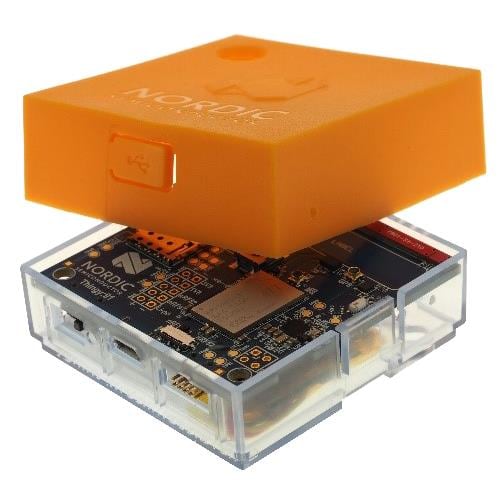
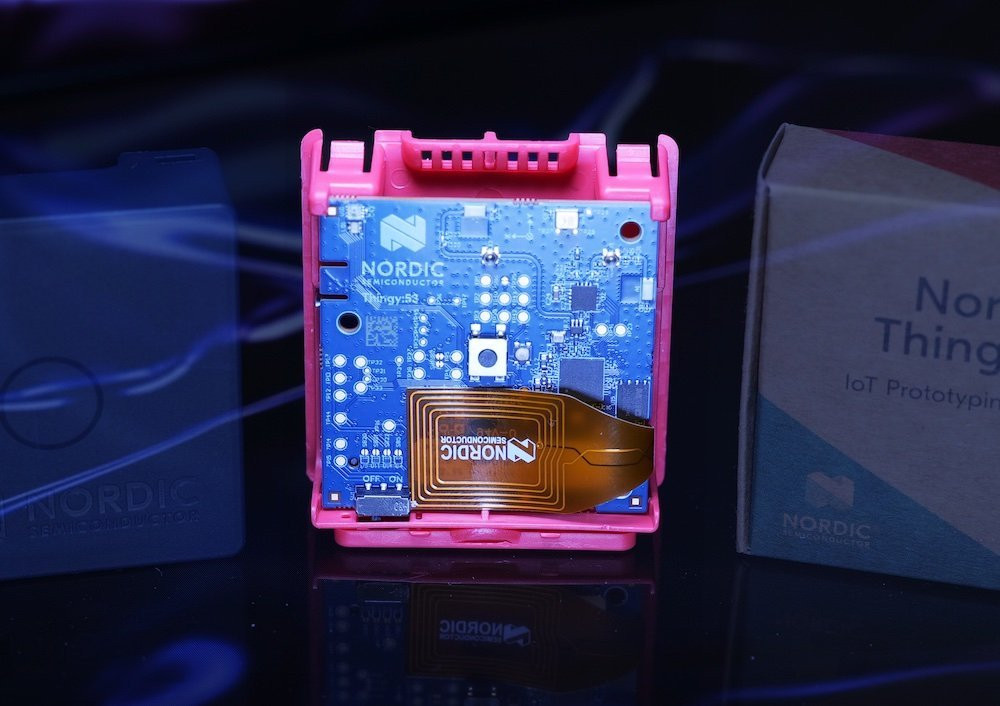
The nRF54L15 Tag is a small development board built around Nordic’s nRF54L15 system-on-chip. Nordic specifies a 33 mm board diameter, making it suitable for experiments where carrying, attaching, or moving the device matters. The complete assembly also includes a battery holder and an angled debug connector, so enclosure designs should use the mechanical files rather than the diameter alone.
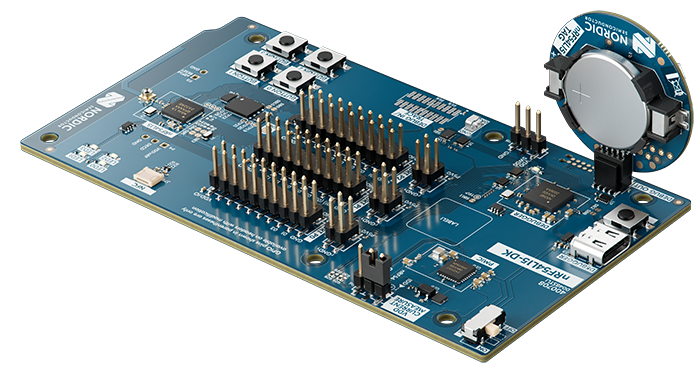
The product names describe three different things: the nRF54L15 is the chip; the nRF54L15 Tag is a portable sensor platform using that chip; and the nRF54L15 DK is a larger development kit with an onboard debugger and more convenient expansion. Nordic’s Tag introduction explains the intended applications.
%20(1).jpeg)
- Portable hardware: a CR2032 holder, fitted sensors, a button, and an RGB LED.
- Ranging hardware: two 2.4 GHz antennas and an RF switch for applications configured to use multiple antenna paths.
- Development flexibility: Nordic SDK applications for Bluetooth, locator-tag development, and Matter, plus a separate Edge AI Add-on.
- Important extra equipment: an external programmer for custom firmware and a compatible second device for ranging.
Hardware specifications and kit contents
The table separates components supplied on the board from expansion positions that require additional parts. Processor and memory figures are manufacturer specifications, not measurements from this evaluation.
| Feature | Supplied hardware and practical implications |
|---|---|
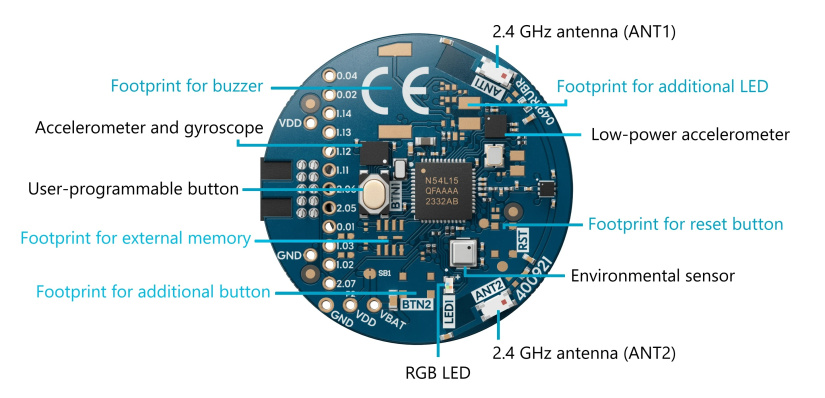
| Processor and memory | nRF54L15 with a 128 MHz Arm Cortex-M33, 1.5 MB nonvolatile memory, and 256 KB RAM. These are chip resources, not additional external memory. |
| Antennas | Two fitted 2.4 GHz antennas with switching hardware. Firmware and the ranging algorithm determine how the antenna paths are used. |
| Motion sensors | Analog Devices ADXL367 low-power accelerometer and Bosch BMI270 six-axis IMU. |
| Environmental sensor | Bosch BME688 for temperature, humidity, pressure, and gas-sensing experiments. |
| User interface | One fitted user button and one RGB LED. |
| Power and programming | CR2032 battery holder and P1 debug connector. The Tag has no onboard USB programming connection or debugger. |
| Optional footprints | Additional user button, reset button, second RGB LED, buzzer circuitry, external flash, and power header. These are not all populated in the supplied assembly. |
| Expansion | GPIO and power test points. Some pins already serve sensors or optional components, so check their assignments before connecting peripherals. |
Verify component placement against the hardware guide and the assembly drawings in Nordic’s hardware download package. The schematic includes components marked as not fitted; their presence in the drawing does not mean they are installed.
According to Nordic’s unboxing and setup guide, the kit contains:
- The nRF54L15 Tag.
- A CR2032 battery.
- A short introduction card.
Budget separately for a development kit or debug probe, its computer cable, and any ranging peer, enclosure, additional components, or measurement equipment.
Bluetooth Channel Sounding and the role of two antennas
Bluetooth Channel Sounding measures distance between two connected, compatible devices. An initiator coordinates the procedure; a reflector participates in the measurement exchange. Nordic’s ranging-service examples then make the reflector’s measurements available to the initiator for distance estimation.
The Bluetooth specification defines phase-based ranging, which uses phase changes across multiple frequencies, and round-trip timing, which uses the timing of exchanged packets. These methods differ from estimating proximity from received signal strength, or RSSI. The Bluetooth SIG’s Core 6.0 overview explains both techniques.
Two antennas give the system different radio paths to evaluate. That can help when orientation or reflections make one path less useful. It does not automatically provide a bearing, a map position, or a fixed accuracy level. Channel Sounding is also separate from Bluetooth angle-of-arrival direction finding, UWB ranging, satellite positioning, and crowdsourced finding networks.
The algorithm matters as much as the antenna count. Nordic notes in its phone-ranging guidance and follow-up discussion that its basic initiator sample does not use the Tag’s second antenna. Enabling antenna switching therefore does not, by itself, demonstrate the benefit of a multi-antenna estimator.
For context, read Electromaker’s coverage of Nordic’s Bluetooth Channel Sounding demonstration at Embedded World. For a prototype, measure performance across the orientations, obstacles, and enclosures that your application will actually encounter.
Which ranging peer do you need?
A typical embedded setup uses the Tag as reflector and an nRF54L15 DK as initiator. Nordic’s v3.4.0 initiator sample requests ranging data and prints distance estimates. A compatible phone can instead supply the initiator and estimator, but Bluetooth connectivity alone does not establish Channel Sounding compatibility.
Check the Tag-specific software path before buying a phone for this demo. Nordic’s launch guide describes Tag reflector development, but the v3.4.0 reflector sample manifest does not list the Tag. A later Nordic support case reports Pixel interoperability problems in v3.4.0 and directs Tag users toward a planned v3.4.1 fix. A released, corrected Tag-to-phone combination was not verified for this guide.
Nordic documents Pixel 9 and Pixel 10 ranging with suitable Android versions and nRF Toolbox, but that DK-focused guidance should not be treated as a guarantee for every Tag firmware build. Confirm the exact board, SDK, phone OS, app, and configuration fragment together.
Find Hub and Find My are separate development pathways
Nearby ranging answers how far away a compatible device is. A crowdsourced finding network can report an accessory’s approximate location through participating phones that encounter it. The Tag itself does not gain GPS, cellular connectivity, or automatic network enrollment from supporting Bluetooth.
| Layer or feature | What is available | What still needs checking |
|---|---|---|
| SoC connectivity | Nordic lists Bluetooth LE, Channel Sounding, Thread, and other protocol capabilities for the nRF54L15. | Each application needs a suitable stack and board configuration. Protocol listings do not mean every feature ships in the factory demo. |
| Board hardware | Dual antennas, motion and environmental sensors, coin-cell power. | No fitted buzzer or external flash. NFC support on the chip does not establish NFC availability in a Tag application. |
| Google Find Hub | The v3.4.0 Fast Pair locator-tag documentation includes the Tag. | Device registration, credentials, test access, required accessory behavior, and certification. Channel Sounding Precision Finding has additional restrictions. |
| Apple Find My | Nordic offers a restricted Find My SDK development route. | Active MFi access, Nordic SDK access, approved firmware, and Apple’s accessory requirements. |
| Matter and edge AI | Documented Tag applications exist. | Correct releases, controller or host setup, model workflow, and application-specific validation. |
For Google Find Hub development, start with Nordic’s v3.4.0 Fast Pair locator-tag sample. It supports development credentials and explains provisioning. It also explicitly identifies the Tag’s missing speaker: a compatible buzzer must be added to evaluate the audible functionality expected from locator tags.
The same release describes Bluetooth Channel Sounding Precision Finding as not publicly available and requires a suitable Android test device and a Google-allowlisted account. Those restrictions are separate from using nRF Toolbox for a Bluetooth ranging experiment. Google’s Find Hub accessory specification and locator-tag requirements govern registration, unwanted-tracking behavior, and certification.
For Apple Find My development, Nordic requires an active MFi license and a private DevZone request containing the company name and MFi number to obtain its Find My SDK. Follow Nordic’s Find My access instructions. Restricted package versions and Tag-specific implementation details could not be independently inspected here; buying the board does not grant access or certify an accessory.
Sensors, gesture recognition, and Matter projects
The two motion sensors serve different purposes. The ADXL367 is suited to low-power movement detection, while the BMI270 provides accelerometer and gyroscope data for richer motion analysis. Nordic’s sensor documentation identifies the fitted parts and connections.
| Sensor | Function and interface | Example use and limitation |
|---|---|---|
| ADXL367 | Three-axis accelerometer; shared I2C/TWI bus, address 0x1D. | Wake a stationary asset tag when it moves. Firmware must configure thresholds and wake behavior; motion alone does not establish location. |
| BMI270 | Six-axis accelerometer and gyroscope; dedicated SPI interface. | Gesture recognition or wearable motion capture. Sampling rate, mounting, and data processing affect power and results. |
| BME688 | Temperature, humidity, pressure, and gas sensor; shared I2C/TWI bus, address 0x76. | Room-condition monitoring. Gas interpretation needs suitable processing; it is not a direct CO2 sensor or a general calibrated gas analyzer. |
Although some launch wording refers to CO2 levels, Bosch’s BME688 documentation distinguishes processed CO2-equivalent outputs. Do not present those estimates as direct CO2 measurements or treat this prototype as a safety gas detector. Gas-heater operation also changes the power budget substantially.
Edge AI gesture recognition
The documented gesture-recognition application supports the Tag and uses motion data to produce Bluetooth HID inputs or inference results. The Tag uses CPU-based Neuton models, rather than an Axon NPU.
The Edge AI documentation currently identifies Add-on v2.3.0, whose release notes specify an nRF Connect SDK v3.4.0 base. Keep those versions aligned.
For custom gestures, collect labeled motion data, train a model, integrate the generated model, and evaluate it with different users and movements. The application’s data-collection mode and Data Forwarder provide starting points. Its Bluetooth NUS collection route requires an additional receiver DK. A supplied demonstration model is not a trained solution for an arbitrary gesture set.
Matter weather station
The v3.4.0 Matter weather-station application explicitly supports the Tag over Thread. It exposes temperature, relative humidity, and pressure, rather than automatically publishing every BME688 output.
Plan for a Matter controller and a suitable Thread network, typically including a Thread border router. Use the application’s onboarding information and a controller setup that accepts development devices. The Tag application does not provide USB or NFC onboarding; its documentation directs developers to RTT for logs. Historical certification statements about earlier application versions do not certify a new Tag-based product.
Electromaker’s coverage of Nordic’s Matter demonstrations provides broader ecosystem context.
Getting started: factory demo, programming, and OTA
Begin with the factory LED Button Service demo. Remove the battery isolation tab, open nRF Toolbox on a compatible phone, and connect to the device advertising as Nordic_LBS. Changing the app’s light control should change the Tag’s LED state or color. Nordic describes this in its first-use walkthrough.
| Development path | Requirements | What it establishes |
|---|---|---|
| Factory demo | Supplied battery and phone with a compatible LBS app. | Basic power, advertising, connection, and LED control. It does not test ranging or all sensors. |
| Custom firmware and debugging | Computer, matching SDK/toolchain, nRF Connect for VS Code, and an nRF54L15 DK or suitable J-Link setup. | Build, flash, and debug access through the Tag’s P1 connector. |
| Bluetooth OTA DFU | Existing compatible bootloader and DFU-enabled application, appropriate update image, and a supported update client. | Wireless application updates. It does not replace wired recovery when the required firmware is absent or unusable. |
Quick-start: build and program the LED Button Service sample
This source-reviewed workflow uses nRF Connect SDK v3.4.0. The release’s sample manifest includes nrf54l15tag/nrf54l15/cpuapp. The procedure below is a basic wired application build, not an OTA configuration.
- Prepare the tools. Install nRF Connect for VS Code, nRF Connect SDK v3.4.0, and its matching toolchain. Have an nRF54L15 DK, a USB data cable for the DK, the Tag, its CR2032, and a phone with nRF Connect for Mobile ready.
- Select the sample. Create an application from
samples/bluetooth/peripheral_lbsin the SDK’snrfrepository. Retain the suppliedprj.conf; selectnrf54l15tag/nrf54l15/cpuapp, use sysbuild, and generate the build without adding an OTA configuration. - Connect the hardware. Align Tag connector P1 with the DK’s DEBUG OUT header. Power the Tag from its CR2032 and connect the DK to the computer by USB. Do not add external Tag power while its battery is installed.
- Flash the application. Select the connected DK’s debugger and flash the Tag build through DEBUG OUT. The attached, powered Tag is the external programming target.
- Check the result. In nRF Connect for Mobile, connect to
Nordic_LBS, enable Button characteristic notifications in Nordic LED Button Service, and press the Tag’s button. Confirm button-state notifications and use the LED characteristic to control the blue LED channel.
The v3.4.0 sample README documents the application behavior. Its flashing note says DEBUG IN, but the current Tag hardware guide specifies the DK’s DEBUG OUT connector. Follow the hardware guide for the physical connection.
Using another DK or a standalone J-Link requires checking the target voltage, connector arrangement, and power source. The USB cable connects to the programmer or DK, not directly to the Tag.
What OTA updates require
OTA is a firmware capability. The bootloader, application update service, signing configuration, and image partitions must agree. An application that omits the update service can remove your wireless update route.
Nordic’s Tag OTA walkthrough uses MCUboot, an application with Bluetooth DFU enabled, and a generated dfu_application.zip with nRF Connect Device Manager. Follow its complete configuration in the matching release rather than copying individual settings into a different sample. Keep the wired debugger available for recovery.
Coin-cell power and current measurement
A CR2032 makes the Tag convenient to carry, but battery life depends on the entire application. Advertising intervals, connection activity, ranging frequency, sensor sampling, inference, logging, and LEDs all contribute. Nordic specifically notes that the factory LBS demo is not power-optimized.
Design around the events that matter. An asset-motion prototype might keep the ADXL367 active while allowing the processor and other sensors to sleep. A gesture recorder needs more sustained sampling. A gas-sensing application must account for the BME688 heater. These workloads should not inherit an advertising-only battery estimate.
A first estimate divides usable battery capacity in mAh by average current in mA. That remains an approximation: usable capacity depends on the cell, temperature, discharge profile, voltage threshold, and pulse load. Measure sleep current, event energy, and supply-voltage droop before making a lifetime claim.
There is a material error in the published measurement instructions. Nordic’s ammeter procedure says to open SB1 and connect the meter between TP6 and TP7. However, sheet 5 of the revision 1.0.0 schematic package identifies TP6 as VBAT and TP7 as ground. Connecting an ammeter directly between those points would short the supply.
The schematic shows SB1 between VBAT and VDD. Current measurement requires the instrument in series with that supply path, such as across the opened bridge, not across battery positive and ground. Confirm the board revision and connection points before modifying the board. For transient measurements, use a suitable current profiler and capture complete sleep, sensing, and radio cycles.
Five practical nRF54L15 Tag project ideas
These are proposed projects, not tested builds. Each needs a defined firmware path and an evaluation plan.
| Project | Firmware and extra equipment | Main feasibility constraint |
|---|---|---|
| Nearby ranging demonstrator | Verified Tag reflector firmware, compatible initiator DK or phone, debugger, and a reference distance measurement. | Release interoperability and estimator behavior across different orientations and obstacles. |
| Owned-asset motion tag | Custom ADXL367 wake-and-report firmware, a Bluetooth receiver, and a mounting enclosure. | False motion triggers and receiver coverage. Movement alerts are not a complete tracking system. |
| Gesture remote | Edge AI gesture application and a Bluetooth HID host; training tools for custom gestures. | Recognition across users and mounting styles, plus sampling and inference power. |
| Environmental Matter sensor | Matter weather-station firmware, controller, and Thread network infrastructure. | Commissioning, controller presentation of measurements, enclosure airflow, and duty cycle. |
| Wearable motion-data collector | BMI270 collection firmware, host receiver, and a secure wearable mount used with consent. | Packet loss, timestamps, battery load, and limited storage without added external memory. |
nRF54L15 Tag vs DK, Bluetooth sensor boards, and UWB
Compare complete development setups. A Tag may require a debugger you do not already own; a UWB ranging experiment needs another compatible endpoint; and a Matter sensor needs network infrastructure. Those requirements can matter more than the board price.
| Platform | Purpose, sensing, and ranging | Power, expansion, and debugging | Complete setup and project fit |
|---|---|---|---|
| nRF54L15 Tag | Portable motion/environmental prototype with dual-antenna Channel Sounding hardware. | CR2032, solderable expansion, external debugger. | Budget for programmer and peer. Choose for compact, moving prototypes once the required software path is confirmed. |
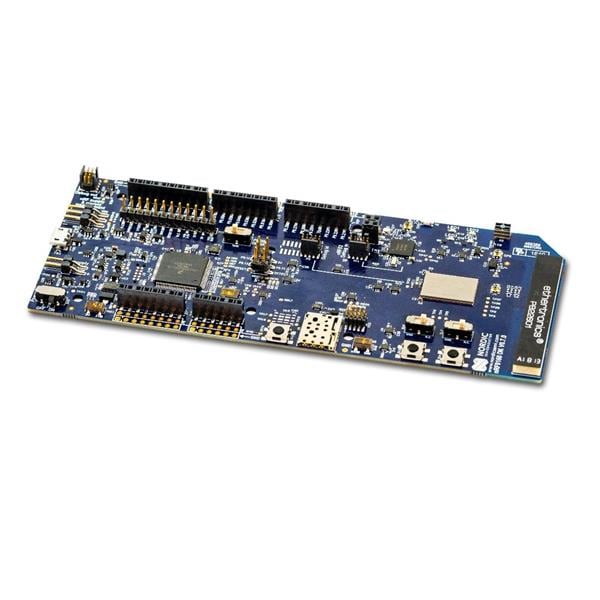
| nRF54L15 DK | General SoC development and Channel Sounding experiments; add sensors for the Tag’s sensing functions. | Bench-oriented board with onboard J-Link, expansion access, measurement facilities, and external flash. | SDK and peer hardware required. Useful for firmware bring-up and as the Tag’s programmer or ranging peer. |
| Arduino Nano 33 BLE Sense Rev2 | nRF52840-based Bluetooth sensing and TinyML board with motion, environmental, light/proximity, and audio sensing. No Bluetooth Channel Sounding hardware. | Compact Nano layout, USB programming, header expansion, and separately arranged portable power. SWD debugging needs an external probe. | Arduino tools, cable, and receiver as needed. Stronger fit for straightforward sensor education or audio experiments. |
| Qorvo DWM3001CDK | UWB platform for two-way ranging or TDoA evaluation, with a module containing a motion sensor. | USB, battery, or external power; onboard J-Link and GPIO expansion. Larger evaluation-board format. | Budget for another UWB endpoint or anchors, cables, and the required software access. Choose when the project specifically needs UWB infrastructure. |
Comparison references: Nordic nRF54L15 DK, Arduino Nano 33 BLE Sense Rev2, and Qorvo DWM3001CDK. UWB phone interoperability also depends on firmware, app, and ecosystem requirements; it does not imply Find My enrollment.
No fixed setup totals are quoted because current regional prices, stock, and accessories were not established consistently. Compare the cost of the complete experiment, including tools already available in your lab.
Troubleshooting and available development resources
Work through failures in order, starting with basic hardware and software identity. A successful Bluetooth connection does not prove that ranging, OTA, or network provisioning is configured correctly.
- Confirm the target and release. Use the Tag target, not the DK target. Check the sample’s release-specific supported-board list and rebuild cleanly after changing versions or configuration.
- Check power and debug alignment. Verify battery condition, P1 orientation, DEBUG OUT selection, and matching target voltage. The debug connection does not automatically power the Tag.
- Check what firmware is running. Identify its advertising name and services. Use RTT where the application provides it; do not assume the Tag exposes USB serial.
- For ranging, check both ends. Confirm initiator/reflector roles, ranging-service compatibility, phone OS and app versions, and whether the intended configuration fragment reached the generated build.
- For OTA, inspect the existing update path. Confirm the bootloader, update service, signing, and partition layout. Use wired recovery when the prerequisites are missing.
- For finding networks, check access. Verify model credentials, account permissions, required hardware, and ecosystem approval separately from basic Bluetooth operation.
- For high current, isolate loads. Compare LED, logging, sensor, radio, and inference activity, then measure the actual sleep and active cycles.
There is some independent Tag coverage: Novel Bits’ hands-on walkthrough describes programming and phone-ranging experiments, while a community Tag firmware repository combines sensing and ranging. These are useful additional references, but their firmware and observations are not validation of Nordic’s unmodified samples or your deployment.
Nordic’s download page provides hardware package v1.0.0 and a precompiled Peripheral LBS image identified as SDK v3.3.0. The hardware archive includes Altium files, schematics, assembly drawings, a bill of materials, and manufacturing files. Its disclaimer supplies the material as-is under Nordic’s terms.
Licensing is separate for each component. The LBS sample configuration identifies the Nordic 5-Clause license; other SDK components and third-party libraries have their own terms. Find My access is restricted, and model-generation services and AI libraries require their respective terms to be checked. Publicly downloadable hardware does not make every associated tool unrestricted open source.
Who should choose the nRF54L15 Tag?
Choose the Tag when its fitted sensors, coin-cell format, and dual-antenna hardware remove work from your prototype. It is particularly relevant when you need to carry the device, attach it to an owned asset, or collect motion data in the intended physical setting.
Choose a DK first when convenient debugging and expansion are your main priorities. Choose a conventional Bluetooth sensor board when ranging is unnecessary, or a UWB platform when the surrounding system already requires UWB. For many Nordic projects, a Tag and an nRF54L15 DK are complementary purchases.
For purchasing, use Nordic’s nRF54L15 Tag product page and distributor routing. Before ordering, confirm the supplied kit contents, the programmer you will use, and the exact software and peer combination needed for your first application.
Frequently asked questions
These answers summarize the hardware and development requirements covered above.
What comes in the nRF54L15 Tag kit?
The kit contains the Tag, a CR2032 battery, and an introduction card. A debugger, computer cable, ranging peer, and enclosure are separate.
How do I program the nRF54L15 Tag?
Use an external debugger, such as an nRF54L15 DK connected through DEBUG OUT to the Tag’s P1 connector. OTA requires compatible firmware already installed.
Does every Bluetooth phone support Channel Sounding?
No. The phone needs compatible radio hardware, OS support, and an appropriate app. The Tag firmware and SDK version must also match the supported ranging setup.
Does the Tag work immediately with Find Hub or Find My?
No. Both require suitable firmware and ecosystem prerequisites. Find My SDK access requires an active MFi license; Find Hub development requires the appropriate registration and test access.
How long does the CR2032 battery last?
There is no single verified runtime. Battery life depends on sensing, radio activity, inference, LEDs, sleep behavior, and the battery’s usable capacity under load.
Can the nRF54L15 Tag run Matter or edge AI?
Yes. Nordic documents a Matter-over-Thread weather-station application and an Edge AI gesture application for the Tag. Each requires its own software configuration and supporting setup.

Residing on the south coast of England, Rich has spent the last few years building Electomaker.io from the ground up. He is usually found behind a laptop coordinating the rest of the EM team and occasionally finding time to contribute articles to the blog. When not tapping away at a laptop, he can be found either paddleboarding, at the beach, playing golf (badly), or camping with his family.






Leave your feedback...