





ELM11 Feather Explained: Lua, C, and FPGA Programming on One Board
The BrisbaneSilicon ELM11 Feather is a Feather-compatible, FPGA-based microcontroller board built around an unusual idea: start with an interactive Lua development experience, then let the developer change lower layers of the system when a project needs more speed, tighter timing, or custom digital hardware.
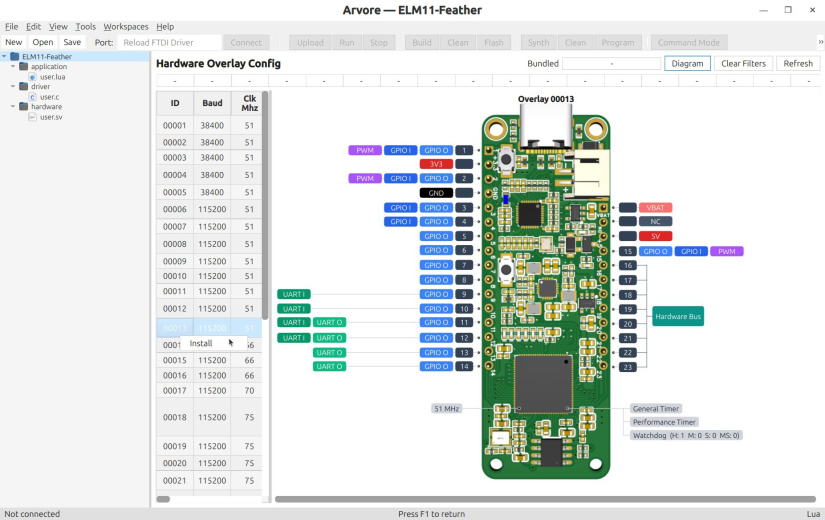
At the Application Layer, you can write Lua and experiment through a REPL. At the Driver Layer, you can add compiled C functions and expose them back to Lua. At the Hardware Layer, you can create SystemVerilog or VHDL modules inside the Gowin FPGA. BrisbaneSilicon calls this full-stack programmability.
This approach can be useful for custom protocols, deterministic timing, digital test equipment, encoder interfaces, packet processing, and teaching hardware-software co-design. It also brings tradeoffs. ELM11 Feather has no documented analog inputs, its advanced workflow depends on RISC-V and GOWIN tools, the Arvore IDE is still described as beta, and several official sources disagree about the default CPU frequency.
Watch the Electromaker Product of the Week video for ELM11 Feather, then use this guide to check the architecture, toolchain, compatibility limits, and current preorder details before deciding whether it fits your project.
What is ELM11 Feather?
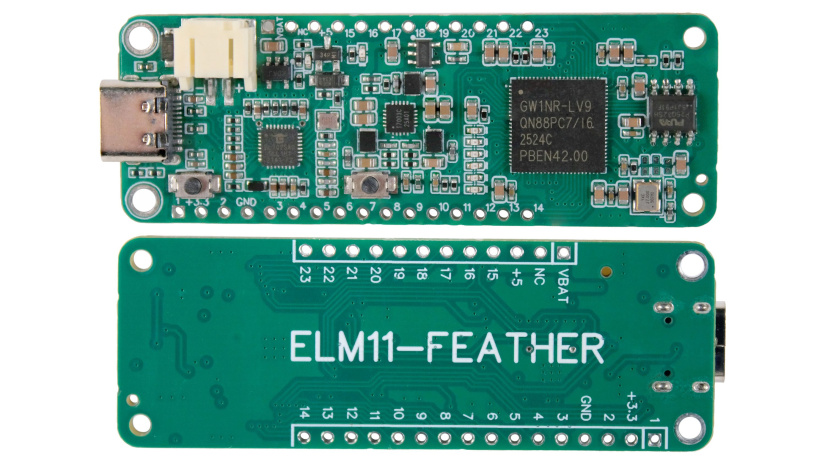
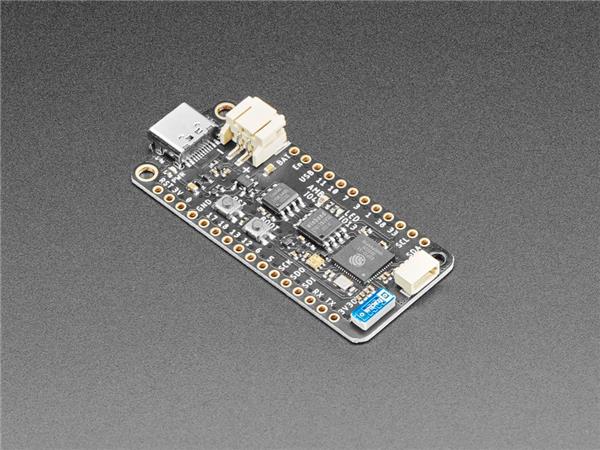
ELM11 Feather is a scriptable microcontroller development board created by BrisbaneSilicon. It follows the Adafruit Feather header arrangement while extending the board beyond the length of a classic Feather. Its main programmable device is a Gowin GW1NR-9 FPGA, written as GW1NR9-C on the Crowd Supply campaign.
The board is sold as a microcontroller platform because it boots into an embedded Lua environment, provides a processor, RAM, timers, a watchdog, and configurable digital peripherals, and can run Lua and C programs. The difference is that the processor and many peripherals are implemented by a Hardware Overlay inside the FPGA rather than fixed permanently in silicon.
That distinction explains an apparent contradiction in the campaign comparison table, which lists the ELM11 Feather CPU as "None." It does not mean that the board executes code without a processor. It means that there is no separate fixed MCU. A selected FPGA configuration supplies the processor and its surrounding hardware.
For readers new to the form factor, Electromaker's Adafruit Feather board guide explains the header layout and FeatherWing ecosystem. ELM11 Feather uses that ecosystem as a starting point, but its digital-only analog positions and longer PCB make compatibility a project-by-project check.
.jpg)
ELM11 Feather features at a glance
The core value is not any single clock speed or interface count. It is the ability to use an ordinary Lua workflow for straightforward tasks and introduce C or RTL only where the project has a measured need.
- Three programmable layers: Lua applications, C drivers, and SystemVerilog or VHDL hardware.
- Interactive development: an embLua REPL is available over USB serial, with one REPL for each processor core supplied by the active overlay.
- Configurable hardware: Hardware Overlays can change processor resources, digital-I/O capabilities, buses, interrupts, timers, watchdogs, and optional acceleration.
- Up to 23 digital I/O positions: GPIO, PWM, UART, SPI, and I2C support depends on the active overlay.
- Feather expansion: the header pattern supports Feather-style add-ons after electrical, mechanical, pin, and software checks.
- Portable power features: USB-C, a LiPoly charging circuit, a battery connector, and a 3.3 V regulator are built in.
- Unified tooling: Arvore combines project workspaces, editing, REPL access, uploads, C builds, RTL synthesis, overlay selection, and documentation.
What is included with the current preorder?
As checked on 25 August 2026, the Crowd Supply purchasing option lists the following:
- One ELM11 Feather board.
- Two unsoldered 24-pin headers, using the wording in the live listing.
- One USB Type-C to Type-A cable.
The campaign was funded on 20 August 2026 and was accepting preorders at $39, plus $8 US shipping or $18 worldwide shipping. It showed $1,618 raised from 19 backers and an estimated 1 November 2026 ship date. These are crowdfunding details, not delivery guarantees, and they should be rechecked on the live page before publication or purchase.
Hardware specifications and unresolved details
The table below separates board-level claims from raw GW1NR-9 device resources. A Hardware Overlay consumes part of the FPGA, so the Gowin device totals are not the amount necessarily left for a custom module.
| Area | Current documented information | Practical qualification |
|---|---|---|
| Main programmable device | Gowin GW1NR-9 FPGA, called GW1NR9-C on the campaign page | Gowin renamed the former GW1NR-9C device category to GW1NR-9 in 2020. The full orderable suffix for the board's package, speed, and temperature grade is not published in the current ELM11 Feather material. |
| Raw FPGA resources | 8,640 LUT4s, 6,480 flip-flops, 468 Kbits block SRAM, 16 Kbits shadow SRAM, 608 Kbits user flash, 20 18 x 18 multipliers, and two PLLs | These are GW1NR-9 family totals from the current Gowin datasheet. The processor, embLua system, and selected peripherals consume resources. Post-overlay resources available to user RTL are not currently published. |
| Processor | A soft processor supplied by the selected Hardware Overlay | Arvore requires a RISC-V GCC toolchain for Driver Layer builds, which identifies the software target as RISC-V. The public board documentation does not name the exact soft-core implementation or complete ISA profile. |
| CPU frequency and cores | Overlay-dependent; currently documented examples use one core at 51 MHz or 66 MHz | The campaign also states 70 MHz for the default overlay and 75 MHz in its comparison table. Confirm the installed overlay from the boot log rather than assuming one figure. |
| Application RAM | 1 MB heap and 40 KB stack in the three datasheet overlay examples | The campaign calls this 1 MB RAM. The datasheet more specifically presents it as overlay-exposed heap, not the total raw memory capacity inside the GW1NR package. |
| Program storage | Lua and C programs can be stored in flash; the block diagram shows separate QSPI flash | The capacity of the external QSPI device is not stated in the current board datasheet or block diagram. |
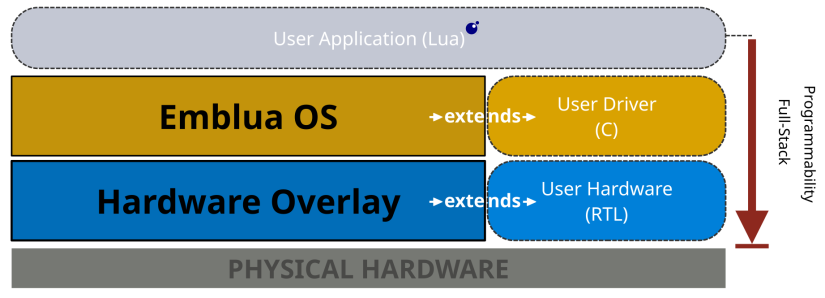
| Digital I/O | Up to 23 pins with GPIO, PWM, UART, SPI, and I2C capability | The active overlay decides the exposed pin count and supported functions. Overlay 0013, for example, exposes 15 pins rather than 23. |
| Analog input | None documented | The six Feather positions commonly used for analog inputs are digital I/O on ELM11 Feather. Use a verified 3.3 V-compatible external ADC when analog measurement is required. |
| Logic level | 3.3 V logic | The presence of a 5 V power pin does not make the I/O 5 V tolerant. The current board documentation does not publish a higher digital-input limit. |
| Regulator | 3.3 V regulator, stated 500 mA peak output | Peak is not the same as continuous current available to a FeatherWing. Subtract the board's own consumption and use the regulator's continuous and thermal limits when they become available. |
| Battery charging | Built-in 500 mA LiPoly charger, battery connector, and charging-status indicator | Confirm cell type, connector polarity, capacity, and permitted charge rate before connecting a battery. The current public board documentation does not identify the connector part or polarity in text. |
| USB | USB-C with an FTDI USB-to-serial path | Use a data-capable cable and install the FTDI virtual COM port driver if the host does not detect the board automatically. |
| Indicators and controls | Campaign lists five user-programmable LEDs, a user button, a reset button, and a charge indicator | The overlay tables describe LED1 through LED6 as heartbeat, activity, memory, and pin-mirror indicators. Treat LED behavior as overlay-dependent rather than assuming five unrestricted outputs. |
| Mechanical | 22.86 x 64.65 x 4.85 mm, 5.2 g, four mounting holes | The width matches the classic 0.9-inch Feather width, but the board is about 13.9 mm longer than the classic 50.8 mm length. |
| Wireless | No supported Wi-Fi or Bluetooth workflow is documented | Do not infer wireless capability from the BL702 component mentioned in the campaign risk section. Its board-level role is not defined in the published ELM11 Feather documentation. |
How full-stack programmability works
The three layers form a progression, not a mandatory checklist. A simple FeatherWing display or digital sensor may stay entirely in Lua. C becomes useful when profiling shows that interpretation or data handling is the bottleneck. RTL is justified when a function needs deterministic timing, true parallelism, a custom electrical protocol, or a hardware path that a processor cannot reproduce reliably.
| Layer | Language and tools | Best use | When to move deeper |
|---|---|---|---|
| Application | Lua through the embLua REPL, uploaded programs, or Arvore | Project logic, sequencing, digital I/O, configuration, experimentation, and readable educational code | Move to C only after measuring a processing, latency, or API limitation. |
| Driver | C, the Arvore-generated user.c structure, Lua C API, RISC-V GCC, and MSYS2 on Windows | Binary work, parsing, packet filtering, calculations, faster loops, and a clean Lua-facing API for custom hardware | Move to RTL when software cannot meet the timing or concurrency requirement. |
| Hardware | SystemVerilog or VHDL, official skeleton, GOWIN EDA 1.9.12, a valid GOWIN license, and Arvore synthesis/programming controls | Deterministic pulse generation, custom digital protocols, parallel state machines, counters, timestamping, and focused acceleration | Use only when the benefit justifies FPGA resource use, verification effort, and a more complex toolchain. |
Data can pass from Lua into a registered C Driver Layer function. The C code can then communicate with a custom Hardware Layer block through the overlay's hardware bus. BrisbaneSilicon's Hardware Layer tutorial describes simplified valid/ready interfaces between the driver, custom logic, and downstream I/O.
Application Layer: Lua and embLua
The fastest path into ELM11 Feather is the embLua REPL. Connect over USB serial, press Enter, and the board presents a dollar-sign prompt. Lua expressions can be evaluated interactively, and multiline input is supported. A running script can be interrupted with the q key, according to the current embLua documentation.
The current board datasheet calls the interpreter a Lua 5 REPL but does not state the minor version. The global _VERSION variable reports the version on the connected board, so print(_VERSION) is more reliable than assuming compatibility with a desktop Lua release.
embLua also has a memory-conscious import model. Most board API functions must be imported before use. You can import only the required names, such as import("set_gpio"), or load the complete board API with import("all"). The latter is convenient for experiments but consumes more memory. The documentation says there is some support for the Lua string, table, and math libraries. It does not promise compatibility with every desktop Lua package, LuaRocks module, NodeMCU module, or arbitrary Lua program.
Interactive commands are ideal for confirming a pin and peripheral. Repeatable applications can then be uploaded to flash, selected as boot programs through Command Mode, or managed with Arvore.
Driver Layer: extending Lua with C
The Driver Layer is the middle bridge. It lets a developer move a focused operation into compiled C while keeping the top-level project readable in Lua. BrisbaneSilicon's official Driver Layer tutorial uses a generated user.c file and the Lua C API.
The official workflow is concise:
- Create an Arvore workspace targeting ELM11 Feather and keep the default overlay for the introductory C example.
- Start from the official
user.luaanduser.cskeletons linked from the campaign update. - Implement a static C function that accepts
lua_State *L, validates and reads arguments from the Lua stack, pushes its results, and returns the number of results pushed. - Register the Lua-visible name and C function pointer in
user_api_registry. - Use Arvore's Build and Flash controls, reboot the board, then import the new function with
import("user", "function_name").
This path requires the supported RISC-V GCC toolchain. Windows users also need MSYS2 with make installed. Those dependencies are not required for the ordinary Lua REPL path.
Hardware Layer: custom SystemVerilog or VHDL
The Hardware Layer is for logic that genuinely benefits from FPGA implementation. The official campaign example implements a bit-shifting function in RTL, connects it to a C driver, and calls the resulting function from Lua. The broader pattern can support an encoder, custom serial framing, timestamping, a deterministic pulse engine, or a parallel digital test fixture.
The official workflow adds several requirements:
- Build the unmodified Driver Layer example first so that the Lua-to-C path is known to work.
- Install an overlay that provides a hardware bus and enough downstream I/O. BrisbaneSilicon's tutorial selects an overlay with 15 I/O pins and a hardware bus.
- Start from the official
user.svskeleton or its VHDL equivalent, preserving the documented upstream and downstream valid/ready interfaces, reset behavior, addressing, signal direction, and pin alignment. - Use GOWIN EDA 1.9.12 to synthesize the Hardware Layer and Arvore to program it.
- Update, build, and flash the C driver that moves data between Lua and the custom module.
- Import the registered Driver Layer function in Lua and test the complete path with safe external hardware.
GOWIN EDA requires a free license. Arvore documents a local license file or a floating license server, and notes that community-listed public servers might not be official or stable. For repeatable engineering work, apply through GOWIN and use an official license arrangement.
Hardware Overlays: what changes at compile time?
A Hardware Overlay is a complete FPGA configuration that supplies the processor and surrounding resources needed by embLua. Selecting a different overlay can change the number of CPU cores, clock rate, available pins, bus width, UART or SPI data width, interrupt support, buffering, timers, watchdog behavior, LED roles, and optional Lua VM acceleration.
Arvore's Hardware Overlay Config view downloads and installs available configurations and allows filtering by feature. BrisbaneSilicon says overlays are continuously added and updated, so the IDE's live catalog is more current than a static article.
| Datasheet example | CPU and memory | I/O and hardware bus | Other resources |
|---|---|---|---|
| 0002 | One core, 51 MHz, 1 MB heap, 40 KB stack | 23 pins, no hardware bus, 8-bit UART and SPI support across the documented pins | No software interrupts or hardware I/O buffers; one-hour hardware watchdog; performance and general timers; no VM acceleration |
| 0003 | One core, 66 MHz, 1 MB heap, 40 KB stack | 23 pins, no hardware bus, no UART or SPI width in the table | No software interrupts, I/O buffers, watchdog, or VM acceleration; performance and general timers remain present |
| 0013 | One core, 51 MHz, 1 MB heap, 40 KB stack | 15 pins, 8-bit write-only hardware bus, 8-bit UART, no SPI width in the table | Software interrupts on all exposed pins, skid buffers, one-hour watchdog, performance and general timers, no VM acceleration |
These are reference examples in the 10 July 2026 datasheet, not an exhaustive list or a promise that the catalog will remain unchanged. All three are single-core and list no Lua VM acceleration. Although embLua supports a separate REPL per configured core, the current datasheet examples do not establish that a multi-core overlay is shipping.
Why do official sources show four CPU speeds?
The current official material does not resolve the default frequency cleanly:
- The Crowd Supply feature list says the default Hardware Overlay runs at 70 MHz.
- The comparison table on the same campaign page says 75 MHz.
- The ELM11 Feather datasheet presents a 51 MHz, 15-pin configuration as the example that ships with the board.
- The datasheet's named overlay list also includes a 66 MHz, 23-pin configuration.
The safest interpretation is that frequency belongs to an overlay, not permanently to the board. On first connection, read the boot log for the actual core count, frequency, heap, stack, firmware build, and digital-I/O count. Then record the overlay ID used for any test result. Clock rate alone is also an incomplete comparison, because C or RTL can offload a well-defined task, while an inefficient or unsuitable custom module can fail to improve it.
Run-time configuration versus a new Hardware Overlay
Run-time changes reuse capabilities already built into the installed overlay. Compile-time changes alter the FPGA configuration itself.
| Run-time configuration | Hardware Overlay change |
|---|---|
| Choose a supported I/O type for a pin, set UART baud, set PWM or SPI frequency, select boot programs, and configure supported interrupt behavior. | Change CPU core count or frequency, exposed pin count, protocol implementations and widths, hardware bus presence, buffers, watchdog, timers, LED behavior, or VM acceleration. |
| Performed through Command Mode or an available Lua API without resynthesizing the FPGA. | Requires selecting a prebuilt overlay or synthesizing and programming a custom one. |
| Cannot create a protocol block or interrupt resource that the overlay does not contain. | Consumes FPGA resources and can trade one capability for another. |
Arvore IDE and development requirements
Arvore provides workspaces, ELM11 or ELM11 Feather target selection, Lua or C top-level modes, SystemVerilog or VHDL selection, overlay browsing, a code editor, Lua upload and run controls, Driver Layer build and flash controls, Hardware Layer synthesis and programming controls, a serial terminal, a REPL, Command Mode, and an integrated documentation panel.
The campaign describes Arvore as beta. Its repository currently provides an x86-64 AppImage, a Debian package, and a Windows installer directly in the repository rather than a clearly versioned GitHub release. Check the repository and commit date before installing.
| Path | Required setup | Official host support |
|---|---|---|
| Beginner Lua | Board, data-capable USB cable, FTDI driver if required, Arvore or a serial terminal, and an overlay exposing the required digital I/O | Arvore officially targets x64 Debian-based Linux and Windows 11. Command-line serial access is documented separately for Linux, macOS, and Windows. |
| Intermediate C | Everything above, plus RISC-V GCC; Windows also needs MSYS2 and make | Use the compiler and MSYS2 paths in Arvore settings. |
| Advanced RTL | Everything above, plus GOWIN EDA 1.9.12, a valid license, and the official Hardware Layer skeleton | Arvore documents expected GOWIN install paths for Linux and Windows. Other setups may require build-script changes. |
If running Arvore from source, its current README requires Python 3.12.3 or later, PyQt6 6.4.0 or later, and pyserial. macOS is not listed as an officially supported Arvore platform even though the board datasheet documents command-line serial access on macOS.
Getting started with a first Lua digital-I/O project
This quick start uses PIN1 because BrisbaneSilicon's official GPIO toggle example identifies it as an onboard LED-connected GPIO, and the current overlay tables say LED4 through LED6 mirror PIN3 through PIN1. Check the boot log and I/O capabilities first, because a custom overlay can change the mapping.
- Inspect the board and leave the headers unsoldered for this onboard LED test. Do not connect a FeatherWing yet.
- Connect ELM11 Feather to the computer using the supplied cable or another data-capable USB-C cable.
- Install or verify the FTDI virtual COM port driver if the board does not appear as a serial device.
- Open Arvore or a serial terminal on the correct port. The July ELM11 Feather datasheet specifies 115200 baud, 8 data bits, one stop bit, no parity, and no flow control. This board-specific setting takes precedence over older general embLua pages that show 921600 baud.
- Press Enter to confirm the Lua
$prompt. Reconnect while resetting the board if you need to capture the boot log. - Enter Command Mode with
cmd, runlist|io_caps, confirm that PIN1 supports GPIO output under the active overlay, then useexitto return to the REPL. - Paste or upload the program below. It imports only the functions used, configures PIN1 as a digital output, toggles it ten times, leaves it low, and resets its I/O type.
- After the interactive result works, upload the Lua file through Arvore or the documented program uploader. Configure a boot program only after you can recover the board through USB serial.
- Add C or RTL only when a measured requirement cannot be met with the Lua path.
import("set_io_type_cfg")
import("reset_io_type_cfg")
import("set_gpio")
import("msleep")

set_io_type_cfg(PIN1, GPIO_OUT)
set_gpio(PIN1, LOW)

for i = 1, 10 do
    set_gpio(PIN1, TOGGLE)
    msleep(500)
end

set_gpio(PIN1, LOW)
reset_io_type_cfg(PIN1)
This is an Application Layer Lua program for the current embLua API. It does not require RISC-V GCC or GOWIN EDA. If the LED does not respond, stop and verify the firmware build, active overlay, PIN1 capability, and LED mapping before changing the code.
Digital I/O and protocol limitations
The campaign advertises up to 23 configurable digital pins and maxima of 20 PWM, 20 UART, six SPI, and ten I2C instances. Those figures are not evidence that every maximum can operate simultaneously. The datasheet directs users to query the active core with list|io_caps and then configure only supported types.
| Function | Current API model | Important limit |
|---|---|---|
| GPIO | Configure a pin as GPIO_OUT or GPIO_IN, then set or read a 3.3 V digital level. | Interrupt availability is overlay-dependent, and 5 V tolerance is not documented. |
| PWM | Configure PWM type, set frequency through Command Mode, and set duty from 0 to the documented PWM_MAX value of 256. | Available frequencies depend on the CPU or overlay clock, and some requested high-end values are rounded to the nearest achievable value above the request. |
| UART | Configure UART_OUT or UART_IN and set baud per pin. | Overlay 0002 and 0013 document 8-bit UART support, while 0003 lists none. Some receive functions are marked unavailable in the beta documentation. |
| SPI | Configure SPI_OUT or SPI_IN and set the clock through Command Mode. | The current datasheet lists a 1 to 250 kHz Command Mode range. Overlay 0002 documents 8-bit SPI, while 0003 and 0013 list none. |
| I2C | Configure a pin for the bidirectional I2C type when the overlay reports support. | Several I2C calls are marked unavailable in the beta API table. Confirm the current firmware and external pull-up requirements before selecting a FeatherWing. |
The lack of onboard ADC channels is the most important interface limitation for typical Feather users. An analog sensor can still be used through an external ADC or ADC FeatherWing, but the converter must accept the sensor range, operate safely with 3.3 V logic, fit the pin mapping, and have a usable embLua or custom driver path.
FeatherWing compatibility and power planning
The official Feather specification defines a classic 22.86 x 50.8 mm board with fixed header locations, 3.3 V logic, standard power positions, and common I2C, SPI, and UART positions. It allows longer mainboards, but longer boards may not fit standard enclosures, breakout boards, or tight stacks. ELM11 Feather is 64.65 mm long, so check at least 13.9 mm of additional clearance.
Before connecting a FeatherWing, check all of the following:
- Analog assumptions: any Wing that expects A0 to A5 as ADC inputs will not receive analog measurements directly from ELM11 Feather.
- Logic voltage: the digital interface is 3.3 V. Do not connect a 5 V logic output without suitable level translation.
- Pin roles: confirm that the active overlay exposes the required I2C, SPI, UART, PWM, interrupt, or GPIO function on the expected Feather position.
- Current draw: the manufacturer specifies 500 mA peak for the 3.3 V regulator, not 500 mA of guaranteed continuous spare current for a Wing.
- Mechanical clearance: check the longer board, USB-C connector, battery connector, component height, mounting holes, stacking headers, and enclosure.
- Software support: CircuitPython or Arduino FeatherWing libraries do not automatically run on embLua. A simple I2C device may only need a small Lua driver, while a complex display or radio can require substantial porting.
- Battery safety: verify LiPoly cell chemistry, connector polarity, capacity, and allowable 500 mA charge rate.
Header compatibility is valuable, but it is not the same as universal FeatherWing compatibility. This is especially important for analog Wings, radio Wings with large software stacks, motor controllers with higher current, and boards with fixed interrupt or chip-select expectations.
Project ideas that fit the three-layer model
The best ELM11 Feather projects make deliberate use of its layering. Ordinary control logic can stay approachable in Lua while a measured bottleneck or timing-sensitive feature moves lower.
| Project | Recommended layer split | Why it fits |
|---|---|---|
| Digital FeatherWing sensor or display prototype | Lua first; C only for a missing or expensive driver operation | Uses the REPL for rapid bus and command testing without forcing RTL into a straightforward project. |
| Battery-powered digital logger | Lua sequencing with a digital sensor; add a compatible external ADC only for analog sources | Uses charging and flash features while keeping the analog limitation explicit. |
| UART packet monitor | Lua controls capture and reporting; C filters binary packets | Separates high-level rules from repetitive byte handling. |
| Quadrature encoder interface | RTL counts edges and direction, C exposes registers, Lua handles application behavior | Demonstrates deterministic edge handling and a simple high-level API. |
| Pulse or timing generator | Lua sets parameters; RTL generates precisely timed digital output | A focused case where hardware timing can be more appropriate than interpreter-driven toggling. |
| Custom protocol bridge | RTL handles physical timing, C moves and validates frames, Lua configures routing | Fits uncommon digital interfaces that a fixed MCU does not provide. |
| Production-line digital fixture | Lua test script, C result processing, RTL parallel stimulus and capture | Combines readable test sequences with repeatable digital timing. |
| Hardware-software co-design lab | Implement one bounded function in Lua, C, and RTL | Helps students compare abstraction, latency, resource use, debugging, and verification. |
External motor drivers, protection, current limits, and power isolation are required for motor-control experiments. ELM11 Feather should not be treated as a sole safety controller for machinery, medical equipment, access control, or emergency shutdown.
ELM11 Feather versus PIO, pico2-ice, and other FPGA boards
ELM11 Feather is not a universal upgrade over a conventional MCU. The buying decision depends on whether the project needs a Lua REPL, Feather expansion, programmable digital hardware, analog input, wireless connectivity, mature libraries, or a larger FPGA.
| Platform | Programming model | Main advantage | Choose another option when |
|---|---|---|---|
| ELM11 Feather | Lua REPL and programs, C extensions, and custom RTL in one FPGA-based architecture | A unified path from scripting to custom hardware in a Feather header layout | You need onboard ADC, verified wireless, mature libraries, a simpler toolchain, or a published production qualification story. |
| tinyVision.ai pico2-ice | A fixed RP2350B MCU plus a separate iCE40UP5K FPGA, with MicroPython or C on the MCU and RTL on the FPGA | Clear separation between a capable fixed MCU and FPGA, extensive exposed I/O, and certified open-source hardware files | You specifically want Feather headers, native embLua, or the processor itself to be part of the selected FPGA overlay. |
| Raspberry Pi Pico or Pico 2 with PIO | Fixed dual-core MCU, C or MicroPython, plus compact PIO state-machine programs | Lower tooling overhead, ADC support, broad examples, and deterministic programmable I/O for many protocols | The project needs wider parallel logic, arbitrary FPGA datapaths, custom CPU resources, or logic beyond PIO's instruction and state-machine model. |
| MicroPython or CircuitPython Feather | Script on a fixed MCU with board and FeatherWing libraries | Familiar libraries, simpler onboarding, and board-specific options for ADC, Wi-Fi, or Bluetooth | You need to implement custom digital logic or expose an RTL accelerator to the scripting layer. |
| Dedicated FPGA board | RTL-first development, often with optional soft processors and vendor-specific tools | More logic, memory, high-speed I/O, transceivers, or specialist interfaces on larger devices | You want an immediate Lua REPL, Feather-style power and expansion, and a small integrated scripting workflow. |
PIO is not a miniature general-purpose FPGA. It uses small, deterministic state machines designed for I/O tasks, while an FPGA overlay can contain custom datapaths, registers, buses, and parallel logic at the cost of synthesis, place-and-route, resource planning, and more verification. Electromaker's RP2040 board comparison provides more context for the Pico ecosystem, while this compact FPGA module article shows another way manufacturers combine programmable logic and embedded features.
Open-source status and ecosystem maturity
Several useful resources are already public, but the complete product should not yet be described as open hardware.
| Artifact | Available now? | Status as checked 25 August 2026 |
|---|---|---|
| Arvore IDE source and binaries | Yes | Public GitHub repository with Python source and Linux or Windows binaries. BrisbaneSilicon calls it open source, but no license file is visible in the current repository root, so reuse terms should be confirmed. |
| embLua examples | Yes | Public examples repository, not a complete embLua OS source release. No license file is visible in its root listing. |
| Driver and Hardware Layer skeletons | Yes, through current campaign tutorials and Arvore workspaces | Useful for building C functions and RTL modules against the published interfaces. |
| Datasheet, block diagram, and dimensions | Yes | Public documents, although the datasheet contains unresolved frequency and beta-feature questions. |
| Board schematics and PCB source | Not found in the supplied current repositories | The campaign says hardware schematics and the firmware API will be made available under MIT during production, after the crowdfunding campaign closes. That is a future commitment rather than current open-hardware evidence. |
The young ecosystem means fewer third-party tutorials, libraries, owner reports, and established troubleshooting patterns than MicroPython, CircuitPython, RP2040, or mainstream FPGA platforms. Current Reddit searches did not surface substantial product-specific discussion. That absence is a coverage gap, not evidence of positive or negative owner sentiment.
BrisbaneSilicon has published detailed API documentation, examples, an integrated IDE, and two advanced workflow tutorials, which are useful foundations. Buyers should still expect beta behavior, API changes, and a need to work close to first-party documentation.
Who should choose ELM11 Feather?
ELM11 Feather is a strong candidate when the project specifically benefits from a Lua-first workflow and the option to move selected functions into C or custom FPGA logic.
- Choose it for: embedded Lua development, custom digital protocols, deterministic digital I/O, hardware-software co-design teaching, Feather-based digital prototypes, test fixtures, encoder interfaces, and compact control projects that may need focused RTL.
- Choose an RP2040 or RP2350 board instead when: PIO, C, or MicroPython already covers the interface, and you value ADC support, mature examples, fast setup, and a smaller toolchain.
- Choose a conventional CircuitPython or MicroPython Feather when: FeatherWing libraries, analog input, Wi-Fi, Bluetooth, or beginner-friendly ecosystem support matters more than custom RTL.
- Choose pico2-ice or another MCU-plus-FPGA board when: you want a fixed, high-performance MCU alongside a distinct FPGA and do not need the Feather layout or native Lua.
- Choose a larger dedicated FPGA board when: the design needs substantially more logic, memory bandwidth, specialist I/O, high-speed transceivers, or established verification tools.
- Wait when: you require production qualification, final schematics and licenses, long-term owner feedback, a stable tagged IDE release, or a fully reconciled hardware specification.
ELM11 Feather documentation and developer resources
Use the most specific source for the task and recheck time-sensitive pages before publication.
- Crowd Supply campaign, preorder status, price, shipping, and updates
- BrisbaneSilicon ELM11 Feather product page
- ELM11 Feather datasheet dated 10 July 2026
- embLua online documentation
- Arvore IDE source, binaries, setup, and Hardware Overlay workflow
- embLua example programs
- ELM11 Feather block diagram
- ELM11 Feather board dimensions
- Official Driver Layer C extension tutorial
- Official Hardware Layer RTL extension tutorial
- Current GOWIN GW1NR family datasheet
- Official Adafruit Feather specification
ELM11 Feather FAQs
These answers summarize the most important buying and setup questions raised by the current documentation.
What is ELM11 Feather?
ELM11 Feather is a Feather-compatible, FPGA-based microcontroller board from BrisbaneSilicon. It runs Lua applications through embLua, supports C Driver Layer extensions, and allows custom SystemVerilog or VHDL Hardware Layer modules.
Is ELM11 Feather a microcontroller or an FPGA board?
It is both an FPGA-based platform and a microcontroller development experience. The Gowin FPGA contains a selected Hardware Overlay that implements the processor and peripherals used by embLua, rather than relying on a separate fixed MCU.
What CPU speed does ELM11 Feather use?
The speed is overlay-dependent. Current official sources conflict: the campaign cites 70 MHz for its default overlay and 75 MHz in a comparison table, while the July datasheet describes 51 MHz and 66 MHz examples. Read the connected board's boot log and record the active overlay.
Does ELM11 Feather have analog inputs?
No onboard ADC input is documented. The six Feather positions commonly reserved for analog inputs are digital I/O on this board. Use a compatible external ADC when analog measurements are required.
Does ELM11 Feather have Wi-Fi or Bluetooth?
No supported user-facing Wi-Fi or Bluetooth feature is documented. The BL702 component mentioned in campaign risk information is not sufficient evidence of wireless hardware, firmware, antenna, or API support.
Will every FeatherWing work with ELM11 Feather?
No. Check 3.3 V logic, current, pin roles, analog requirements, interrupts, bus support, software drivers, board length, and mechanical clearance for each FeatherWing and active Hardware Overlay.
Do I need GOWIN EDA to use ELM11 Feather?
Not for normal Lua use or the basic REPL. RISC-V GCC is added for C Driver Layer work. GOWIN EDA 1.9.12 and a valid license are required when building or extending the Hardware Layer or synthesizing a custom overlay.
Who should preorder ELM11 Feather?
It best suits developers who want Lua productivity plus a path into compiled C and custom digital hardware. A conventional MicroPython or CircuitPython board is usually easier when analog input, wireless support, mature libraries, or a simpler toolchain is the priority.

Robin Mitchell is an electronic engineer who has been involved in electronics since the age of 13. After completing a BEng at the University of Warwick, Robin moved into the field of online content creation developing articles, news pieces, and projects aimed at professionals and makers alike. Currently, Robin runs a small electronics business, MitchElectronics, which produces educational kits and resources.








Leave your feedback...