





The Best Single Board Computers for Android in 2025
Running Android on a single-board computer isn’t just possible in 2025, it’s practical, powerful, and seriously fun. Whether you’re building a custom Android TV setup, a retro gaming console, or a touchscreen app interface, today’s SBCs can handle it with ease.
Android offers a polished, app-rich experience that’s perfect for media playback, mobile-style development, and lightweight UI projects. Thanks to growing community support and optimized Android builds, setting up a smooth experience is easier than ever, no rooting around forums for hacks required.
In this guide, we’re highlighting the best SBCs for Android, hand-picked from the Electromaker store and ready to drop into your next build. From powerful Raspberry Pi boards to x86 machines like the LattePanda, these are the boards we’d recommend for anyone looking to run Android in a real-world project.
Whether you’re testing Android apps on real hardware or building your own Android-powered media center, these boards deliver the performance, compatibility, and flexibility to bring your ideas to life, all stocked and ready to ship from Electromaker.
Why Run Android on an SBC in 2025?
While Linux still dominates the SBC space for most maker projects, Android has carved out a strong niche of its own, especially when it comes to multimedia, touchscreen interfaces, and app-centric builds. With community-backed options like (LineageOS, Android x86, and Android TV ports), and even Android x86, it’s easier than ever to bring the mobile experience to your favorite single-board computer.
For makers, Android’s real strength lies in its flexibility, it runs well on affordable hardware, supports a wide range of input options (like remotes, touchscreens, and gamepads), and gives you access to the same apps and tools found on millions of phones and tablets.
Why Android is a solid choice for SBC projects:
- Broad app compatibility with Android TV, Android x86, LineageOS, and more
- Touchscreen and display-ready for interactive projects
- Excellent for retro gaming and emulator builds
- Supports popular app stores like Google Play, Aptoide, and F-Droid
What to Look for in an Android-Compatible SBC
Not every SBC is cut out for a smooth Android experience. While most boards can boot a Linux distro, Android places extra demands on things like graphics performance, display output, and app compatibility. If you’re planning to run Android, especially for media playback, gaming, or UI-driven projects, hardware specs and software support matter.
Fortunately, a handful of well-supported boards deliver exactly what’s needed to make Android feel fast and functional. From handling full HD video to supporting touch displays and USB peripherals, these boards go beyond the basics to provide a polished Android experience.
Here’s what to look for when picking an SBC for Android in 2025:
- Performance: At least 2GB RAM and a modern multi-core CPU for fluid app performance, plus GPU support for 1080p or even 4K video playback
- Android Image Support: Official OS images or actively maintained community builds like LineageOS or Emteria.OS
- Display & USB Connectivity: HDMI (or DisplayPort) for output, plus USB ports for gamepads, keyboards, and touch interfaces
- Storage Options: microSD is fine for casual use, but onboard eMMC storage delivers faster boot and load times
- Community & Software Support: A strong maker/dev community means better documentation, troubleshooting, and future updates
In short: the best Android-compatible boards combine capable hardware with active software ecosystems, giving you the confidence to build and customize without hitting frustrating roadblocks.
Top SBCs for Android – 2025 Edition
All Available via Electromaker
Not all SBCs are equally suited for Android, but the ones below strike the right balance between hardware capability and real-world software support. Whether you're building a media centre, retro console, or interactive touchscreen device, these boards are ready to go and in stock at Electromaker.
Raspberry Pi 5 – Best for Android TV and Retro Gaming
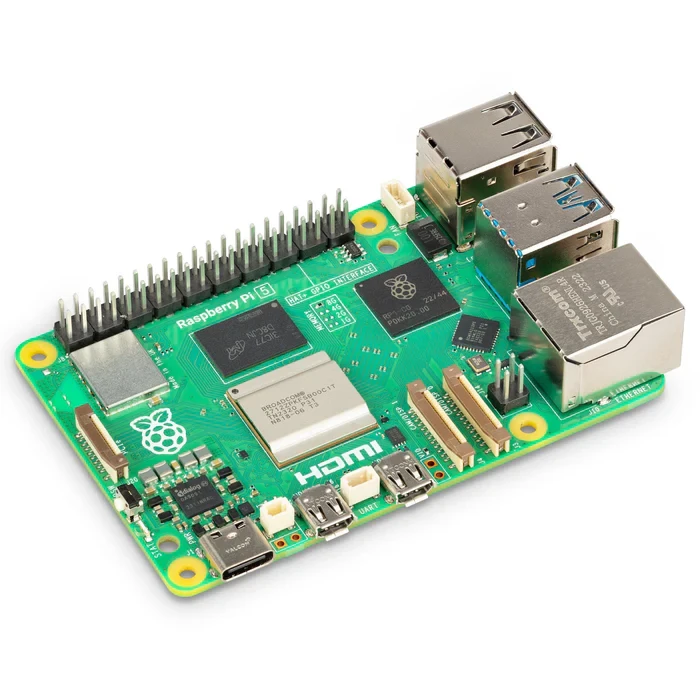
The Raspberry Pi 5 brings serious power to Android projects. With a faster CPU, upgraded GPU, and better I/O, it's a perfect fit for high-performance Android TV boxes, emulation stations, or touchscreen UIs. Community-supported Android builds like LineageOS and Slash TV are already available and getting better with time.
Specs Summary:
- Quad-core Cortex-A76 @ 2.4GHz
- 4GB or 8GB LPDDR4X RAM
- Dual 4K micro-HDMI, USB 3.0, PCIe, and Gigabit Ethernet
Android Support: LineageOS 20, Slash TV, Konstakang builds
Best For: Android TV media centers, retro gaming, touch interfaces
Price: $80.00 (via Electromaker)

Raspberry Pi 4 – Budget Android SBC

If you're looking to run Android on a budget, the Raspberry Pi 4 still holds up in 2025. With solid GPU performance and stable Android builds like LineageOS 18 and Emteria.OS, it’s a great option for DIY streaming boxes or lightweight dev environments. It may not match the Pi 5 on performance, but it gets the job done, and it’s widely supported by tutorials and community projects.
Specs Summary:
- Quad-core Cortex-A72 @ 1.5GHz
- 1GB, 2GB, 4GB, or 8GB RAM options
- 2× micro-HDMI (up to 4K), USB 3.0, Gigabit Ethernet
Android Support: LineageOS 18+, Emteria.OS, Slash TV
Best For: Budget Android TV builds, basic app testing, DIY retro gaming
Price: $45.00 (via Electromaker)
LattePanda 2G/32GB – Android x86 Desktop SBC

The LattePanda is a Windows- and Linux-compatible x86 SBC that also supports Android x86 and RemixOS. With onboard storage, HDMI, and USB, it works great as a low-power desktop replacement or kiosk. Its support for full Android apps and standard PC hardware makes it an excellent fit for developers who need a real-world Android environment, especially for productivity and testing.
Specs Summary:
- Intel Atom x5-Z8350 quad-core CPU @ 1.44–1.92GHz
- 2GB RAM, 32GB eMMC onboard storage
- HDMI, USB 3.0/2.0, Ethernet, WiFi, Bluetooth
Android Support: Android-x86, RemixOS
Best For: App testing, development, touch interfaces, productivity builds
Note: Android-x86 support is community-driven and best suited for experienced developers.
Price: $120.00 )
UDOO Bolt V3 – High-Performance Android x86 SBC
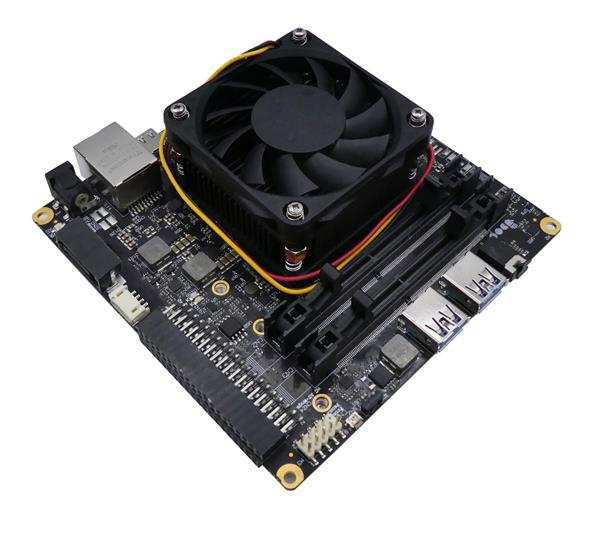
The UDOO Bolt V3 delivers desktop-grade power in a compact SBC format. Featuring a Ryzen V1202B processor with Radeon Vega 3 graphics, it runs Android-x86 with fluid performance. It’s perfect for developers, testers, and power users building productivity-focused Android environments or advanced kiosks. Touch display support, USB-C video out, and full Linux/Windows compatibility add to its flexibility.
Specs Summary:
- AMD Ryzen Embedded V1202B, dual-core @ 2.3GHz (3.2GHz boost)
- Radeon Vega 3 GPU, up to 32GB DDR4 RAM
- 32GB eMMC, M.2 NVMe + SATA storage, dual HDMI, USB-C DP
Android Support: Android-x86 (experimental, community-supported)
Best For: Android productivity setups, app testing, powerful kiosk UIs
Price: $414.15 (via Electromaker)
Olimex A20-LIME2 – Industrial Android SBC
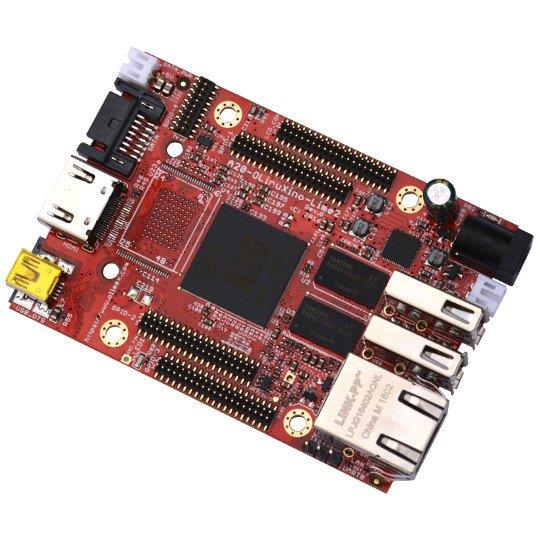
The Olimex A20-OLinuXino-LIME2 is a rugged open-source SBC built for industrial and embedded Android applications. With wide temperature tolerance and official Android support, it's a great pick for digital signage, control panels, or IoT gateways. It features 16GB eMMC onboard, Gigabit Ethernet, and extensive GPIO access for custom integrations.
Specs Summary:
- Allwinner A20 dual-core Cortex-A7 @ 1GHz
- 1GB RAM, 16GB eMMC + 16MB SPI Flash
- Gigabit Ethernet, HDMI, USB, GPIO, UART, I²C, SPI
Android Support: Official Android 4.x and community-maintained builds
Best For: Industrial Android devices, digital signage, embedded GUIs
Price: $68.40 (via Electromaker)
Quick Comparison Table
If you're deciding between boards, this quick comparison highlights the key strengths of each Android-compatible SBC featured above. Whether you’re optimizing for performance, form factor, or app compatibility, this table can help you pick the right tool for your build.
| SBC | Android Support | Best Use Case | Available on Electromaker? |
|---|---|---|---|
| Raspberry Pi 5 | LineageOS, Slash TV | Android TV, gaming | ✅ |
| Raspberry Pi 4 | Emteria, LineageOS | Budget Android builds | ✅ |
| LattePanda | Android x86 | Full desktop Android | ✅ |
| Compute Module 4 | Custom ROM support | Kiosks, tablets, signage | ✅ |
| ESP32-S3 BOX 3 | Embedded Android-like UI | IoT interface development | ✅ |
Use Case Breakdown
Different projects call for different strengths. Whether you’re after performance, portability, or pixel-perfect playback, Android on SBCs opens up a wide range of creative applications. Below are four standout use cases where Android truly shines, and the boards that help bring them to life.
? Android for Retro Gaming
With access to Android emulators and Bluetooth controller support, SBCs like the Raspberry Pi 5 and Raspberry Pi 4 make excellent foundations for DIY retro consoles. From classic arcade ROMs to PSP and PS1 emulation, these boards handle most 2D and 3D games with ease. Add Slash TV or RetroArch into the mix, and you’ve got a plug-and-play setup for hours of nostalgia.
Recommended Boards: Raspberry Pi 5, Raspberry Pi 4
? Android TV & Media Centers
One of the most popular use cases for Android on SBCs is media streaming. Thanks to Android TV launchers and support for Kodi, Plex, Netflix, and more, you can turn a Pi 5 or LattePanda into a full-featured smart TV box. With dual HDMI outputs and 4K playback, the Pi 5 in particular is a great choice for living room builds, and community ROMs like LineageOS make setup easy.
Recommended Boards: Raspberry Pi 5, LattePanda
? App Testing & Development
If you're developing Android apps and want to test them on real hardware, an SBC provides a flexible, low-cost sandbox. The LattePanda is especially useful here with its x86 architecture and compatibility with Android x86 builds, letting you work in a full desktop environment. Touchscreen support and GPIO expand the testing possibilities even further.
Recommended Boards: LattePanda, Raspberry Pi 4
? DIY Android UI & Tablet Projects
Want to build your own Android-based control panel, dashboard, or touchscreen kiosk? The Compute Module 4 and ESP32-S3-BOX-3 are great starting points. The CM4 offers the power and modular flexibility to drive custom displays, while the S3-BOX-3 supports lightweight embedded GUIs using LVGL or MicroPython, ideal for low-power interactive UIs.
Recommended Boards: Compute Module 4, ESP32-S3 BOX 3
Wrapping Up – Choosing the Right SBC for Android
There’s no one-size-fits-all answer when it comes to picking the perfect Android-compatible SBC, it depends entirely on your goals. If you’re chasing performance and 4K playback, the Raspberry Pi 5 is hard to beat. For budget builds or lighter workloads, the Pi 4 still delivers. Developers will appreciate the full desktop capabilities of the LattePanda, while kiosk and signage builders will love the modular power of the Compute Module 4. And if your project leans toward embedded UIs or IoT interfaces, the ESP32-S3-BOX-3 offers impressive flexibility in a compact form.
All of the boards featured in this guide are available now through the Electromaker store, so you can start building without delays or sourcing headaches. Many of these boards also pair perfectly with accessories like official touchscreens, cases, Raspberry Pi accessories, and more.
As always, we’d love to see what you’re building. Whether it’s an emulation station, Android-powered home dashboard, or app dev sandbox, your creativity is what drives the maker community forward.
Which board are you running Android on in 2025? Share your setup on the Electromaker Discord or tag us in your project builds. We might just feature your creation in an upcoming blog!



Matt Walker is a key contributor at Electromaker. With extensive experience in digital marketing, he crafts high-impact strategies that boost visibility for tech brands. His campaigns help businesses stay ahead in the fast-moving world of electronics and embedded systems.












Leave your feedback...