





Texas Instruments Adds AI to CCStudio™ development tools
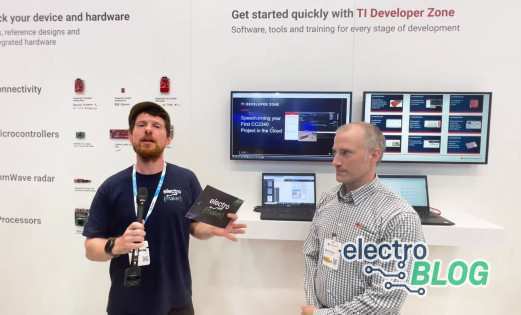
At Embedded World 2026, Texas Instruments demonstrated how artificial intelligence is becoming integrated directly into the embedded development workflow. CCStudio™ IDE, TI’s long-standing integrated development environment for programming its microcontrollers and processors, now includes AI-assisted features designed to support the full development cycle. Rather than focusing only on generating code, the new capabilities extend into configuration and debugging, giving developers a way to interact with their project, hardware, and development tools from a single interface.
What CCStudio™ IDE Is Used For
CCStudio™ IDE is Texas Instruments’ primary development environment for building applications on its embedded hardware platforms. The CCStudio IDE includes tools for writing code, building projects, compiling applications, and debugging programs running on target devices. It supports a wide range of TI hardware including microcontrollers, wireless devices, and embedded processors, making it a central tool for developers working within the TI ecosystem.
The software brings together multiple development steps into a single environment, including a source code editor, optimizing C/C++ compiler, project management tools, and debugging capabilities. By integrating these functions into one interface, CCStudio IDE allows developers to move from writing firmware to testing and analysing it without switching tools or workflows.
Bringing AI Assistance Into Embedded Development
The new AI integration in CCStudio IDE focuses on improving productivity across the entire development workflow rather than simply suggesting code. Within the IDE, the AI assistant can help generate firmware while also understanding the context of TI’s software development kits and documentation. This context awareness allows it to produce suggestions that are more relevant to specific microcontrollers, development boards, and peripheral configurations.
Unlike general-purpose coding assistants, the CCStudio IDE implementation connects directly with the development environment and hardware configuration tools. This allows the AI to guide developers through tasks such as selecting device peripherals or adjusting configuration settings, helping ensure that generated code aligns with the expected setup for TI devices.
Configuring Hardware with CCStudio™ SysConfig
A key part of this integration is the connection to CCStudio™ SysConfig, a configuration tool used across many TI development platforms. SysConfig provides a graphical interface that allows developers to configure pins, peripherals, clocks, drivers, and software stacks for a device. The tool automatically generates the required source code to implement those settings within an application.
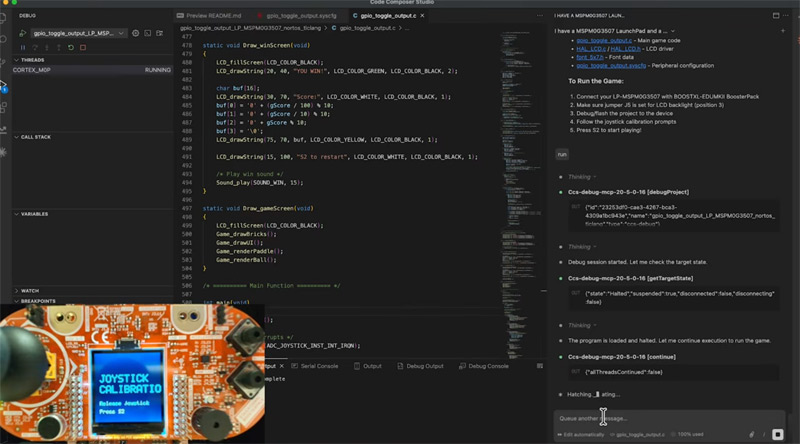
By linking the AI assistant to SysConfig, configuration tasks can be automated while still following TI’s recommended configuration workflow. Instead of writing configuration code manually, the AI can interact with the configuration system directly, ensuring that peripherals and drivers are set up in a consistent way while reducing setup time for new projects.
AI-Driven Debugging Inside the IDE
Debugging is another area where the updated CCStudio IDE introduces AI-assisted capabilities. Developers can interact with the AI assistant to control parts of the debugging workflow, including running programs, setting breakpoints, and inspecting variables. These tasks normally require switching between code editors, debugging views, and analysis tools.
By allowing the AI assistant to control these steps from within a single interface, CCStudio IDE can support a more automated development loop. The AI assistant can examine variable values, identify potential issues in the code, and attempt fixes while the program is running on the target hardware. This approach combines code generation and debugging in one workflow, helping developers iterate on embedded firmware more quickly.

Residing on the south coast of England, Rich has spent the last few years building Electomaker.io from the ground up. He is usually found behind a laptop coordinating the rest of the EM team and occasionally finding time to contribute articles to the blog. When not tapping away at a laptop, he can be found either paddleboarding, at the beach, playing golf (badly), or camping with his family.













Leave your feedback...