





Robotics Dream Keeper Challenge: Build an RDK X5 Robot and Win $1,000
The Robotics Dream Keeper Challenge is a beginner-friendly robotics competition for anyone who wants to turn an AI robot idea into a working RDK X5 project. It is aimed at makers, students, hobbyists, educators, robotics enthusiasts and AI developers who want a structured path from first setup to a demonstrable robot.
The main prize is a $1,000 award for the most outstanding completed project, but the challenge is not only about winning. Participants get staged milestones, online bootcamp support, weekly webinars, office hours, Discord help, ROS learning benefits and a reason to finish a real AI robotics build.
To join, participants need to complete three onboarding steps: join the official Discord server, submit the application form and register for RDK Studio. From there, the challenge moves through three stages: Ignite, Build and Launch.
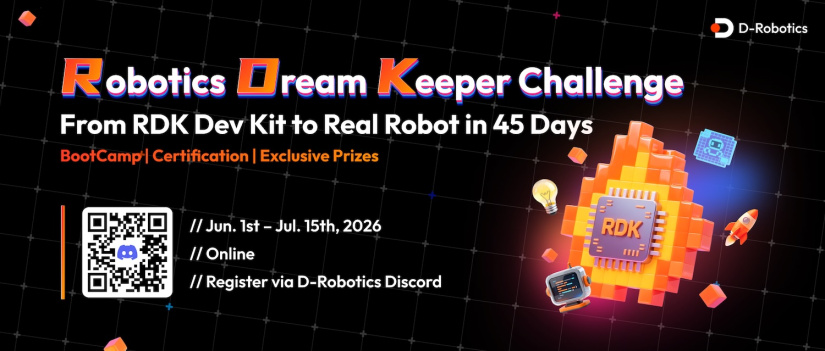
What is the Robotics Dream Keeper Challenge?
The Robotics Dream Keeper Challenge is a staged AI robot development challenge hosted by D-Robotics. Participants use the RDK X5 robot development platform to move from basic board setup to a complete, demo-ready intelligent robot project.
NOTE: Participants who complete all three stages can qualify for a full cash rebate on their RDK X5 purchase, subject to the official challenge terms.
The challenge is designed around practical progress. Instead of asking beginners to start with a blank page, it gives entrants a sequence of milestones:
- Ignite: power on the RDK X5 and run an initial AI task.
- Build: design the robot concept, AI system and project plan.
- Launch: integrate the system into a working AI robot demo.
That structure makes the competition useful for people who have an idea but need help turning it into a working build. It also suits students and educators who want a project-based way to explore robotics, ROS, edge AI and real-world system integration.
The official challenge instructions, stage descriptions and submission workflow are available in the Robotics Dream Keeper Challenge GitHub repository.
Competition summary
| Item | Details |
|---|---|
| Competition | Robotics Dream Keeper Challenge |
| Organiser | D-Robotics |
| Platform | RDK X5 robot development board |
| Skill level | Beginner to intermediate |
| Who it is for | Makers, students, educators, robotics enthusiasts, hobbyists and AI developers |
| Main aim | Build a working AI robotics project using RDK X5 |
| Registration steps | Join Discord, submit the application form and register for RDK Studio |
| Official instructions | GitHub challenge repository |
| Full completion deadline | 15 July 2026 |
| Awards and closing | 23 July 2026 |
Key dates, prizes and requirements
The challenge uses a staged timeline, but participants can move through the stages flexibly as long as they complete all three by the final deadline. Check the official GitHub page for the latest stage details before submitting.
| Stage | Window | Goal | Support |
|---|---|---|---|
| Sign Up | 14 May to 10 June 2026 | Register, join the community and prepare for the challenge | Discord, application form and RDK Studio onboarding |
| Stage 1: Ignite | 1 to 10 June 2026 | Set up the RDK X5 and run a first on-device AI task | Kickoff webinar and office hour |
| Stage 2: Build | 11 to 25 June 2026 | Design the robot concept, architecture and execution plan | Themed webinar and Q&A |
| Stage 3: Launch | 26 June to 15 July 2026 | Build, integrate and demonstrate the final AI robot project | Show-and-tell webinar and office hour |
| Awards and closing | 23 July 2026 | Celebrate completed projects and highlight standout work | Global livestream and community recognition |
Prize and benefit table
| Reward | What It Means |
|---|---|
| $1,000 grand prize | Awarded to the most outstanding completed project. |
| $500 community advocate reward | A separate reward for participants who share useful progress and support the community. |
| Hardware rebate | Participants who complete all three stages can qualify for a full cash rebate on their RDK X5 purchase, subject to the official challenge terms. |
| ROS learning license | Registered participants who complete the onboarding steps can receive a one-month learning license from The Construct Robotics Institute. |
| Stereo camera lucky draw | Three registered participants are selected for a D-Robotics Stereo Camera giveaway. |
| Titles and badges | Participants can earn stage titles such as RDK Explorer, RDK Builder and RDK Creator. |
Competition stages explained
Stage 1: Ignite Challenge
Stage 1 is about getting the robot’s brain running. Participants start with the RDK X5, set up the board, activate basic sensors and run a first on-device AI demo.
This stage is important because it removes the first barrier for beginners. Instead of designing a complete robot immediately, entrants first prove that the development board, system image, tools and basic AI workflow are working.
Stage 2: Build Challenge
Stage 2 moves from “I can run a demo” to “I know what I am building”. Participants define the robot concept, describe the AI system architecture and create a plan for the final project.
A strong Stage 2 plan should answer these questions:
- What problem does the robot solve?
- What sensors does it need?
- What AI task will run on the RDK X5?
- How will the robot move, respond or interact?
- What will the final demo show?
Stage 3: Launch Challenge
Stage 3 is the final build and demonstration stage. Participants integrate hardware, AI inference, software, movement, interaction and documentation into a complete project package.
The strongest submissions will not only show that the robot works. They will also explain how it works, why the design choices make sense and what the participant learned during the build.
Why beginners can participate
The Robotics Dream Keeper Challenge is beginner-friendly because it gives participants a guided path, not just a deadline. The challenge includes online bootcamp support, webinars, office hours, direct technical support and open-source reference material.
That matters because beginner robotics projects often fail for practical reasons. The idea may be good, but the builder gets blocked by setup, unclear software steps, sensor integration, model deployment or project scope. The staged format helps participants make useful progress before attempting a complete robot.
Beginners do not need to start with a humanoid robot, complex manipulator or fully autonomous vehicle. A simple mobile platform with vision, a desk assistant with voice interaction or a camera-based sorting demo can all be useful starting points if the project is clear and demonstrable.
What is the RDK X5 platform?
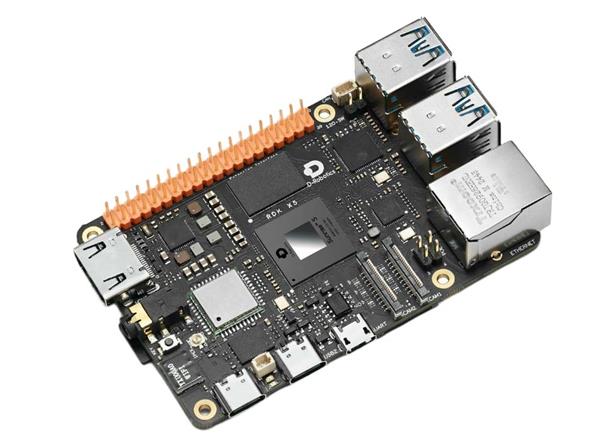
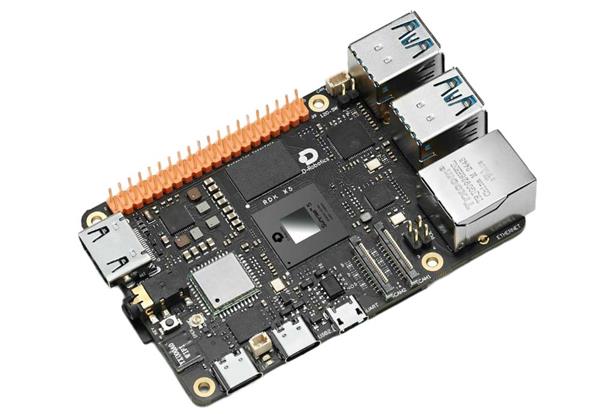
The RDK X5 is a robot development board built for edge AI and robotics projects. It is based on the D-Robotics Sunrise 5 AI chip and provides up to 10 TOPS of AI computing power. It supports Ubuntu 22.04 and is designed for robot perception, local inference and ROS-based development.
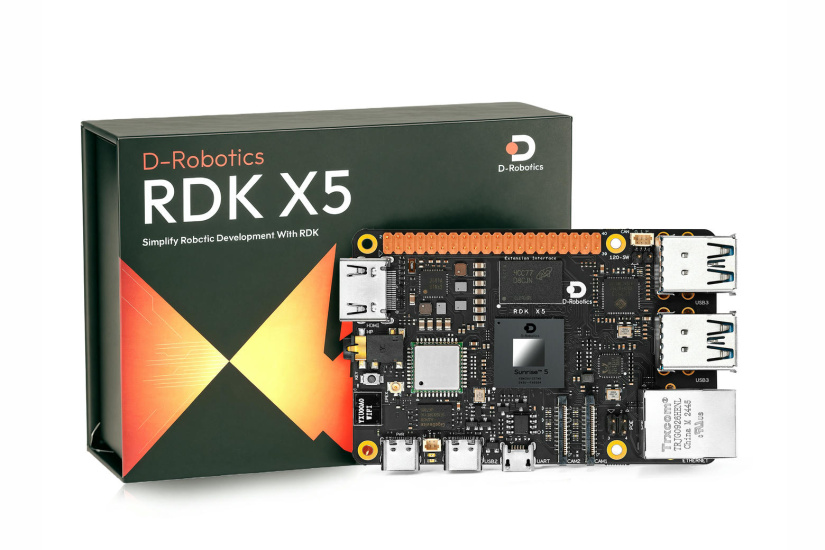
Useful hardware and platform features include:
- Up to 10 TOPS AI performance for on-device inference.
- 8-core Arm Cortex-A55 CPU.
- 4GB or 8GB LPDDR4 memory options.
- Ubuntu 22.04 support.
- Dual 4-lane MIPI CSI camera inputs for vision projects.
- Gigabit Ethernet with PoE support.
- CAN FD for robotics and embedded control use cases.
- USB 3.0 host ports for peripherals.
- GPIO, UART, PWM, I2C, SPI and I2S interfaces.
For AI robotics, the key point is local processing. Instead of sending every perception task to the cloud, participants can run models on the board. That is useful for mobile robots, smart cameras, interactive robots and systems that need fast responses.
Software ecosystem and development tools
Participants should expect to use the RDK X5, RDK Studio, GitHub and the official challenge documentation. The challenge also points participants toward ROS learning resources and the D-Robotics model examples.
The practical development workflow looks like this:
- Register for the challenge and RDK Studio.
- Set up the RDK X5 and confirm the board is working.
- Run an official AI demo or model example.
- Choose a realistic robot idea.
- Create a GitHub repository for code, logs and experiments.
- Build the system in stages.
- Collect screenshots, videos, links and documentation.
- Submit a project showcase document through a pull request to the official challenge repository.
Project ideas for participants
A good Robotics Dream Keeper Challenge project should be small enough to finish, but clear enough to demonstrate. The best beginner projects usually combine one main sensing method, one AI task and one visible robot behaviour.
Mobile robot ideas
- AI desk rover: a small wheeled robot that detects objects and moves toward a target.
- Line-following robot with deep learning: a camera-based robot that follows a path using visual input.
- Room patrol robot: a mobile robot that identifies people, objects or zones in a room.
- Delivery rover demo: a small robot that moves between marked locations and reacts to visual markers.
Vision AI project ideas
- Object recognition camera robot: a robot that detects tools, components or classroom objects.
- Gesture-controlled robot: a robot that responds to hand gestures captured by a camera.
- Smart sorting assistant: a robot that identifies objects and signals which bin or location they belong in.
- Safety zone monitor: a robot or camera system that detects people entering a marked area.
Educational robot ideas
- Classroom AI companion: a small robot that answers simple prompts, reacts to faces or demonstrates AI concepts.
- STEM teaching rover: a robot that shows students how sensors, motors and AI inference work together.
- Interactive quiz robot: a desk robot that uses buttons, voice or vision to run a learning activity.
Autonomous system ideas
- Visual navigation demo: a robot that uses camera input to move through a simple course.
- Obstacle-aware rover: a robot that detects obstacles and changes route.
- Mini warehouse demo: a robot that identifies objects and moves them between marked zones.
Human-robot interaction ideas
- Voice-reactive robot assistant: a robot that responds to simple commands and gives visual or motion feedback.
- Expression-aware companion: a desk robot that reacts to faces, gestures or presence.
- Accessibility interaction demo: a robot interface that uses gesture, camera or audio input to trigger actions.
How to choose a realistic beginner project
For a first RDK X5 robotics challenge project, keep the scope narrow. Choose one robot behaviour that can be filmed clearly in under two minutes.
A practical beginner project could follow this format:
- Input: camera, button, microphone, IMU or distance sensor.
- AI task: object detection, gesture detection, person detection, line tracking or simple classification.
- Robot action: move, turn, stop, point, light an LED, speak, sort or send a signal.
- Demo result: a clear video showing the robot making a decision based on sensor input.
This approach keeps the project manageable and gives judges or viewers a simple story: the robot senses something, the RDK X5 processes it and the robot responds.
Learning resources and community support
The challenge provides several support routes for participants:
- Official Discord server: the main community space for updates, questions and participant discussion.
- Online bootcamp: structured learning support for RDK X5 development.
- Weekly webinars: live sessions with development tips, expert guidance and project ideas.
- Office hours and Q&A: chances to ask technical questions during the challenge window.
- GitHub documentation: stage instructions, pull request guidance, FAQ material and RDK reference notes.
- RDK model examples: reference samples for AI model deployment and application development.
- The Construct ROS learning benefit: a one-month learning license for eligible registered participants.
Participants should use the official Discord server early, even before they have a finished project. Asking a clear setup question in week one is better than losing several days alone.
How to register and get started
To enter the Robotics Dream Keeper Challenge, complete the official onboarding steps first. These steps unlock the challenge support and benefits.
- Join the official Discord server. This gives you access to community updates, support and participant discussion.
- Submit the application form. Use the official form to register your interest and provide the required participant details.
- Register for RDK Studio. Create or use your D-Robotics account so you can access the development environment.
- Prepare your RDK X5 hardware. You need an RDK X5 development board and any accessories required for your project.
- Read the GitHub stage guides. Start with Stage 1 and check what artifacts you need to collect.
- Create your own GitHub repository. Use it for code, experiment logs, screenshots and project notes.
- Build in stages. Do not wait until the end to document progress. Capture screenshots, short videos and notes as you go.
- Submit a showcase document. Open a pull request to the official challenge repository and add your project document under the projects folder.
Submission requirements
The official GitHub workflow asks participants to create their own repository, complete the stage challenges and collect the required artifacts. These artifacts can include screenshots, videos and project links.
The final showcase should make the project easy to understand. A useful submission should include:
- Project title and short summary.
- The problem or use case.
- Hardware used, including RDK X5 and any accessories.
- Software tools, models, ROS packages or libraries used.
- System architecture or workflow.
- Photos or screenshots.
- A short demo video link.
- Build notes, lessons learned and next steps.
- Link to the participant’s own GitHub repository.
The public challenge page does not provide a detailed judging rubric, so entrants should focus on the visible criteria implied by the challenge: completion, working demonstration, technical execution, project clarity, communication and impact.
Why join even if you do not win?
The $1,000 prize is useful, but the learning value may matter more for many participants. By the end of the challenge, a participant can have a working demo, a public GitHub project, a clearer understanding of ROS and edge AI, and experience documenting a hardware build.
That is useful for school projects, university portfolios, job interviews, maker events and future robotics work. A finished small robot is often more valuable than an unfinished ambitious idea.
Ready to start? Join the Discord, submit the application form, register for RDK Studio and review the official challenge repository.
Residing on the south coast of England, Rich has spent the last few years building Electomaker.io from the ground up. He is usually found behind a laptop coordinating the rest of the EM team and occasionally finding time to contribute articles to the blog. When not tapping away at a laptop, he can be found either paddleboarding, at the beach, playing golf (badly), or camping with his family.











Leave your feedback...