





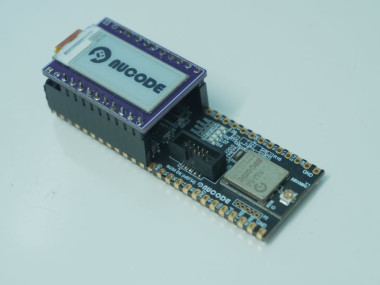
Eink Shield For Nucode - Nu54dk

Made by ashokr / Communication / Displays / Sustainability / Wearables / IoT
About the project
Design of custom 0.96" Eink display shield board for NU54 Development Kit
Project info
Difficulty: Easy
Platforms: Microsoft, Edge Impulse, JLCPCB, Nordic Semiconductor
Estimated time: 6 hours
Items used in this project


Story
Building a Custom E-ink Shield for the NU54-DK Bluetooth EVK
In the world of IoT, power efficiency is king. When I started working with the Nucode NU54-DK Bluetooth Evaluation Kit, I wanted to find a display solution that matched its low-power capabilities. The answer was clear: E-ink.
Today, I’m sharing the process of designing and building a custom 0.96" E-ink Shield specifically tailored for the Nucode ecosystem.
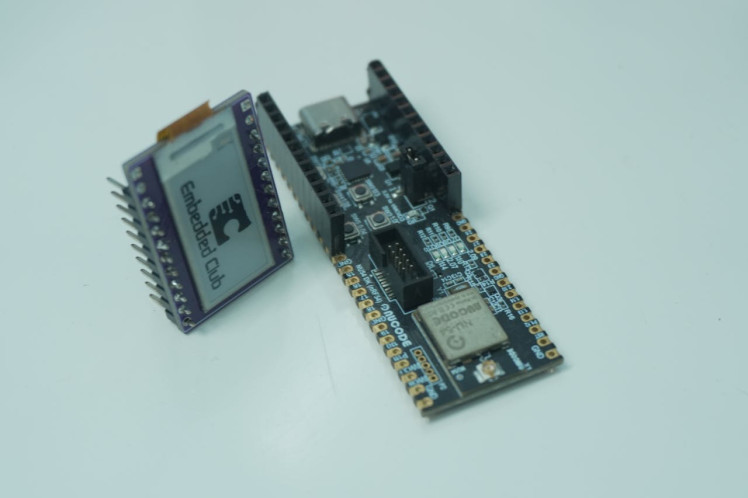
The NU54-DK is a powerful Bluetooth Low Energy (BLE) development platform. It’s designed for high performance with minimal energy consumption. However, traditional LCD or OLED screens are "power hungry" because they require constant energy to maintain an image.
By using the Good Display 0.96" E-ink (GDEW0097T11), the device only draws power during a screen refresh. Once the image is set, it stays there indefinitely, even if you disconnect the battery.
The Hardware DesignThe core of this project was designing a custom PCB (Shield) that bridges the NU54-DK headers with the E-ink display’s specific driving requirements.
The Display: 0.96" E-ink
The display chosen is a 0.96-inch monochrome screen with a resolution of 88x184. It uses an SPI interface, making it compatible with most microcontrollers.
Ultra-wide viewing angle
- Ultra-wide viewing angle
- Paper-like readability (Perfect for outdoor use)
- SPI Interface (CS, MOSI, CLK, RST, D/C, BUSY pins)
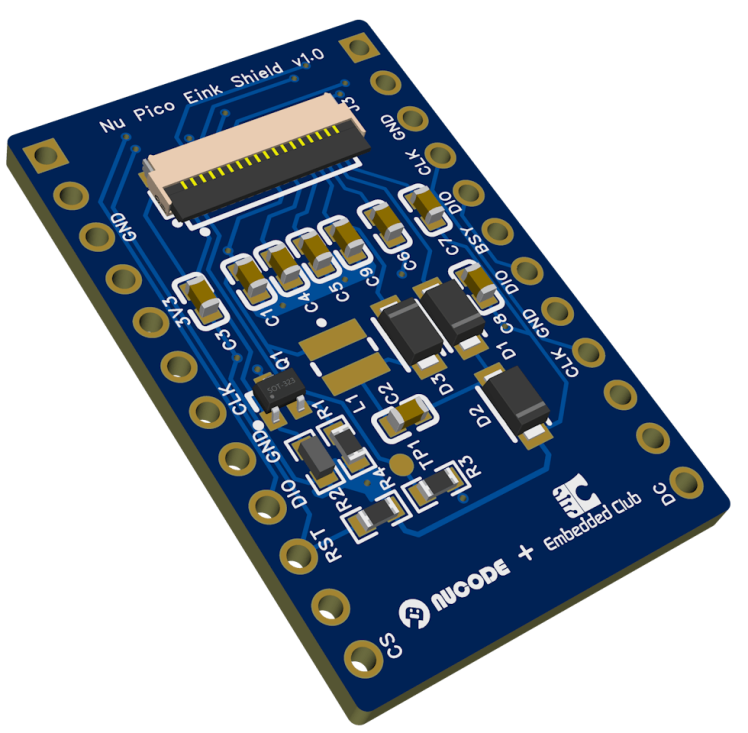
The PCB LayoutDesigning the shield required careful routing for the SPI signals and the booster circuit required to drive the E-ink panel. E-ink displays require a specific set of capacitors, Inductors and MOSFETs to handle the high-voltage pulses needed to move the physical ink capsules.
Find more details here https://www.good-display.com/product/486.html
Pin Mapping for NU54-DK
I designed the shield to plug directly into the NU54-DK headers. The mapping ensures that the SPI pins (MOSI, SCK, CS) align perfectly with the Nucode's high-speed peripherals, while the Busy and Reset lines are handled by standard GPIOs.
Design 3D Output
With this hardware stack (NU54-DK + E-ink Shield), you can build:
Smart Name Tags: Update your name or QR code via Bluetooth.
Sensor Nodes: Display temperature or humidity data that stays visible for weeks on a single coin cell.
Crypto Trackers: A pocket-sized device to track live prices over BLE.
ConclusionDesigning this shield was a great exercise in combining display technology with BLE connectivity. The result is a highly efficient, readable, and versatile development tool for anyone using Nucode’s Bluetooth solutions.
What’s next? I’m currently working on a custom driver library to optimize the refresh rate and introduce "Partial Refresh" to the 0.96" screen!
Schematics, diagrams and documents
CAD, enclosures and custom parts
Code
Credits
Related products



Leave your feedback...