





Compact Sms Alert System With Seeed Studio Xiao Esp32

Made by electroscope_archive / Communication / Displays / Environmental Sensing
About the project
Build a motion-activated SMS alert system using Seeed Studio XIAO ESP32, an ultrasonic sensor, and CircuitDigest Cloud SMS API, no GSM.
Project info
Items used in this project
Hardware components


Story
Use a tiny Send SMS Alert using Seeed Studio XIAO ESP32 to detect nearby movement and send an SMS alert to your phone over Wi-Fi using a free cloud SMS API. When an object comes within a set distance, the system instantly sends a text message using the internet — no SIM card or GSM module required.
Seeed Studio Xiao ESP32
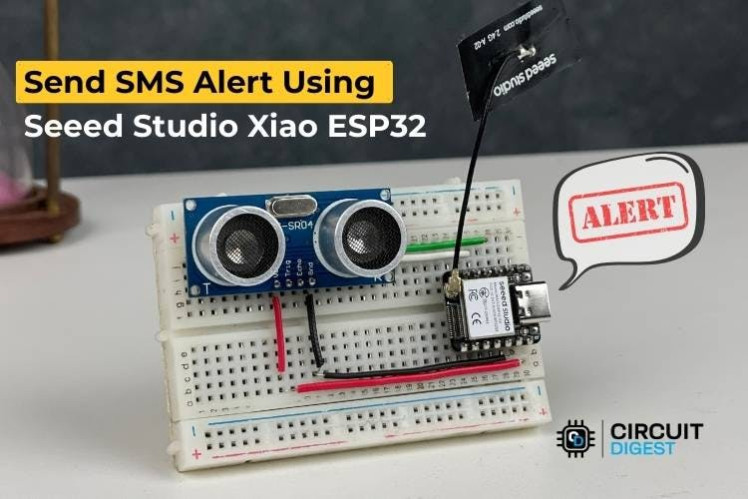
Seeed Studio Xiao ESP32
What You’ll BuildA compact IoT device that:
- Monitors distance using an HC-SR04 ultrasonic sensor
- Detects when an object crosses a distance threshold
- Connects to Wi-Fi
- Sends an SMS alert via a cloud SMS API
- Power up & Wi-Fi connect: The XIAO connects to your Wi-Fi network.
- Distance sensing: The HC-SR04 continuously measures distance.
- Trigger detection: If an object comes closer than the threshold (e.g., 100 cm), it triggers an alert.
- HTTP request to SMS API: The ESP32 sends an HTTP POST to the cloud SMS service with API credentials and message details.
- SMS delivery: The cloud service sends the SMS to your phone.
This approach avoids needing a GSM module entirely by relying on internet connectivity and a cloud SMS provider.
Circuit Diagram
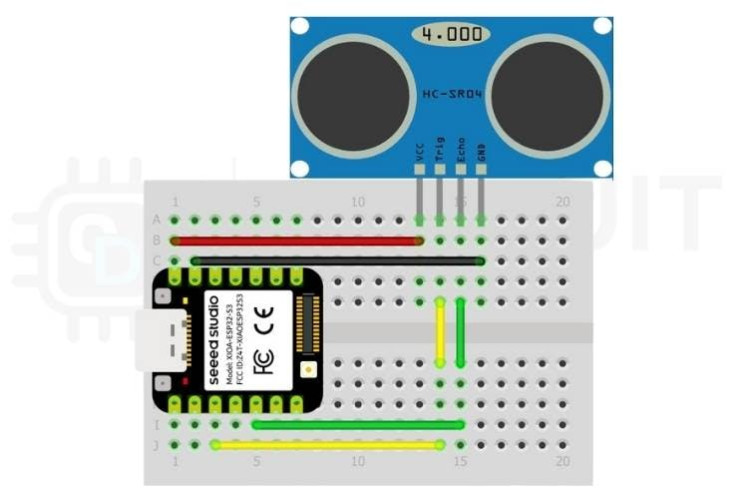
Circuit Diagram
Programming the ESP32Libraries & Definitions
#include <WiFi.h>
// Ultrasonic pins
#define TRIG_PIN 5
#define ECHO_PIN 3
long duration;
float distance;
// Wi-Fi credentials
const char *ssid     = "Your_SSID";
const char *password = "Your_PASSWORD";
// SMS API details
const char* apiKey      = "YOUR_API_KEY";
const char* templateID  = "TEMPLATE_ID";
const char* mobileNumber = "91XXXXXXXXXX";
const char* var1 = "Motion";
const char* var2 = "Detected";
bool alertSent = false;
Setup Function
void setup() {
Serial.begin(9600);
pinMode(TRIG_PIN, OUTPUT);
pinMode(ECHO_PIN, INPUT);
// Connect to Wi-Fi
WiFi.begin(ssid, password);
while (WiFi.status() != WL_CONNECTED) {
delay(500);
Serial.print(".");
}
Serial.println("Wi-Fi connected!");
Serial.println(WiFi.localIP());
}
Distance Measurement
float readDistance() {
digitalWrite(TRIG_PIN, LOW);
delayMicroseconds(2);
digitalWrite(TRIG_PIN, HIGH);
delayMicroseconds(10);
digitalWrite(TRIG_PIN, LOW);
duration = pulseIn(ECHO_PIN, HIGH);
return duration * 0.034 / 2; // cm
}
Send SMS Function
void sendSMS() {
if (WiFi.status() == WL_CONNECTED) {
WiFiClient client;
if (client.connect("www.circuitdigest.cloud", 80)) {
String payload = "{"mobiles":"" + String(mobileNumber) +
"","var1":"" + String(var1) +
"","var2":"" + String(var2) + ""}";
client.println("POST /send_sms?ID=" + String(templateID) + " HTTP/1.1");
client.println("Host: www.circuitdigest.cloud");
client.println("Authorization: " + String(apiKey));
client.println("Content-Type: application/json");
client.println("Content-Length: " + String(payload.length()));
client.println();
client.println(payload);
while (client.available()) {
Serial.println(client.readStringUntil('n'));
}
client.stop();
}
}
}
Main Loop
void loop() {
float dist = readDistance();
Serial.print("Distance: ");
Serial.println(dist);
if (dist < 100 && !alertSent) {
sendSMS();
alertSent = true;
}
if (dist >= 100) {
alertSent = false;
}
delay(500);
}Upload the code using the Arduino IDE.
Open the Serial Monitor at 9600 baud.
Walk in front of the sensor — when the object is within 100 cm, you should see log messages and receive an SMS.
ApplicationsThis compact SMS alert system can be used for:
- Home security systems
- Parking space monitoring
- Water tank level alerts
- Agricultural intrusion detection
- Industrial safety alerts
Replace the sensor and adjust the logic to fit other use cases (e.g., temperature or moisture).
Working Demo
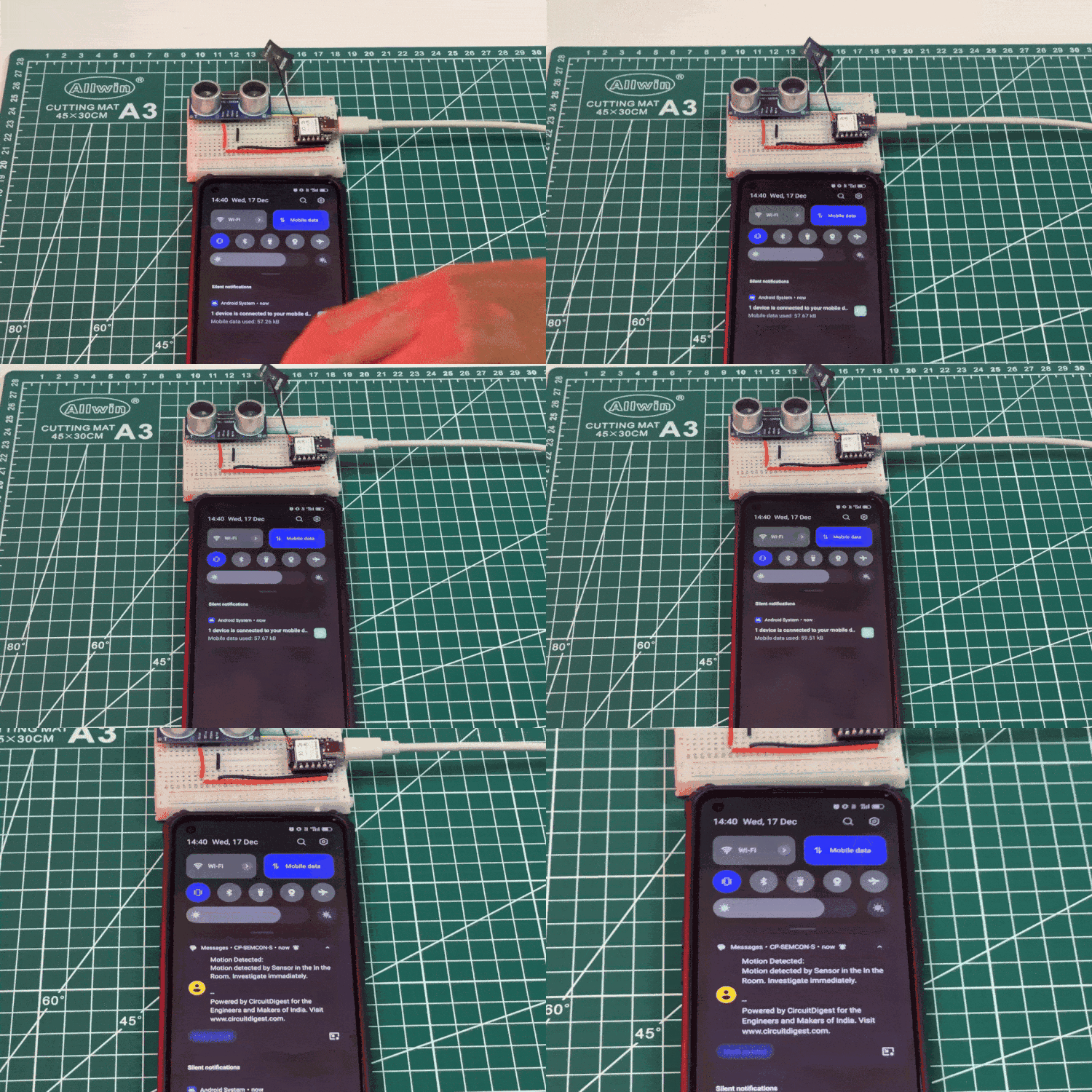
Working Demo
Schematics, diagrams and documents
Code
Credits
Related products




Leave your feedback...