





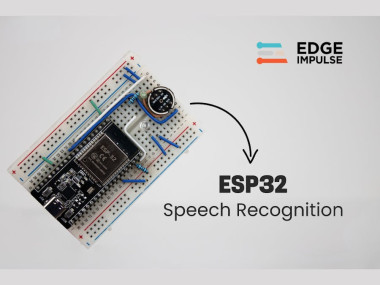
Offline Esp32 Voice Recognition With Edge Impulse

Made by electroscope_archive / Voice
About the project
Build a fully offline ESP32 voice assistant using Edge Impulse and an I²S mic. Runs local ML inference for fast, private voice commands.
Project info
Difficulty: Moderate
Platforms: Arduino, SparkFun, M5Stack
Estimated time: 6 hours
License: MIT license (MIT)
Items used in this project
Hardware components


Story
Voice interfaces have become one of the most intuitive ways to interact with electronics. Yet most speech-recognition systems depend on cloud services, internet access, and external APIs. This introduces latency, privacy issues, and ongoing service limitations. What if you could build a completely offline voice assistant that runs directly on a microcontroller?
In this project, we turn an ESP32 into a self-contained offline voice-recognition module powered entirely by Edge Impulse. Unlike internet-based platforms, this approach allows local inference on the ESP32’s dual-core 240 MHz processor. The result is a fully standalone voice-activated system capable of wake-word recognition and command classification without sending audio to the cloud.
You will build an embedded speech-recognition pipeline using the ESP32, an INMP441 I²S microphone, Edge Impulse for dataset training, and a lightweight neural network deployed directly through the Arduino IDE. By the end, you will have a complete voice assistant controlling LEDs through commands like “on”, “off”, and a wake word such as “marvin”.
This is a complete, engineering-grade guide for makers, embedded developers, and ML engineers who want a practical introduction to edge-based voice recognition.
Project FeaturesBased on the original documentation, this ESP32 speech-to-text system offers:
- Fully offline voice recognition
- Custom wake-word and command detection
- Real-time ML inference
- No cloud, no API calls, no network dependency
- Low latency (200–500 ms total)
- Low power operation
- Expandable architecture for more commands
The combination of embedded machine learning, digital audio capture, and ESP32 processing makes this a compact but powerful edge-computing demonstration.
Hardware setup with INMP441 microphone module and ESP32 development board
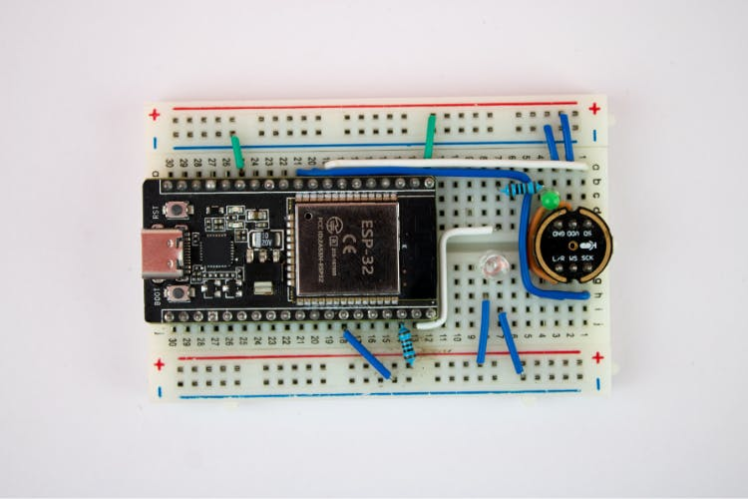
Hardware setup with INMP441 microphone module and ESP32 development board
The INMP441 is used due to its low noise, MEMS construction, and digital I²S interface, making it ideal for audio inference.
System Architecture OverviewThe ESP32 voice-assistant system follows this workflow
- Audio Capture (INMP441 → ESP32 I²S)
- Preprocessing (MFCC or spectral features)
- Neural Network Inference (Edge Impulse model)
- Wake-Word Decision Logic
- Command Classification
- LED Output Execution
This hybrid pipeline allows the ESP32 to continuously listen for the wake word, then interpret subsequent commands.
Step 1: Dataset CollectionThe project uses the Google Speech Commands V2 dataset for the words: The project uses the Google Speech Commands V2 dataset
- noise
- marvin (wake word)
- on
- off
You may also record custom clips or expand with multilingual data. As noted in the article, real-world accuracy improves with:
- Multiple speaker
- Different accents
- Various background conditions
- Different distances from the microphone
Edge Impulse accepts bulk uploads, folder-based imports, and labelling per sound category.
Step 2: Train the Voice-Recognition Model in Edge ImpulseThis section is derived from the step-by-step interface instructions in the source document
Create Your Edge Impulse Project- Sign in
- Create a new project
- Name it something like
ESP32_STT_Recognition
Edge Impulse
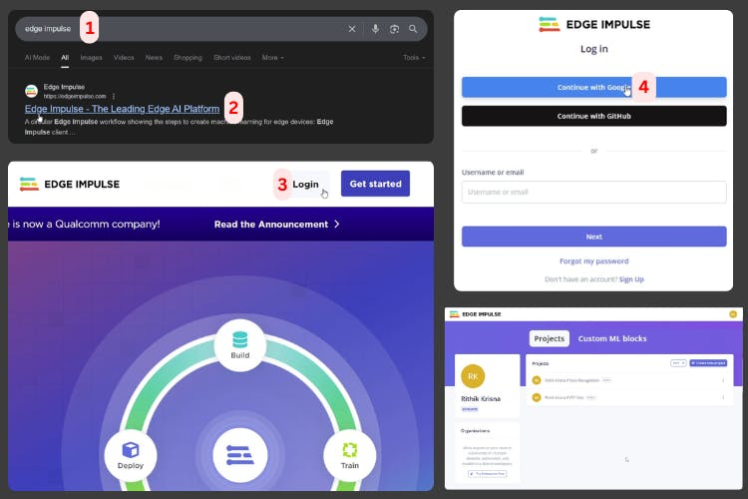
Edge Impulse
Upload Audio DatasetUse Data Acquisition → Add Data → Upload Data, choosing folders for each labelled class.Proper labelling is essential for accurate keyword classification.
Design the ImpulseUnder Impulse Design:
- Add an Audio (MFCC) processing block
- Add a classification learning block
- Choose a 1-second window size
Set:
- Training cycles: 50–100
- Learning rate: default
- Validation split: automatic
Click “Save and Train”.
You'll receive training output charts, accuracy metrics, and confusion matrices.
Validate the ModelUse Classify All for testing with the reserved dataset.Aim for:
- 85%+ for prototyping
- 90%+ for production
From the deployment instructions in your source file
- Open Deployment
- Select theArduino Library and click Build
- Download the ZIP file
- Install via Sketch → Include Library → Add.ZIP Library
This adds the full neural-network inference engine to the Arduino IDE.
Step 4: Hardware WiringWiring information is taken from the wiring table and pin maps in your file and the microphone pinout section. Wiring information is taken from the wiring table and pin maps in your file
Mic Wiring (INMP441)INMP441 Pin
L/R
WS
SCK
SD
VDD
GND
LED Wiring- Indicator LED → GPIO23 → 220 Ω → GND
- Command LED → GPIO22 → 220 Ω → GND
The original file includes the test example and the extended production-ready code.
I²S Audio ConfigurationFrom your file’s code block
i2s_pin_config_t pin_config = {
    .bck_io_num = 26,    // IIS_SCLK
    .ws_io_num = 32,     // IIS_LCLK
    .data_out_num = -1,  // IIS_DSIN
    .data_in_num = 33,   // IIS_DOUT
};
i2s_pin_config_t pin_config = {
    .bck_io_num = 26,    // IIS_SCLK
    .ws_io_num = 32,     // IIS_LCLK
    .data_out_num = -1,  // IIS_DSIN
    .data_in_num = 33,   // IIS_DOUT
};From the original code section
typedef struct {
   int16_t *buffer;
   uint8_t buf_ready;
   uint32_t buf_count;
   uint32_t n_samples;
} inference_t;
typedef struct {
   int16_t *buffer;
   uint8_t buf_ready;
   uint32_t buf_count;
   uint32_t n_samples;
} inference_t;const float COMMAND_CONFIDENCE_THRESHOLD = 0.80;
const float RECOGNITION_CONFIDENCE_THRESHOLD = 0.50;
const float COMMAND_CONFIDENCE_THRESHOLD = 0.80;
const float RECOGNITION_CONFIDENCE_THRESHOLD = 0.50;Open the Serial Monitor after uploading the code.
You will see output similar to:
Wake word detected: marvin (0.94)
Command: on (0.88)
LED turned ON
Wake word detected: marvin (0.94)
Command: on (0.88)
LED turned ON
This provides real-time classification confidence for each detected word.
ConclusionYou now have a complete offline ESP32 Voice Recognition using Edge Impulse, capable of detecting wake words and executing spoken commands entirely on-device. This project showcases the capabilities of embedded machine learning and serves as an ideal starting point for voice-controlled IoT systems, home automation, robotics, and accessibility devices.
The system is fully expandable: collect more voice samples, retrain, and redeploy new models to your ESP32.
Schematics, diagrams and documents
Code
Credits
Related products





Leave your feedback...