





Fallsena

Made by FallSena / Communication / Health / Kids & Family / Notifications / Security
About the project
FallSena detects falls and alerts caretakers within seconds. The wearable device senses a fall the moment it happens and sends an alert straight to a caretaker's phone, ensuring the caretaker is always aware.
Story
For more than a year, Dmytro Osyka designed, soldered and tested FallSena, a wearable fall detector — from the first schematic to a batch of 16 devices. We asked him about every stage in detail: why the device is worn on the waist, how the circuit board is built, how the algorithm tells a fall from sitting down hard, and what the tests showed.
Full interview with images can be viewed here
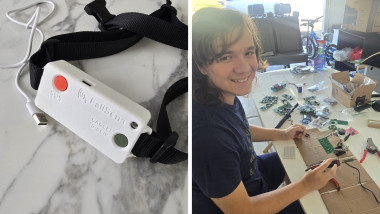
FallSena is a small white device on a waist strap with two large buttons: a red SOS and a green Cancel. It recognizes a fall by itself, gives the person ten seconds to cancel a false alarm, and sends a notification to a relative’s or caretaker’s phone. It has no camera, no microphone and no subscription. A batch of 16 devices has now been built, and field trials lie ahead, including at rehabilitation centers in Ukraine.
How did the project start?With numbers. One in four people over 65 falls at least once a year. But what struck me more was this: most falls happen when the person is alone, many older people can’t get up on their own, and about a third stay on the floor for an hour or longer. Among people found helpless in their homes, 12% die if help arrives within an hour, and 67% if it comes three days or more later. So a fall lasts a second, but the outcome depends on the time after it. That’s the time I wanted to shorten.
Why not use an existing solution?
That’s exactly where I started. A pendant button works only if the person is conscious and able to press it — and that’s precisely what a serious fall can take away. Smartwatches can detect falls, but the sensor sits on the wrist, which moves all day, and they need charging almost every day. Cameras cover one room, usually require a subscription, and many people simply don’t like living in front of a lens. I compared all of this and wrote down my requirements: the device triggers without the person doing anything, works at home and outdoors, alerts a caretaker within seconds, lasts several days on a charge, records nothing and needs no subscription.
Who is the device mainly for?
For older people who live alone or spend long stretches at home without anyone around, and for people going through rehabilitation after injuries or surgery. And, of course, for their loved ones — the people who get the notification and can come to help in time.
Why the waist and not the wrist?
Where the sensor is worn matters as much as the algorithm. Your hand is constantly making sharp movements — gestures, cooking, typing — so a sensor on the wrist sees lots of “events” that mean nothing. At the waist, close to the body’s center of mass, the orientation is stable: vertical when you stand or walk and horizontal when you lie down. One of the algorithm’s checks is built on that. The downside is that the device has to be worn correctly: centered and snug, not on the side or in a bag.
Where did you start the design?With the enclosure, because it sets the dimensions for everything else. In Fusion 360 I modeled two parts: a base that holds the board and the battery, and a lid with openings for two buttons. The logo and the SOS and CANCEL / ВІДБІЙ labels are embossed right into the lid, so there’s nothing to peel off.
Why does the lid have two labels, CANCEL and ВІДБІЙ?
Because the devices will be tested in Ukraine, among other places. In a stressful moment a person needs to understand right away, in their own language, what each button does. Red calls for help, green cancels.
What’s inside?
The brain of the device is a Seeed XIAO ESP32‑C6 module. It’s tiny and has Wi‑Fi and Bluetooth built in. Motion is measured by an MPU‑6050 sensor: it has an accelerometer and a gyroscope, but I keep the gyroscope off to save battery. The board also carries two buttons, an RGB LED that shows the status, a buzzer, a little vibration motor so the person can feel the countdown, and a 1000 mAh battery.
Were there any non-obvious engineering decisions?
Lots of small ones. For example, you can’t connect the buzzer straight to a microcontroller pin — it can’t supply enough current — so a BC337 transistor switches it on. Each LED color has its own 120 Ω resistor. And so the device knows how much charge is left, the battery voltage is halved by two 100 kΩ resistors and fed to an input that measures it. I drew the schematic in KiCad.
How did the circuit board come about?
Its shape was dictated by the enclosure: a long, narrow strip with a button at each end — right under the openings in the lid — and the sensor in the middle. I laid out the board in KiCad and labeled every part on it: outline, reference designator, value. So when the bare boards arrived, every component simply went where it was drawn.
You built not one prototype but 16 devices at once. Why?
One prototype proves the idea works. But to test the device on real people you need a batch. I ordered boards and components for 16 units and assembled everything by hand: the module, sensor, transistor, resistors, buzzer, LED, buttons and battery. I checked every board before putting it in its case. Sixteen boards in a row is a good test of patience.
How does the device know someone has fallen?The accelerometer is read a hundred times a second. A fall has a very distinctive shape. First comes a fraction of a second of free fall — acceleration drops sharply below 0.55 g. Then the impact — a spike above 3 g within 700 milliseconds. Then the body changes position — a tilt of about 35 degrees from vertical. And finally stillness — 800 milliseconds without movement. The device checks these four conditions in order, and only if all of them are met does it decide there was a fall.
And what if someone just sits down hard on a chair?
That’s the hardest part. Catching a fall is easier than staying quiet the rest of the time. The things that look most like a fall are sitting down hard, flopping onto a bed, going down stairs, bending to pick something up, or the device being put down on a table. Almost always, those movements are filtered out at the last check, because the person keeps moving. And if the algorithm does get it wrong, there’s a second layer of protection — the ten-second countdown.
What happens during those ten seconds?
The device vibrates and beeps so the person is sure to notice. If everything is fine, they hold the green button and nothing gets sent. If no one cancels, the person most likely can’t reach the button, so the alert goes out. The red SOS button works separately: you can press it at any time, even if there was no fall.
How does the alert reach a family member?Through four links. The device sends the signal over Bluetooth to the wearer’s Android phone. The app forwards it over mobile data to the FallSena server. And the server sends a push notification to the caretaker’s phone. The caretaker sees what happened — a fall or an SOS press — and the time, and in the app they also see the person’s location, battery level and device status.
And if the connection drops?
That’s the weak point of any chain like this, so I made sure you can hear the problem. If Bluetooth drops, the device blinks blue and beeps, and the app reports the problem too. A detector that silently disconnects is worse than none at all: the person thinks they’re protected when they’re not.
How long does it run on one charge?
The firmware “sleeps” between measurements and wakes up fully only when there’s movement, and keeping the gyroscope off saves about 3.3 mA. By my calculations that’s several days of operation, but I’ll measure the exact figure during the field trials. For a safety device this matters: if it has to be charged often, at the critical moment it will be on the charger instead of on the person’s waist.
How does the wearer know the device is working?
From the LED. Blinking green means 40 to 100% charge and everything is working. Yellow means under 40%, so charge it soon. Red means under 20%, charge it now. Red with a beep means under 10% and the device is about to shut down. And blue with a beep means the connection to the phone has been lost.
How did you test the device?The tests answered two questions: does it catch falls, and does it stay quiet the rest of the time? I did more than 70 simulated falls of five types — forward, backward, sideways, sliding down a wall and falling from a chair — and recorded more than 50 hours of everyday life: sitting, lying down, stairs, picking things up, uneven ground, getting into a car. There were also three series of bench tests: dropping the case, draining the battery to zero and checking Bluetooth range. I tuned the thresholds not only on my own recordings but also on SisFall, an open research dataset with the movements of 38 people, including older adults, recorded with a waist-worn sensor.
And the results?
In those tests FallSena detected 97% of falls and correctly stayed quiet in 98% of everyday activity. The weakest spot is a slow slump, when someone slides down a wall: there’s no clear “weightlessness” and no strong impact, so the first checks may not fire. The fix is a barometric sensor that sees the change in height directly. But to be honest, these were all simulated falls, mostly by young volunteers. Real falls of older people are different, and that still has to be tested.
70+simulated falls
50+ hof everyday activity
97%of falls detected
98%with no false alarm
Why did you need a research dataset?
You can’t ask older people to fall for an experiment — it’s dangerous. But the open SisFall dataset already contains the movements of 38 people, including older adults, recorded with a sensor at the waist, just like FallSena: 15 types of falls and 19 kinds of everyday activity. I used those recordings to check that the device doesn’t trigger on an older person’s ordinary movements and to choose the thresholds.
What can’t the device do?
It can’t help if it’s switched off, charging or not being worn. The alert won’t get through if the phone is dead or has no internet. If someone feels unwell but doesn’t fall, there’s only the SOS button — as long as they can press it. The app is Android-only for now. And FallSena is not a medical device: it doesn’t call an ambulance, it notifies a person who decides what to do.
How does the device get to the person who will wear it?
For the field trials I wrote a setup procedure. The device is charged until the LED blinks green. The FallSena app is installed on the wearer’s phone and paired with the device, then installed on the caretaker’s phone, and the caretaker is added in the wearer’s app. The device is fastened at the center of the waist, a test alert is sent, and we check that it arrived. The serial number is recorded. And we always ask for the person’s consent to this kind of monitoring.
What’s nextWhat are your plans?
Field trials with 16 devices, including at rehabilitation centers in Ukraine. Caretakers will log every fall — caught or missed — and every false alarm. In parallel, I want to run controlled drop tests, measure how many seconds it takes for an alert to reach the phone, add a deep-sleep mode and the barometer, and build an iPhone app.
What was the biggest lesson for you?
That a safety device isn’t just electronics. It matters just as much how it’s set up, who’s responsible for charging it, whether the person has a phone with internet, and whether they agree to be looked after this way. Without that, even a perfect algorithm creates a false sense of security.
“FallSena doesn’t replace looking after someone,” Dmytro says in closing, “but it can make the hour after a fall much shorter.” You can follow the project at fallsena.com.
Leave your feedback...