





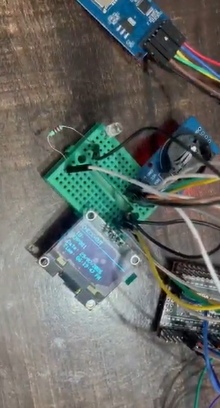
Case Study: Building A Qr Code Attendance System On Arduino

Made by chanchaldada / Sensors / IoT
About the project
A manufacturing facility in Pune approached us with a frustrating problem.
Project info
Items used in this project
Hardware components


Story
The Problem
A manufacturing facility in Pune approached us with a frustrating problem. They were tracking employee attendance using a mix of biometric fingerprint scanners and manual registers. The biometric units kept failing in their dusty environment — sensors clogged, false rejections spiked during monsoon season, and workers spent five to ten minutes queued at the gates every shift change.
They needed something faster, more reliable, and cheaper to deploy across three facility entrances. Their IT manager floated the idea of QR code scanning. Employees already had company ID cards. Printing QR codes on those cards was trivial. The question was: what hardware would handle the scanning without breaking the bank?
Why Arduino Mega?
We evaluated a few options before settling on the Arduino Mega 2560. The ESP32 was tempting for its built-in WiFi, but the client's network security team wasn't ready to put IoT devices on the production floor VLAN. The nRF52 series felt like overkill for what was essentially a serial-to-display application.
The Mega won for three reasons:
1. Plenty of UART ports — we needed one for the QR scanner module, one for a thermal printer, and one for a serial LCD display. The Mega has four hardware UARTs. No software serial hacks required.
2. 5V logic — most QR scanner modules we tested (the ubiquitous barcode scan engines from Honeywell and Zebra) operate at 5V TTL. The Mega matches that natively without level shifting.
3. Cost — a genuine Mega board runs around $12-15 in volume. Even with a scanner module, display, and enclosure, the total bill of materials came to roughly $85 per unit. Compare that to commercial attendance terminals that cost $400-600 each.
The Architecture
Here's what we shipped:
- Arduino Mega 2560 as the brain
- Honeywell N3680 QR scan engine — reads QR codes from ID cards at any angle within about 20 cm
- 20x4 character LCD with I2C backpack for employee feedback
- Thermal receipt printer (the Epson TM-T20 equivalent, but a cheap Chinese clone) for entry logs
- Real-time clock module (DS3231) with battery backup — critical for accurate attendance timestamps
- MicroSD card shield for local storage — the facility's WiFi was unreliable near the gates, so we couldn't rely on cloud sync in real time
The firmware was written in C++ using the Arduino IDE toolchain. Nothing fancy, no RTOS — a simple state machine loop that handled scanning, validation, and logging.
The Firmware Logic
```cpp
// Simplified flow
void loop() {
if (scanner.available()) {
String qrData = scanner.read();
bool valid = validateEmployeeQR(qrData);
if (valid) {
logAttendance(qrData);
displayFeedback("ACCESS GRANTED", employeeName);
printReceipt(employeeName, timestamp);
} else {
displayFeedback("INVALID QR", "");
digitalWrite(buzzerPin, HIGH);
}
}
}
```
The validation logic was straightforward. Each employee QR code contained a unique ID that mapped to an entry in a local lookup table stored on the SD card. The table was updated nightly via a serial connection from the office PC — a batch process that ran at 2 AM when the gates were idle.
We also added a few edge case handlers:
- Duplicate scan prevention — if the same QR was scanned within 30 seconds, the system flagged it as a potential tailgating attempt.
- Shift-based validation — the RTC let us check whether the employee was scanning during their scheduled shift. Early arrivals got a "PLEASE WAIT" message.
- Power loss recovery — the SD card logging used a simple append-only CSV format. If power dropped mid-write, the worst case was a truncated last line, which we could detect and skip during processing.
The Hardware Challenges
The first prototype worked on our bench. Then we put it in the field and reality hit.
Problem 1: Ambient light interference. The N3680 scan engine struggled in direct sunlight at the main gate. We solved this by mounting the scanner behind a tinted acrylic window and adding a small hood. This cut false reads by about 90%.
Problem 2: Dust ingress. The facility's dust was abrasive. We ended up potting the entire PCB in conformal coating and using IP65-rated enclosures with cable glands. The thermal printer needed a vent, but we oriented it downward so dust couldn't settle on the print head.
Problem 3: Power quality. The gate area had voltage fluctuations from nearby machinery. A cheap switching supply kept brownout-resetting the Mega. We swapped to a Mean Well supply with a 1000 µF electrolytic capacitor across the output. Problem solved.
Testing and Deployment
We ran a two-week pilot at one gate with 50 volunteer employees. The scan-to-acknowledgment time averaged 0.8 seconds. Compare that to the 3-5 seconds for the biometric units. The queue at the gate during morning shift dropped from 8 minutes to under 2.
The false rejection rate was 0.3% — and most of those were employees holding their cards at an awkward angle or covering part of the QR code with a thumb. We printed a small "scan here" sticker on each card showing the correct orientation.
The Results
After the pilot, the client ordered units for all three gates. The full deployment has been running for eight months now. Here's what we measured:
- Employee throughput increased from roughly 12 people per minute to 35 per minute per gate
- Hardware failure rate — two units needed maintenance (one printer jam, one scanner ribbon cable came loose). Both fixed in under 15 minutes
- Data accuracy — attendance records now match payroll data with zero manual corrections needed. The old biometric system had a 2-3% discrepancy rate
The client's HR team exports the CSV logs daily and imports them into their existing payroll software. No cloud dependency, no subscription fees, no proprietary vendor lock-in.
What We Learned
If you're planning something similar, here's our honest advice:
Don't over-engineer the validation. For most use cases, a local lookup table is sufficient. Cloud-based validation adds latency and network dependencies that hurt throughput.
Test in the actual environment early. Our bench tests didn't catch the sunlight issue or the dust problem. Put a prototype in the field within the first week if possible.
Plan for the printer. Thermal printers are the most failure-prone component. Stock spare heads and keep the mechanism clean. Also, make sure your thermal paper is rated for the temperature range — cheap paper fades in heat.
Budget for enclosure costs. The electronics were only about 40% of the total unit cost. Machined enclosures, cabling, and mounting hardware added up quickly.
Need Something Similar?
This project took our team about six weeks from initial concept to full deployment. If you're considering a similar system — QR attendance, access control, or any custom embedded solution — and you're looking to hire arduino programmer talent who has actually shipped production hardware, not just hobby projects, we'd be happy to talk.
We've done this kind of work across manufacturing, logistics, and retail. The same approach applies whether you're building a single prototype or deploying fifty units. We handle firmware development, PCB design when needed, 3D printed enclosures for prototyping, and we ship fully assembled and tested prototypes anywhere in the world.
The Arduino Mega isn't always the right answer — sometimes an ESP32 with WiFi makes more sense, or a custom PCB based on the STM32 family. But for this client's constraints, it was the right tool, and it's been running reliably ever since.
https://drive.google.com/file/d/14Bd2zqe1ciK-QpuaG0Xy2160qkhGVEFu/view
Schematics, diagrams and documents
Credits
chanchaldada
Chanchal Dada is an IoT developer at DigitalMonk, focused on building smart embedded systems using Arduino and ESP32. She specializes in IoT-based automation, smart monitoring solutions, and real-world hardware-software integration for practical applications.
Related products





Leave your feedback...