





Industrial Android/linux Sbc Based On Rk3566 By Rocktech

Made by kevin-zhang / Displays / IoT
About the project
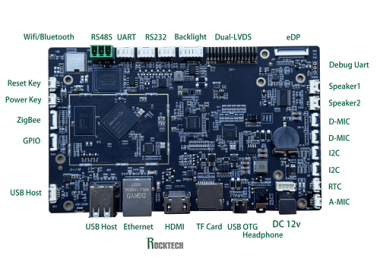
This project introduces an industrial-grade SBC developed by Rocktech, based on the RK3566 SoC. It runs Android/Linux, supports LVDS display and capacitive touch, and is ideal for smart HMI panels and industrial terminals.
Project info
Difficulty: Easy
Platforms: Android, Linux Arm, Arm
Estimated time: 1 hour
License: GNU General Public License, version 3 or later (GPL3+)
Items used in this project
Hardware components

Software apps and online services

Story
📘 Build an Embedded HMI Panel with RK3566-based Android/Linux SBC
This project demonstrates how to create a custom Android/Linux-based panel using a Rockchip RK3566 SBC and a 10.1” LVDS TFT touchscreen. The setup is ideal for developers building industrial HMIs, control terminals, or IoT interfaces.
🔗 A wide range of production-ready embedded SBCs with Android/Linux support are available for rapid prototyping and scalable deployment.🧩 What is the RK3566 SBC?
The RK3566 SBC used in this project is a quad-core Cortex-A55 platform running at 1.8GHz. It offers rich multimedia and I/O capabilities in a compact form factor.
Supports dual LVDS, HDMI, MIPI-DSI, and eDP displays
Multiple USB ports, Ethernet, TF card slot
Audio in/out, mic, speaker, and headphone support
UART, RS232, RS485, I2C, GPIO
Prebuilt Android 11 firmware and Linux options (Yocto, Buildroot)
🎯 Project Goals
Rapidly prototype UI on real hardware before final board is ready
Integrate 10.1” LVDS touchscreen and validate touch functionality
Evaluate Android GUI performance and device response
Kickstart app development and peripheral testing
💻 Software Stack
Operating System: Android 11 (default), Buildroot/Yocto Linux also supported
Display Integration: DTS overlay for LVDS configuration
Touch Interface: USB HID (plug-and-play) or I2C-based CTP
Dev Tools: Android Studio, ADB, and device tree overlays
⚙️ Hardware Components:
- RK3566 SBC: Quad-core Cortex-A55 board with Linux/Android support
- 10.1” LVDS TFT Display: 1280x800 resolution, capacitive touchscreen
- USB Touch Interface: For capacitive panel control
- 12V Power Supply: DC input (jack 5.5mm)
🛠️ How to Set It Up
Flash Firmware – Install Android or Linux OS using standard RK tools
Connect Display – Use LVDS cable and USB for touch
Device Tree Update – Add RK101HI34E.dtsi or equivalent to board DTS
Power Up – 12V input for stable operation
Verify UI – Confirm screen + touch work on first boot
Start Development – Use Android Studio or Linux tools for app integration
🌐 More Information
-
Learn more about RK3566 SBC technical details
-
Explore other embedded Linux/Android SBC platforms
-
Visit the homepage for full solution offerings
🏷️ Tags
Android SBC • Linux SBC • RK3566 • Embedded Panel • HMI Display • LVDS Touchscreen • Industrial Applications
Schematics, diagrams and documents
Credits
Related products






Leave your feedback...