





Items used in this project
Hardware components



View all
Software apps and online services

Story
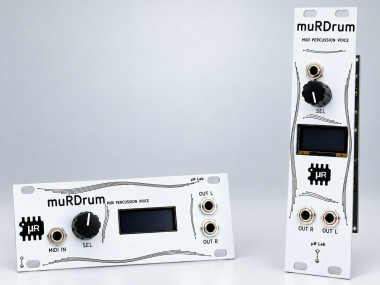
murDrum
A polyphonic drum sample player for Eurorack, built around the Raspberry Pi
Pico 2. Eight slots, one-shot playback, MIDI in. No pitch, no envelopes, no
filters: it plays your samples, cleanly and on time.
Made by muR Lab. It comes in two formats with the same board and the same
firmware: 1U, 20HP and 3U, 6HP.
Features
- 8 slots, 16 voices. Each slot is monophonic with a 1 ms choke, the way a
drum machine behaves, so the voice count is fixed and no hit ever gets
stolen in normal playing - Up to about 83 seconds of samples in total, up to 200 samples, stored in
the Pico 2's own flash and organised in kits of eight. There is no SD card - Three kits included: SYN_808, SYN_909 and SYN_DUST, synthesised from
scratch after the classic machines and released under CC0 (seekits/) - MIDI in on a 3.5 mm TRS jack, Type A, listening on channel 10 by
default, with slots on the General MIDI drum notes - Stereo out with a pan per slot. At centre a slot sounds exactly as it
would in mono - Level per slot, from 0 dB down to −24 dB in 3 dB steps, or off
- Hat choke, optional: the closed and open hi-hat cut each other, the way
one cymbal does - Velocity response in four curves: OFF, LOW, MID, HIGH
- 8 user presets, saved to flash with the settings
- One encoder and a small OLED. Every function is three gestures: turn,
press, long press
Loading your own samples
Use the sample loader on the muR Lab site, murlab.it/loader. It runs entirely
in the browser, so your samples are never uploaded anywhere. It builds the
library and writes it to the module over USB.
From the command line, firmware/tools/convert_wav.py builds the same
library file from a list of WAVs. See kits/README.md for
a worked example.
Firmware
Release UF2s are attached to each GitHub release. There are
four, and the names stay the same from one release to the next (they were
picodrum_… before the rename):
FilePanelEncoder
murdrum_1U_enc-std.uf21U, 20HP, 0.91" displaystandard
murdrum_1U_enc-rev.uf21U, 20HP, 0.91" displayreversed
murdrum_3U_enc-std.uf23U, 6HP, 0.96" displaystandard
murdrum_3U_enc-rev.uf23U, 6HP, 0.96" displayreversed
std and rev match the S / R mark on the back of the panel. See
docs/FLASHING.md for how to flash, and what to do if
the knob turns the wrong way.
Building
You need the Pico SDK 2.2.0 and the
official Arm GNU Toolchain
(14.2 is what is tested). The Homebrew arm-none-eabi-gcc formula does not
work, because it ships without newlib.
cd firmware
PICO_SDK_PATH=/path/to/pico-sdk ./build.sh                 # 1U, standard encoder
PANEL=6HP ./build.sh                                       # 3U
ENC=REV ./build.sh                                         # reversed encoder
tools/build_all.sh                                         # all four release UF2s
build.sh looks for the toolchain in ~/pico/toolchain/, or wherever
PICO_TOOLCHAIN_PATH points.
Tests
The mixer, MIDI parser, encoder decoder, settings store and user interface
build natively on the host, with no hardware and no SDK:
cd firmware
tools/run_tests.sh
Hardware
The board's schematic is in hardware/muRDrum_schematic.pdf.
The main parts:
- Raspberry Pi Pico 2 (RP2350)
- PCM5102A stereo DAC over I2S, driven by the PIO
- H11L1 optocoupler on the MIDI input
- SSD1306 OLED: 128x32 on 1U, 128x64 on 3U
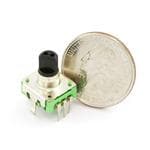
- EC11 rotary encoder with push switch
- Power from the Eurorack +12 V rail
The two outputs are plain jacks with no normalling. If you patch only one of
them, anything panned hard to the other side is silent.
Repository layout
PathWhat it holds
firmware/Firmware sources, host tests, and the build and library tools
kits/The three bundled kits: source WAVs, the synthesiser that made them, and a ready-to-flash library
hardware/The schematic
docs/Flashing guide
License
- Firmware and tools: GNU General Public License, version 3 or (at your
option) any later version (GPL-3.0-or-later), seeLICENSE - Bundled kits (
kits/): CC0 1.0, seekits/LICENSE - Schematic (
hardware/): CC BY-SA 4.0, seehardware/LICENSE - The muR Lab, muRDrum and PicoDrum names and the muR Lab logo are not licensed
under the GPL
Third-party code included here:
firmware/src/audio_i2s.piois derived from theaudio_i2sprogram in
pico-extras, © Raspberry Pi
(Trading) Ltd, BSD-3-Clausefirmware/pico_sdk_import.cmakeis from the Pico SDK, © Raspberry Pi
(Trading) Ltd, BSD-3-Clause
© 2026 muR Lab
Schematics, diagrams and documents
Code
Credits
Related products



Leave your feedback...