





Make A Morse Practice Recording In Your Browser

Made by SimpleMorse / Communication
About the project
Turn a short message into a Morse audio file, then use a decoder to read it back. A simple exercise with no circuit to build.
Project info
Difficulty: Easy
Estimated time: 1 hour
Items used in this project
Software apps and online services

Story
Want to try Morse code before building a circuit? Start with a short audio file.
In this guide, I'll show you how to turn a message into Morse sound, save it, and open it in an audio decoder. You can use the same phrase each time, which makes it easier to spot a missing letter or a gap in the wrong place.
You'll need a computer or phone with a browser and SimpleMorse. It's a free Morse toolkit. This exercise uses its translator and audio decoder.
1. Pick a short message
Open the translator and type HELLO WORLD.
Keep the first message short. It's easier to compare ten letters than a whole paragraph. The translator shows the dots and dashes beside your text.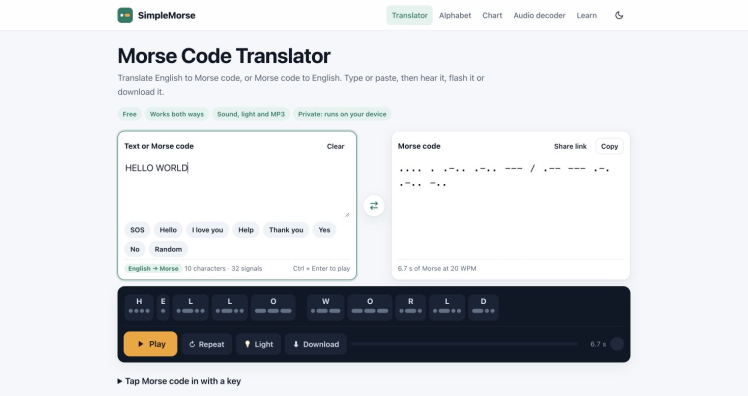
The screenshot shows the message ready to play. The controls below it let you listen or download the audio.
2. Listen, then save the file
Press Play and listen to the phrase. Choose a speed between 5 and 40 words per minute for this exercise, since that is the decoder's approximate speed range.
Use Download to save the message as MP3 or WAV. Give the file a clear name, such as hello-world.wav, so you can find it again.
If you're practising by ear too, the translator has Farnsworth speed. You can also try light or vibration instead of sound.
3. Open the recording in the decoder
Open the Morse audio decoder and choose Decode an audio file. Select the file you just saved.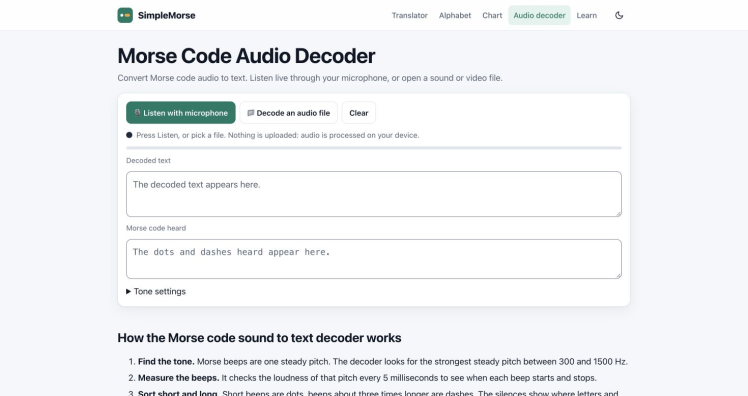
The decoder has separate fields for the text and the Morse symbols it hears. The screenshot shows these fields before a recording is selected.
It also accepts microphone input. For this first exercise, using a file keeps the steps simple.
4. Compare the text
Compare the decoded message with HELLO WORLD. Check the letters and the space between the two words.
If the result differs, check that you selected the right recording. The decoder works with tones from 300 to 1500 Hz and speeds of about 5 to 40 words per minute. A recording outside those ranges is a useful thing to rule out before trying again.
Keep a note of the original phrase, the settings you chose, and the result. That gives you something concrete to compare when you change one setting.
5. Try another phrase
Once you're comfortable with the steps, make a second file with a different short message. Change one thing at a time so you can follow what happened.
To practise reading the dots and dashes yourself, use the guide to reading Morse code. SimpleMorse also has a printable chart and a 35-lesson Koch trainer if you want to keep learning.
That's enough for a first exercise. You now have a short message to work with and a simple way to compare the sound with the text.
Credits
Related products





Leave your feedback...