





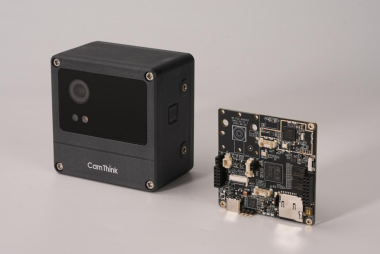
Camthink Neoeyes Ne301 End-to-end Edge-ai Toolkit

Made by dave-chris / Artificial intelligence
About the project
AI Tool Stack is an end-to-end edge-AI toolkit for NeoEyes NE301 (and similar) devices, covering data collection, labeling, training, quantization, and deployment. It can be self-hosted and continuously updated.
Items used in this project

Story
Overview
After receiving the CamThink NeoEyes NE301, I realized that while it supports model detection, a very important step was missing — image annotation after data collection.
I spent three days building an AI-based tool to solve this problem. With just 20 images, you can complete model training and perform image annotation automatically.
I also plan to further quantize and add more models to expand the annotation capabilities. The project has now been open-sourced on GitHub, and I hope it can be helpful to the community
AI Tool Stack is an end-to-end edge-AI toolkit for NeoEyes NE301 (and similar) devices, covering data collection, labeling, training, quantization, and deployment. It can be self-hosted and continuously updated.
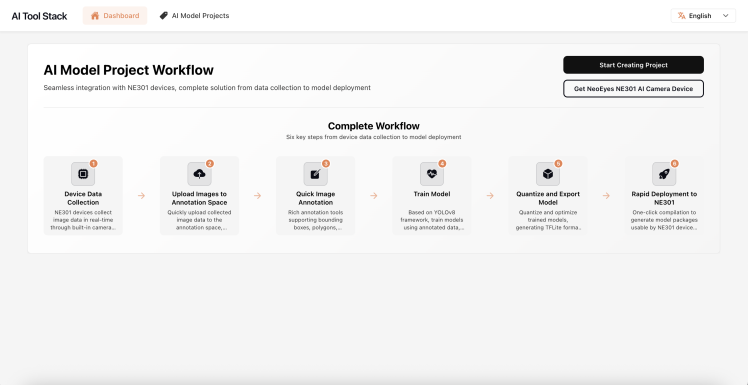
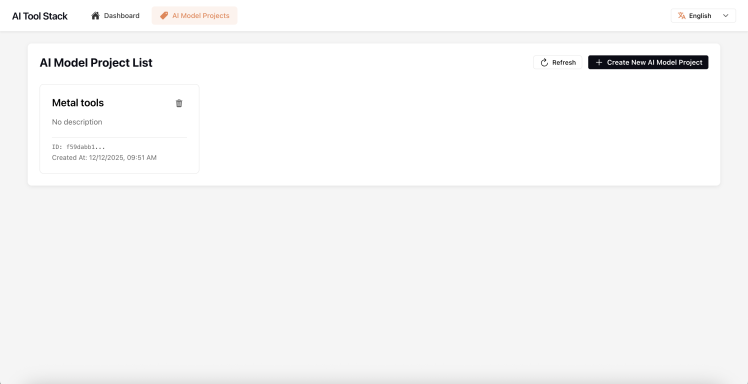
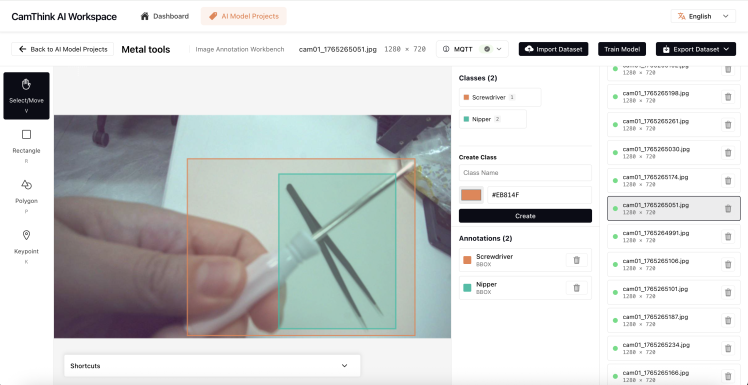
Key Features
- Data ingest & management: MQTT image ingest; project/image lists.
- Annotation workbench: shortcut-driven labeling, class management, dataset import/export (COCO / YOLO / project ZIP), annotation history.
- Training & testing: YOLO-based training and model testing.
- Quantization & deployment: one-click NE301 model package export.
- Export: YOLO training dataset, full annotation ZIP.
Requirements
Docker & docker-compose (required):(Optionally) If you need to generate the NE301 quantization model package, please pull the image in advance:
docker pull camthink/ne301-dev:latest
Quick Start (Docker)
docker-compose build
docker-compose up
The frontend is built in-container (react-scripts) and the backend is FastAPI. Check container logs for the exposed frontend URL (usually http://localhost:8000 or mapped port).
Local Development (optional)
Run frontend and backend separately:
cd frontend && npm install && npm start
cd backend && pip install -r requirements.txt && uvicorn main:app --reload
API routes live in backend/api/routes.py. Frontend config is in frontend/src/config.ts.
Typical Workflow
Data Import / Export
- Import: COCO (.json), YOLO (.zip), project export ZIP (images/ + annotations/ + classes.json)
- Export: YOLO dataset, full annotation ZIP
Keyboard Shortcuts (common)
- Navigate images: A / ←, D / →
- Tools: R rectangle, P polygon, V select
- Class select: 1–9 for first 9 classes
- Toggle annotations: H
- Undo/Redo: Ctrl/Cmd + Z, Ctrl/Cmd + Shift + Z
- Save: Ctrl/Cmd + S
Roadmap
- Model hub: standalone quantization and downloadable model library
- Device management: NE101/NE301 connection, data debugging, OTA
Ports & Environment
- Default ports (docker-compose):
- Backend / API:
8000 - Frontend (react-scripts in container):
3000(proxied/mapped, check logs)
- Backend / API:
- Key environment variables (examples):
API_BASE_URL: frontend API base (e.g.,http://localhost:8000)MQTT_BROKER_HOST: MQTT broker host/IP (e.g.,localhostor broker service name in compose)MQTT_BROKER,MQTT_TOPIC: NE301 MQTT settingsDATASETS_ROOT: backend dataset storage path- Add more as needed in
.envor compose env overrides.
Dataset Formats (import/export)
- COCO: single JSON with
images/annotations/categories. - YOLO: ZIP with
images/+labels/(.txt). - Project ZIP:
images/+annotations/*.json+ optionalclasses.json(id/name/color). - Exports: YOLO dataset ZIP; full annotation ZIP (images + annotations + classes.json).
Troubleshooting
- Build fails (frontend) missing assets: ensure all referenced CSS/TSX exist (
DatasetImportModal.cssetc.). - Port conflicts: adjust mapped ports in
docker-compose.yml. - Slow annotation layer on fast navigation: caching added; still slow → reduce image size (JPEG/WebP) or check network/CPU.
Testing
- If tests exist: run frontend lint/tests via
npm testor backend tests viapytest(add when available). - If absent: mark as TODO in issues; manual smoke: load project, navigate images, import/export datasets, train/quantize happy-path.
Contributing
- Issues & PRs welcome.
- Style: follow repo defaults (eslint/prettier for frontend, black/flake8 if configured for backend).
- Branching: fork & PR or feature branches; please keep changes scoped and include repro steps for bug fixes.
Security
- Do not commit secrets/tokens.
- For security reports, contact maintainer privately (add email/contact here).
License
- Add your license of choice (e.g., MIT/Apache-2.0). Add
LICENSEfile and reference it here.
Credits
Related products





Leave your feedback...