





Arduino-based Automatic Air Compressor Controller

Made by steven_82 / Communication
About the project
Build an Arduino-based air compressor controller that automatically maintains tank pressure using an analog pressure sensor and a relay module.
Project info
Difficulty: Easy
Estimated time: 1 hour
License: GNU General Public License, version 3 or later (GPL3+)
Items used in this project

Story
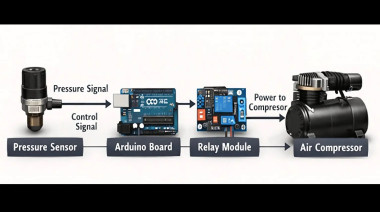
An Arduino-based air compressor controller is a practical DIY electronics project that automates pressure monitoring and compressor operation. Instead of manually switching the compressor on and off, the system uses a pressure sensor to measure the air pressure inside the tank and an Arduino to control a relay according to predefined pressure limits.
This project is useful for exploring automation in applications such as airbrushing, small pneumatic tools, and workshop equipment. It also provides hands-on experience with sensor interfacing, relay control, and closed-loop control systems.
In this guide, we will look at the required components, how the system operates, the sensor and relay connections, and the essential safety precautions for building an Arduino-controlled air compressor.
What Is an Arduino Air Compressor Controller?
A conventional air compressor may require manual operation or rely on a mechanical pressure switch to stop the motor when the desired pressure is reached. By introducing an Arduino, pressure monitoring and switching can be managed electronically.
The system works as follows:
A pressure sensor continuously measures the pressure inside the air tank.
The Arduino reads the sensor output and calculates the corresponding pressure.
When the pressure falls below the predefined minimum, the Arduino activates a relay to turn on the compressor.
When the pressure reaches the specified maximum, the Arduino deactivates the relay and turns off the compressor.
This arrangement provides automatic pressure control without requiring the user to operate the switch continuously.
Additional features, such as an LCD display, warning indicators, or data logging, can also be incorporated. The underlying principle is closed-loop control: the system measures a condition and responds automatically to changes in that condition.
Pressure Monitoring
The pressure sensor is installed in a suitable pressure connection so that it can measure the tank's internal pressure. As the pressure changes, the sensor's output voltage changes accordingly.
The Arduino reads this voltage through an analog input and converts it into a pressure value using the sensor's calibration characteristics.
Automatic Compressor Control
The measured pressure is compared against two predefined values:
Cut-in pressure: The pressure below which the compressor starts.
Cut-off pressure: The pressure at which the compressor stops.
For example, a controller might be configured to start the compressor below 60 PSI and stop it at 90 PSI, provided those values are suitable for the specific equipment.
When the pressure falls below the cut-in threshold, the Arduino activates the relay. The compressor then runs and increases the pressure inside the tank. Once the pressure reaches the cut-off threshold, the Arduino deactivates the relay.
This monitoring process continues as the system operates.
Why Two Pressure Thresholds Are Important?
Using separate cut-in and cut-off pressures introduces hysteresis into the control system. This prevents rapid switching when the measured pressure fluctuates near a single threshold.
It also helps reduce unnecessary compressor cycling and associated mechanical wear.
The actual pressure settings must always remain within the approved operating limits of the compressor, tank, sensor, and other components.
Pressure Sensor and Relay Connections
The following connections describe the low-voltage control side of the project. Verify the voltage and pin requirements of your specific modules before connecting them.
Pressure Sensor Connections
For a compatible 5 V analog sensor:
VCC connects to Arduino 5V.
GND connects to Arduino GND.
Signal connects to Arduino analog input A0.
The analog signal allows the Arduino to measure the sensor output and calculate the corresponding pressure.
The example sensor type described here produces an output of 0.5–4.5 V, but its exact pressure conversion depends on its specified calibration.
Relay Module Connections
For a compatible relay module:
VCC connects to Arduino 5V.
GND connects to Arduino GND.
IN or SIG connects to Arduino digital pin D7.
Digital pin D7 provides the control signal used to switch the relay.
The relay module's input logic must be checked before operation because some modules activate with a HIGH signal, while others use an active-LOW signal.
Compressor Power Connections
The relay's load-side circuit must be designed for the compressor's voltage, running current, and startup current. Mains-voltage wiring must be handled by a qualified person using appropriately rated components, protective devices, and an enclosure.
Do not connect the compressor directly to an Arduino pin or use the Arduino's power supply to operate the compressor.
Essential Safety Precautions
Compressed air systems can be hazardous if the tank, hoses, or fittings fail. Electrical switching introduces additional risks, especially when mains voltage is involved.
Use Mechanical Overpressure Protection
Install a correctly rated mechanical pressure relief valve on the tank. Software-based pressure control cannot replace this protection.
If the Arduino, sensor, or relay fails, independent mechanical protection must remain available to help prevent dangerous overpressure.
Maintain Electrical Isolation
Keep hazardous-voltage wiring properly separated from the Arduino's low-voltage circuits. Use components with appropriate ratings and isolation, and ensure that the wiring and enclosure meet the requirements of the installation.
Install an Emergency Stop
Include a physical emergency-stop mechanism that interrupts compressor power through an appropriately designed circuit. It should not depend solely on the Arduino program to stop the compressor.
Check Component Ratings
Verify the pressure rating of the sensor, the operating limits of the tank, and the electrical ratings of the relay and wiring. The relay must be suitable for the compressor's startup current as well as its normal operating current.
Check Hoses and Fittings
Use pressure-rated hoses and fittings and inspect the connections for leaks. Do not operate the compressor with a blocked outlet or bypass its original safety mechanisms.
The Arduino controller should be treated as an experimental automation system, not as a certified or standalone safety controller.
Common Beginner Mistakes
Several mistakes can affect the reliability of an automatic pressure controller.
Skipping the pressure relief valve: Always retain independent mechanical overpressure protection.
Using an underrated relay: Check the compressor's electrical requirements, including startup current.
Using only one pressure threshold: Separate cut-in and cut-off values help prevent rapid switching.
Ignoring power-supply requirements: Keep the Arduino's supply appropriate for the control circuit and provide suitable power for the compressor.
Using unsuitable hoses or fittings: All pressure-bearing components must be rated for the intended operating conditions.
Ignoring sensor calibration: An incorrect voltage-to-pressure conversion produces inaccurate readings and unreliable control.
Addressing these issues during the design stage helps make the system more dependable.
Possible Upgrades and Improvements
After the basic system has been tested and its safety measures have been verified, additional features can expand its capabilities.
LCD or OLED Display
A display can show the measured pressure in real time, allowing users to observe the tank pressure without opening a computer's Serial Monitor.
Warning LEDs and Buzzer
Visual and audible indicators can provide status information or alert users to selected operating conditions.
SD Card Data Logging
An SD card module can record pressure measurements over time. The collected data can help users study pressure changes and compressor cycling.
ESP32-Based Wireless Monitoring
An ESP32 can be used in an expanded version of the project to support wireless monitoring and notifications, provided the system is designed and tested appropriately.
Temperature Monitoring
A temperature sensor can provide additional information about compressor operating conditions.
These improvements offer opportunities to explore embedded programming, instrumentation, and connected monitoring while retaining independent mechanical and electrical safety protections.
Conclusion
An Arduino-based air compressor controller demonstrates how a microcontroller, pressure sensor, and relay can work together to automate a practical mechanical system.
By monitoring pressure and switching the compressor at predefined thresholds, the project illustrates sensor interfacing, closed-loop control, and relay operation. Optional displays, indicators, data logging, and wireless monitoring can provide additional functionality.
Before using the design with a real compressor, verify the sensor calibration, pressure settings, relay ratings, and mechanical installation. The original compressor safety mechanisms and independent pressure relief protection must remain in place.
Further Reading
For the original step-by-step guide, including the complete component details, wiring instructions, Arduino implementation, and additional project notes, visit:
Credits
steven_82
I’m an electronics engineer who enjoys experimenting with electronics, exploring new technologies, and learning something new every day. I love working on electronics projects, sharing ideas, and exchanging knowledge with the community. Always curious to try new things, solve problems, and learn from fellow electronics enthusiasts.
Related products







Leave your feedback...