





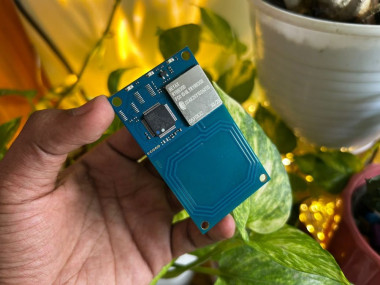
Nfc Attendance Tracking Using Xiao Rp2040 & Ryrr30d
Made by pradeeplogu0
About the project
Track check‑in/check‑out, live inside duration, and analytics – all in your browser, no cloud required.
Project info
Difficulty: Easy
Estimated time: 1 hour
License: GNU General Public License, version 3 or later (GPL3+)
Items used in this project

Story
Every morning at our makerspace, members used to scribble their names on paper sheets. We wanted a contactless, secure, and fun way to log attendance – but didn’t want to pay for expensive cloud services or deal with Apple/Google Wallet certifications.
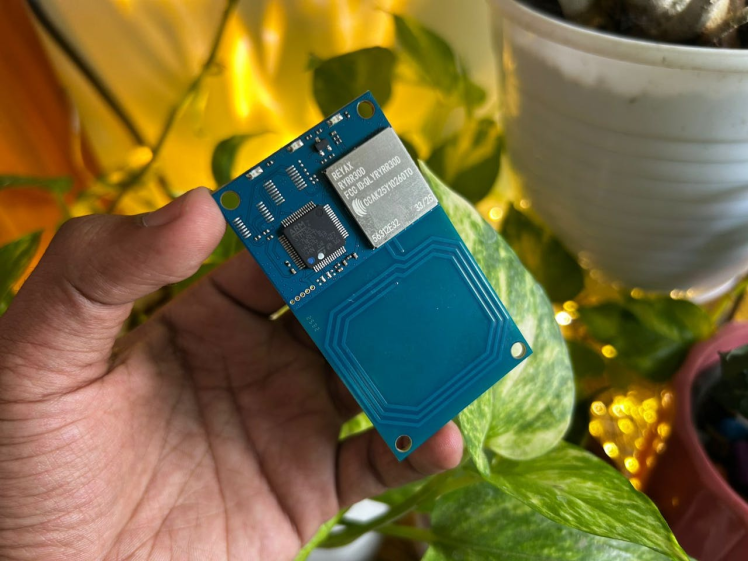
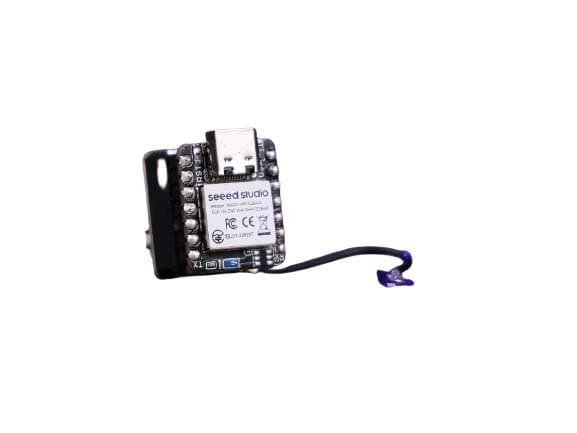
Using a XIAO RP2040, a RYRR30D NFC reader, and a few cheap NFC tags, we built a complete attendance system that:
- Reads NFC tag UIDs (just like your office badge or a sticker).
- Runs a web dashboard that connects via Web Serial – no extra software.
- Toggles check‑in / check‑out with each tap.
- Shows real‑time duration inside (seconds count up).
- Saves all data locally in your browser’s
localStorage. - Provides hourly & weekly charts, live feed, and CSV export.
Best of all: No Arduino Wi‑Fi, no cloud subscription, no Apple/Google credentials. Just a USB cable.
The NFC Module & The Company Behind It
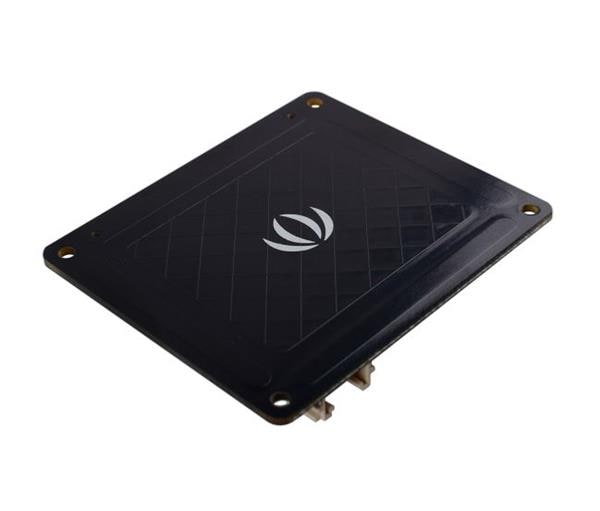
At the heart of this attendance system lies the RYRR30D NFC module from REYAX Technology, a trusted Taiwanese manufacturer known for its high‑performance wireless and IoT solutions.
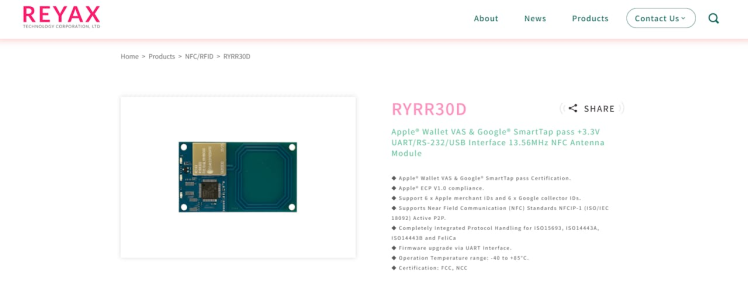
Unlike basic NFC readers that only capture card UIDs, the RYRR30D is a certified multi‑protocol reader that supports ISO14443A, ISO14443B, FeliCa, and even advanced mobile wallet protocols like Apple VAS and Google Smart Tap. Its simple AT command set and UART interface make it incredibly easy to integrate with microcontrollers like the XIAO RP2040. With over a decade of experience, REYAX has built a reputation for producing robust, developer‑friendly modules that balance cost and functionality. Whether you're building an attendance tracker, a loyalty system, or a secure access control solution, the RYRR30D provides a reliable, future‑proof foundation.
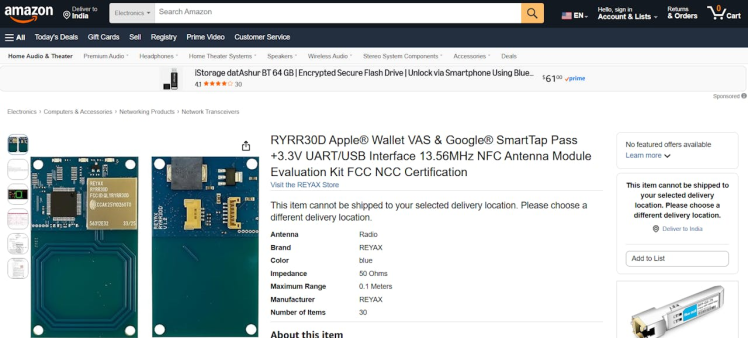
If you’d like to buy this product, you can find it here: Buy Now
Also you can check your local distributors
Connect the RYRR30D to the XIAO RP2040 as shown:
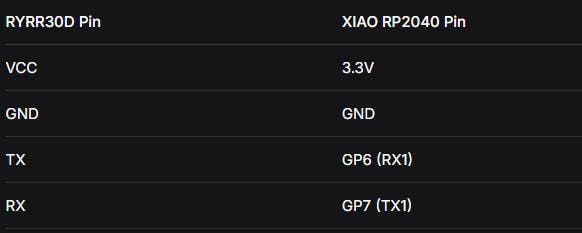
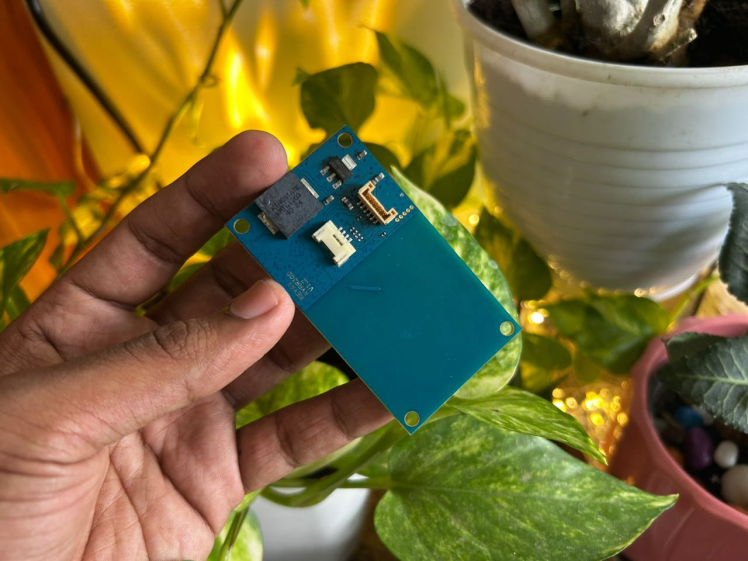
Note: The RYRR30D uses 3.3V logic – perfect for the XIAO. Do not use 5V.🧠 How It Works (High Level)
- The RYRR30D continuously polls for NFC cards. When a tag is tapped, it outputs a line like
+ISO14443A=13BF172Dover UART. - The XIAO RP2040 reads that line, debounces it (ignores repeats for 1.5 seconds), and forwards the UID to the USB serial port (which becomes the Web Serial device).
- A modern web browser (Chrome/Edge) connects to that serial port using the Web Serial API.
- The browser receives the UID, looks up the user (or asks to register new ones), toggles check‑in/out, and updates the dashboard in real time.
- All attendance logs and user data are stored in the browser’s
localStorage– they persist even after closing the page.
- Download and install Arduino IDE.
- Add RP2040 boards:
File → Preferences → Additional Boards Manager URLs
Add:https://github.com/earlephilhower/arduino-pico/releases/download/global/package_rp2040_index.json
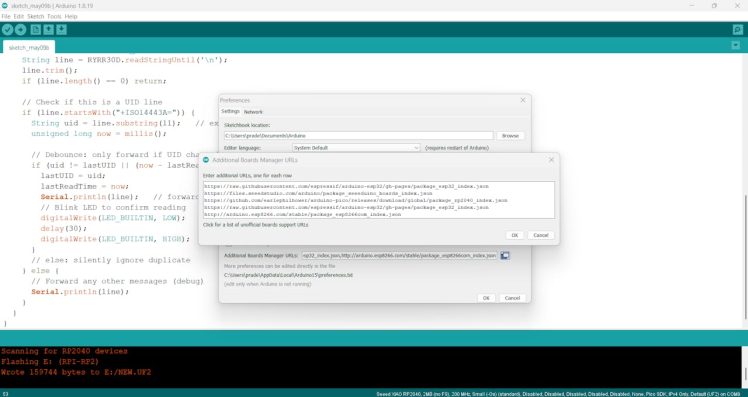
- Open Tools → Board → Boards Manager, search for Raspberry Pi Pico/RP2040 by Earle F. Philhower, and install.
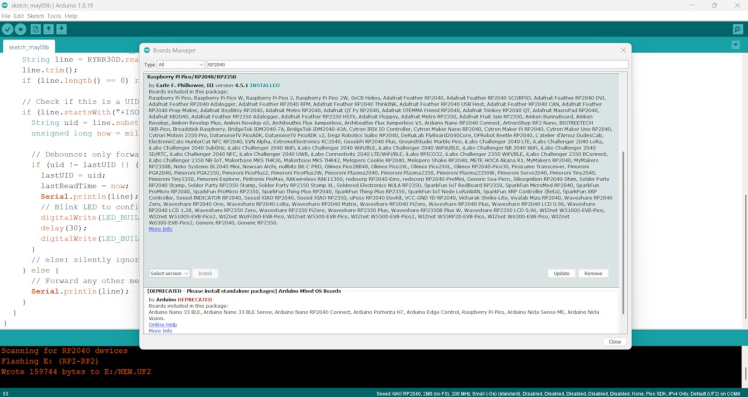
- Select your board: Tools → Board → Raspberry Pi RP2040 Boards → Seeed XIAO RP2040.
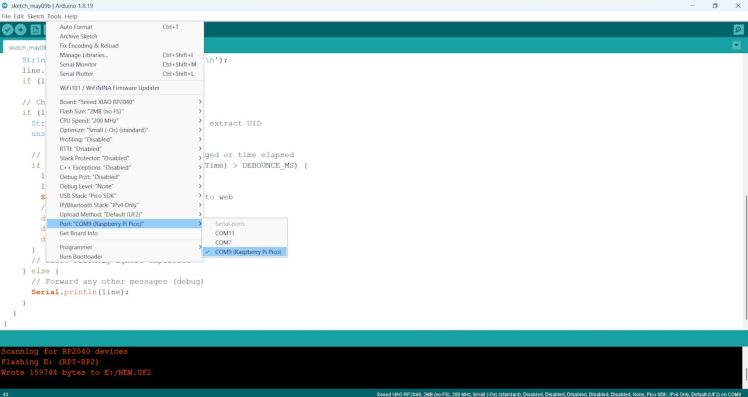
Copy the code below, paste into Arduino IDE, and upload to the XIAO RP2040 (connect via USB, select the correct COM port).
#include <Arduino.h>

#define RYRR30D Serial1

String lastUID = "";
unsigned long lastReadTime = 0;
const unsigned long DEBOUNCE_MS = 1500;   // ignore same UID for 1.5 seconds

void setup() {
  Serial.begin(115200);   // USB to computer (Web Serial)
  RYRR30D.begin(115200);  // UART to RYRR30D (GP6=TX, GP7=RX)

  pinMode(LED_BUILTIN, OUTPUT);
  digitalWrite(LED_BUILTIN, HIGH);

  // Configure RYRR30D for ISO14443A tags (your working mode)
  RYRR30D.print("ATrn");
  delay(100);
  RYRR30D.print("AT+MODE=2rn");
  delay(100);
  RYRR30D.print("AT+CTYPE=1100000000000010rn");
  delay(100);

  Serial.println("NFC Reader Ready - debounced UID output");
}

void loop() {
  if (RYRR30D.available()) {
    String line = RYRR30D.readStringUntil('n');
    line.trim();
    if (line.length() == 0) return;

    // Check if this is a UID line
    if (line.startsWith("+ISO14443A=")) {
      String uid = line.substring(11);   // extract UID
      unsigned long now = millis();

      // Debounce: only forward if UID changed or time elapsed
      if (uid != lastUID || (now - lastReadTime) > DEBOUNCE_MS) {
        lastUID = uid;
        lastReadTime = now;
        Serial.println(line);   // forward to web
        // Blink LED to confirm reading
        digitalWrite(LED_BUILTIN, LOW);
        delay(30);
        digitalWrite(LED_BUILTIN, HIGH);
      }
      // else: silently ignore duplicate
    } else {
      // Forward any other messages (debug)
      Serial.println(line);
    }
  }
}
What this does:
- Configures the RYRR30D to read ISO14443A tags.
- Reads lines from the module.
- If a line contains
+ISO14443A=..., it extracts the UID and forwards it only once per physical tap (debounce). - Blinks the onboard LED on every valid read.
After uploading, open the Serial Monitor (115200 baud) and tap an NFC tag – you should see lines like:
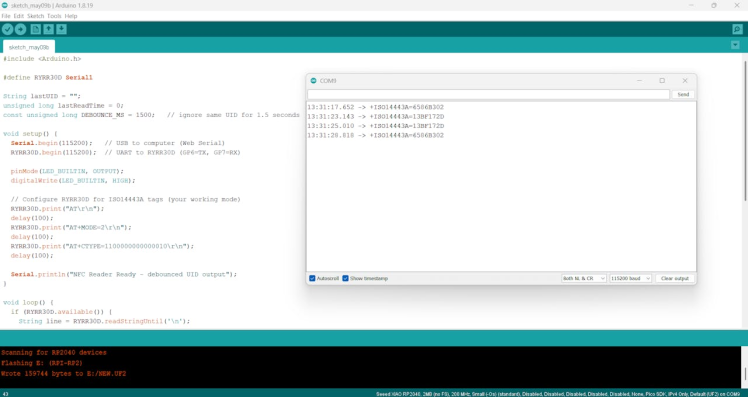
The dashboard is a single HTML file that you can save anywhere and open in Chrome or Edge (Firefox/Safari do not support Web Serial).
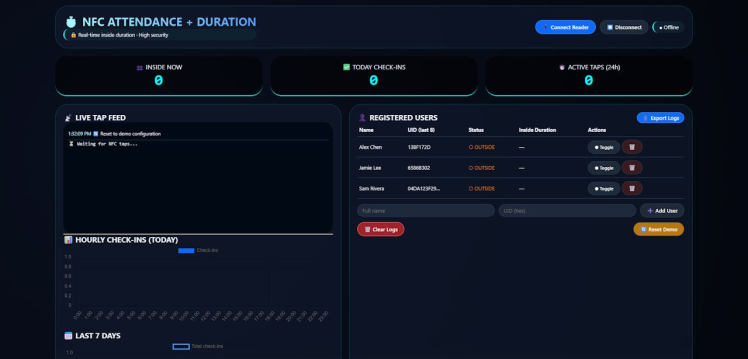
Copy the entire code below into a file named attendance.html.
Note: The code is quite long but packed with features. I’ve split it into logical sections.
<!DOCTYPE html>
<html lang="en">
<head>
<meta charset="UTF-8">
<meta name="viewport" content="width=device-width, initial-scale=1.0, user-scalable=no">
<title>🔐 NFC Attendance with Duration Tracking</title>
<script src="https://cdn.jsdelivr.net/npm/[email protected]/dist/chart.umd.min.js"></script>
<style>
* { margin: 0; padding: 0; box-sizing: border-box; font-family: 'Inter', system-ui, monospace; }
body { background: radial-gradient(circle at 20% 30%, #0a0f1e, #03060c); min-height: 100vh; padding: 20px; color: #eef2ff; }
.glass { background: rgba(15, 25, 45, 0.65); backdrop-filter: blur(14px); border-radius: 32px; border: 1px solid rgba(0,255,255,0.2); padding: 1.2rem; }
.dashboard { max-width: 1600px; margin: 0 auto; display: flex; flex-direction: column; gap: 20px; }
.header { display: flex; justify-content: space-between; align-items: center; flex-wrap: wrap; gap: 15px; }
.title h1 { font-size: 1.8rem; background: linear-gradient(135deg, #aaffff, #4c9aff); -webkit-background-clip: text; background-clip: text; color: transparent; }
.badge { background: #0f212e; padding: 6px 14px; border-radius: 40px; font-size: 0.8rem; border-left: 3px solid #0ff; }
button { background: #1e2a3a; border: none; padding: 8px 16px; border-radius: 40px; color: white; font-weight: 500; cursor: pointer; border: 1px solid #2d3e50; }
button.primary { background: #0f6bff; border-color: #3e8eff; }
button.danger { background: #a1222a; border-color: #ff6b6b; }
button.warning { background: #b9770e; }
button:hover { transform: scale(0.96); filter: brightness(1.1); }
.grid-2col { display: grid; grid-template-columns: 1fr 1.2fr; gap: 20px; }
.grid-3col { display: grid; grid-template-columns: repeat(3, 1fr); gap: 20px; }
.stat-card { background: rgba(0,0,0,0.5); border-radius: 28px; padding: 1rem; text-align: center; border-bottom: 2px solid cyan; }
.stat-number { font-size: 2.4rem; font-weight: 800; font-family: monospace; color: #0ff; }
.live-feed { background: #010a14; border-radius: 24px; padding: 12px; height: 280px; overflow-y: auto; font-family: monospace; font-size: 0.75rem; }
.feed-entry { border-bottom: 1px solid #1e3a5f; padding: 8px 0; font-size: 0.75rem; }
table { width: 100%; border-collapse: collapse; font-size: 0.8rem; }
th, td { text-align: left; padding: 8px 5px; border-bottom: 1px solid #2d3e5a; }
.user-status-in { color: #2ecc71; font-weight: bold; }
.user-status-out { color: #e67e22; }
.action-badge { background: #0b2b38; border-radius: 20px; padding: 2px 10px; font-size: 0.7rem; display: inline-block; }
canvas { max-height: 200px; width: 100%; }
.flex-row { display: flex; gap: 10px; flex-wrap: wrap; align-items: center; }
input, select { background: #1e293b; border: 1px solid #2d3e5f; padding: 6px 12px; border-radius: 20px; color: white; width: 100%; }
.footer { font-size: 0.7rem; text-align: center; opacity: 0.6; margin-top: 20px; }
.modal { display: none; position: fixed; top: 0; left: 0; width: 100%; height: 100%; background: rgba(0,0,0,0.7); justify-content: center; align-items: center; z-index: 1000; }
.modal-content { background: #0f172a; border-radius: 24px; padding: 24px; width: 320px; border: 1px solid cyan; }
@media (max-width: 900px) { .grid-2col, .grid-3col { grid-template-columns: 1fr; } }
</style>
</head>
<body>
<div >
<div >
<div >
<h1>⏱️ NFC ATTENDANCE + DURATION</h1>
<div >🔒 Real‑time inside duration · High security</div>
</div>
<div >
<button id="connectBtn" >🔌 Connect Reader</button>
<button id="disconnectBtn">⏹️ Disconnect</button>
<span id="connStatus" >● Offline</span>
</div>
</div>
<div >
<div ><div>👥 INSIDE NOW</div><div id="insideCount">0</div></div>
<div ><div>✅ TODAY CHECK‑INS</div><div id="totalCheckinsToday">0</div></div>
<div ><div>⏱️ ACTIVE TAPS (24h)</div><div id="totalTaps24h">0</div></div>
</div>
<div >
<div >
<h3>📡 LIVE TAP FEED</h3>
<div id="liveFeed" >⏳ Waiting for NFC taps...</div>
<hr>
<h3>📊 HOURLY CHECK‑INS (TODAY)</h3>
<canvas id="hourlyChart"></canvas>
<h3 >📅 LAST 7 DAYS</h3>
<canvas id="weeklyChart"></canvas>
</div>
<div >
<div >
<h3>👤 REGISTERED USERS</h3>
<button id="exportCsvBtn" >📎 Export Logs</button>
</div>
<div >
<table id="userTable">
<thead><tr><th>Name</th><th>UID (last 8)</th><th>Status</th><th>Inside Duration</th><th>Actions</th></tr></thead>
<tbody id="userTableBody"><tr><td colspan="5">Loading...</td></tr></tbody>
</table>
</div>
<div >
<input type="text" id="newUserName" placeholder="Full name" >
<input type="text" id="newUserUid" placeholder="UID (hex)" >
<button id="addUserBtn">➕ Add User</button>
</div>
<div >
<button id="clearAllLogsBtn" >🗑️ Clear Logs</button>
<button id="resetDemoDataBtn" >🔄 Reset Demo</button>
</div>
</div>
</div>
<div >
<h3>📜 DETAILED ATTENDANCE LOG (last 50 events)</h3>
<div >
<table id="logTable">
<thead><tr><th>Timestamp</th><th>User</th><th>UID</th><th>Action</th><th>Duration (if OUT)</th></tr></thead>
<tbody id="logTableBody"><tr><td colspan="5">No events yet</td></tr></tbody>
</table>
</div>
</div>
<div >🔐 Duration updates every second · Data stored locally</div>
</div>
<div id="registerModal" >
<div >
<h3>🆕 Unknown NFC Tag</h3>
<p>UID: <strong id="unknownUid"></strong></p>
<input type="text" id="modalUserName" placeholder="Assign to person (full name)">
<div >
<button id="modalConfirmBtn" >Register & Check‑in</button>
<button id="modalCancelBtn">Ignore</button>
</div>
</div>
</div>
<script>
// ---------- DATA ----------
let users = []; // { uid, name, status, lastCheckinTime (ISO), lastCheckoutTime, lastDurationSeconds (optional) }
let attendanceLog = []; // { timestamp, uid, name, action, durationSeconds }
// Debounce Map
let lastTapTime = new Map();
const DEBOUNCE_MS = 2000;
// Web Serial
let port = null, reader = null, keepReading = false;
let hourlyChart, weeklyChart;
let durationUpdateInterval = null;
// ---------- Load / Save ----------
function loadData() {
const storedUsers = localStorage.getItem('attendance_users');
if (storedUsers) users = JSON.parse(storedUsers);
else {
users = [
{ uid: "13BF172D", name: "Alex Chen", status: "out", lastCheckinTime: null, lastCheckoutTime: null },
{ uid: "6586B302", name: "Jamie Lee", status: "out", lastCheckinTime: null, lastCheckoutTime: null },
{ uid: "04DA123F291589", name: "Sam Rivera", status: "out", lastCheckinTime: null, lastCheckoutTime: null }
];
}
const storedLog = localStorage.getItem('attendance_log');
attendanceLog = storedLog ? JSON.parse(storedLog) : [];
renderAll();
startDurationUpdater();
}
function saveUsers() { localStorage.setItem('attendance_users', JSON.stringify(users)); }
function saveLog() { localStorage.setItem('attendance_log', JSON.stringify(attendanceLog)); }
// Helper: format seconds into HH:MM:SS or MM:SS
function formatDuration(seconds) {
if (seconds === null || seconds === undefined || isNaN(seconds)) return "00:00";
const hrs = Math.floor(seconds / 3600);
const mins = Math.floor((seconds % 3600) / 60);
const secs = seconds % 60;
if (hrs > 0) return `${hrs}h ${mins}m ${secs}s`;
return `${mins}m ${secs}s`;
}
// Compute current inside duration for a user (if status === 'in')
function getCurrentDuration(user) {
if (user.status !== 'in' || !user.lastCheckinTime) return null;
const checkin = new Date(user.lastCheckinTime);
const now = new Date();
return Math.floor((now - checkin) / 1000);
}
// Update user table with live durations (called every second)
function renderUserTable() {
const tbody = document.getElementById('userTableBody');
if (!users.length) {
tbody.innerHTML = '<tr><td colspan="5">No users. Tap unknown tag to add.</td></tr>';
return;
}
let html = '';
users.forEach(user => {
const shortUid = user.uid.length > 12 ? user.uid.slice(0,10)+"…" : user.uid;
const statusClass = user.status === "in" ? "user-status-in" : "user-status-out";
const statusText = user.status === "in" ? "● INSIDE" : "○ OUTSIDE";
let durationDisplay = "—";
if (user.status === 'in') {
const secs = getCurrentDuration(user);
if (secs !== null) durationDisplay = formatDuration(secs);
} else if (user.lastDurationSeconds) {
durationDisplay = formatDuration(user.lastDurationSeconds) + " (last)";
}
html += `<tr>
<td>${escapeHtml(user.name)}</td>
<td>${shortUid}</td>
<td >${statusText}</td>
<td>${durationDisplay}</td>
<td>
<button >⏺ Toggle</button>
<button >🗑️</button>
</td>
</tr>`;
});
tbody.innerHTML = html;
document.querySelectorAll('.force-toggle').forEach(btn => btn.addEventListener('click', () => processTap(btn.dataset.uid)));
document.querySelectorAll('.delete-user').forEach(btn => btn.addEventListener('click', () => {
if (confirm("Delete user and all their logs?")) {
const uid = btn.dataset.uid;
users = users.filter(u => u.uid !== uid);
attendanceLog = attendanceLog.filter(l => l.uid !== uid);
saveUsers(); saveLog();
renderAll();
}
}));
}
function renderLogTable() {
const tbody = document.getElementById('logTableBody');
if (!attendanceLog.length) {
tbody.innerHTML = '<tr><td colspan="5">No attendance events yet</td></tr>';
return;
}
let html = '';
attendanceLog.slice(0, 50).forEach(ev => {
const durationStr = ev.durationSeconds ? formatDuration(ev.durationSeconds) : (ev.action === 'IN' ? '—' : '');
html += `<tr>
<td>${new Date(ev.timestamp).toLocaleString()}</td>
<td>${escapeHtml(ev.name)}</td>
<td>${ev.uid}</td>
<td><span >${ev.action}</span></td>
<td>${durationStr}</td>
</tr>`;
});
tbody.innerHTML = html;
}
function updateRealTimeCounters() {
document.getElementById('insideCount').innerText = users.filter(u => u.status === "in").length;
const today = new Date().toDateString();
const todayCheckins = attendanceLog.filter(ev => ev.action === "IN" && new Date(ev.timestamp).toDateString() === today).length;
document.getElementById('totalCheckinsToday').innerText = todayCheckins;
const last24h = new Date(Date.now() - 24*3600*1000);
const taps24h = attendanceLog.filter(ev => new Date(ev.timestamp) > last24h).length;
document.getElementById('totalTaps24h').innerText = taps24h;
}
function updateAnalytics() {
const today = new Date().toDateString();
const hourly = Array(24).fill(0);
attendanceLog.forEach(ev => {
if (ev.action === "IN" && new Date(ev.timestamp).toDateString() === today) {
hourly[new Date(ev.timestamp).getHours()]++;
}
});
if (hourlyChart) hourlyChart.destroy();
hourlyChart = new Chart(document.getElementById('hourlyChart'), {
type: 'bar',
data: { labels: Array.from({length:24},(_,i)=>i+":00"), datasets: [{ label: 'Check‑ins', data: hourly, backgroundColor: '#0f6bff' }] },
options: { responsive: true, maintainAspectRatio: true }
});
const weekDays = [], weekCounts = [];
for (let i=6; i>=0; i--) {
const d = new Date(); d.setDate(d.getDate() - i);
const dayStr = d.toDateString();
weekDays.push(d.toLocaleDateString(undefined,{weekday:'short'}));
weekCounts.push(attendanceLog.filter(ev => ev.action === "IN" && new Date(ev.timestamp).toDateString() === dayStr).length);
}
if (weeklyChart) weeklyChart.destroy();
weeklyChart = new Chart(document.getElementById('weeklyChart'), {
type: 'line',
data: { labels: weekDays, datasets: [{ label: 'Total check‑ins', data: weekCounts, borderColor: '#4c9aff', tension: 0.2, fill: true }] },
options: { responsive: true, maintainAspectRatio: true }
});
}
function renderAll() {
renderUserTable();
renderLogTable();
updateRealTimeCounters();
updateAnalytics();
}
// Periodically refresh the user table to update durations (every second)
function startDurationUpdater() {
if (durationUpdateInterval) clearInterval(durationUpdateInterval);
durationUpdateInterval = setInterval(() => {
// Only re-render user table if any user is currently "in"
const hasActive = users.some(u => u.status === 'in');
if (hasActive) renderUserTable();
}, 1000);
}
// ---------- Core Tap Handling with Duration Calculation ----------
function processTap(uid) {
const now = Date.now();
if (lastTapTime.has(uid) && (now - lastTapTime.get(uid)) < DEBOUNCE_MS) {
addLiveFeed(`⏸️ Ignored duplicate tap for UID ${uid} (debounced)`, "#aaaaaa");
return;
}
lastTapTime.set(uid, now);
const user = users.find(u => u.uid.toUpperCase() === uid.toUpperCase());
if (!user) {
document.getElementById('unknownUid').innerText = uid;
document.getElementById('registerModal').style.display = 'flex';
window.pendingUid = uid;
return;
}
let action = "";
let durationSec = null;
if (user.status === "out") {
// CHECK-IN
user.status = "in";
user.lastCheckinTime = new Date().toISOString();
action = "IN";
addLiveFeed(`✅ [IN] ${user.name} (${uid})`, "#86efac");
} else {
// CHECK-OUT: compute duration from lastCheckinTime to now
if (user.lastCheckinTime) {
const checkin = new Date(user.lastCheckinTime);
const checkout = new Date();
durationSec = Math.floor((checkout - checkin) / 1000);
user.lastDurationSeconds = durationSec; // store for display
user.lastCheckoutTime = checkout.toISOString();
}
user.status = "out";
user.lastCheckinTime = null;
action = "OUT";
addLiveFeed(`🔴 [OUT] ${user.name} (${uid}) – Duration: ${formatDuration(durationSec)}`, "#f97316");
}
saveUsers();
// Add to log with duration (only for OUT actions)
addLog(uid, user.name, action, durationSec);
renderUserTable();
updateRealTimeCounters();
updateAnalytics();
}
function addLog(uid, name, action, durationSeconds = null) {
attendanceLog.unshift({
timestamp: new Date().toISOString(),
uid, name, action,
durationSeconds: action === 'OUT' ? durationSeconds : null
});
if (attendanceLog.length > 500) attendanceLog.pop();
saveLog();
renderLogTable();
}
function addLiveFeed(msg, color = "#bbf0ff") {
const feed = document.getElementById('liveFeed');
const div = document.createElement('div');
div.className = 'feed-entry';
div.innerHTML = `<span >${new Date().toLocaleTimeString()}</span> ${msg}`;
feed.prepend(div);
while (feed.children.length > 100) feed.removeChild(feed.lastChild);
}
function escapeHtml(str) { return str.replace(/[&<>]/g, function(m){ if(m==='&') return '&'; if(m==='<') return '<'; if(m==='>') return '>'; return m;}); }
// ---------- Web Serial (unchanged) ----------
async function connectSerial() {
if (port) await disconnectSerial();
try {
port = await navigator.serial.requestPort();
await port.open({ baudRate: 115200 });
document.getElementById('connStatus').innerHTML = '● Connected';
document.getElementById('connectBtn').disabled = true;
document.getElementById('disconnectBtn').disabled = false;
keepReading = true;
readLoop();
addLiveFeed("🔌 Serial connected. Waiting for taps...", "#aaffaa");
} catch(e) { alert("Connection error: " + e.message); }
}
async function disconnectSerial() {
keepReading = false;
if (reader) { try { await reader.cancel(); reader.releaseLock(); } catch(e) {} reader = null; }
if (port) { await port.close(); port = null; }
document.getElementById('connStatus').innerHTML = '○ Offline';
document.getElementById('connectBtn').disabled = false;
document.getElementById('disconnectBtn').disabled = true;
addLiveFeed("🔌 Serial disconnected", "#ffaaaa");
}
async function readLoop() {
if (!port || !port.readable) return;
const textDecoder = new TextDecoderStream();
port.readable.pipeTo(textDecoder.writable);
const readerStream = textDecoder.readable.getReader();
let buffer = '';
try {
while (keepReading && port && port.readable) {
const { value, done } = await readerStream.read();
if (done) break;
buffer += value;
let lines = buffer.split('n');
buffer = lines.pop() || '';
for (let line of lines) {
line = line.trim();
if (!line) continue;
addLiveFeed(`📟 ${line}`, "#6c8cbf");
const match = line.match(/+ISO14443A=([0-9A-F]+)/i);
if (match) processTap(match[1].toUpperCase());
}
}
} catch(err) { console.warn(err); }
finally { readerStream.releaseLock(); }
}
// ---------- Registration Modal ----------
function registerUnknown(uid, name) {
if (!name || name.trim() === "") return;
const newUser = { uid: uid.toUpperCase(), name: name.trim(), status: "out", lastCheckinTime: null, lastCheckoutTime: null };
users.push(newUser);
saveUsers();
renderUserTable();
addLiveFeed(`✨ New user registered: ${name} (${uid})`, "#facc15");
processTap(uid); // auto check-in after registration
}
// ---------- DOM Event Listeners ----------
document.getElementById('connectBtn').onclick = connectSerial;
document.getElementById('disconnectBtn').onclick = disconnectSerial;
document.getElementById('addUserBtn').onclick = () => {
const name = document.getElementById('newUserName').value.trim();
const uid = document.getElementById('newUserUid').value.trim().toUpperCase();
if (!name || !uid) { alert("Name and UID required"); return; }
if (users.find(u=>u.uid===uid)) { alert("UID already registered"); return; }
users.push({ uid, name, status: "out", lastCheckinTime: null, lastCheckoutTime: null });
saveUsers();
renderUserTable();
document.getElementById('newUserName').value = '';
document.getElementById('newUserUid').value = '';
addLiveFeed(`➕ Manual user added: ${name} (${uid})`);
};
document.getElementById('clearAllLogsBtn').onclick = () => {
if (confirm("Delete ALL attendance history? Users will remain.")) {
attendanceLog = [];
saveLog();
renderLogTable();
updateAnalytics();
updateRealTimeCounters();
addLiveFeed("🧹 Attendance log cleared");
}
};
document.getElementById('resetDemoDataBtn').onclick = () => {
if (confirm("Reset to demo users and clear logs?")) {
users = [
{ uid: "13BF172D", name: "Alex Chen", status: "out", lastCheckinTime: null, lastCheckoutTime: null },
{ uid: "6586B302", name: "Jamie Lee", status: "out", lastCheckinTime: null, lastCheckoutTime: null },
{ uid: "04DA123F291589", name: "Sam Rivera", status: "out", lastCheckinTime: null, lastCheckoutTime: null }
];
attendanceLog = [];
saveUsers(); saveLog();
renderAll();
addLiveFeed("🔄 Reset to demo configuration");
}
};
document.getElementById('exportCsvBtn').onclick = () => {
if (!attendanceLog.length) { alert("No logs to export"); return; }
let csv = "Timestamp,User,UID,Action,Duration(seconds)n";
attendanceLog.forEach(ev => {
csv += `"${ev.timestamp}","${ev.name}","${ev.uid}","${ev.action}","${ev.durationSeconds || ''}"n`;
});
const blob = new Blob([csv], {type:"text/csv"});
const a = document.createElement('a');
a.href = URL.createObjectURL(blob);
a.download = `attendance_${new Date().toISOString().slice(0,19)}.csv`;
a.click();
URL.revokeObjectURL(a.href);
};
const modal = document.getElementById('registerModal');
document.getElementById('modalConfirmBtn').onclick = () => {
const name = document.getElementById('modalUserName').value.trim();
if (name && window.pendingUid) registerUnknown(window.pendingUid, name);
modal.style.display = 'none';
document.getElementById('modalUserName').value = '';
window.pendingUid = null;
};
document.getElementById('modalCancelBtn').onclick = () => {
modal.style.display = 'none';
window.pendingUid = null;
};
window.onclick = (e) => { if (e.target === modal) modal.style.display = 'none'; };
loadData();
if (!('serial' in navigator)) alert("❌ Web Serial API not supported. Please use Chrome/Edge.");
</script>
</body>
</html>Key dashboard features:
- Live Tap Feed – shows each raw serial line and processed check‑in/out.
- Real‑time occupants & duration – for every user currently inside, a live counter (updates every second).
- User registry – add/remove users, assign names to UIDs.
- Analytics charts – hourly check‑ins (today) and last 7 days trend.
- Attendance log – last 50 events with duration for check‑outs.
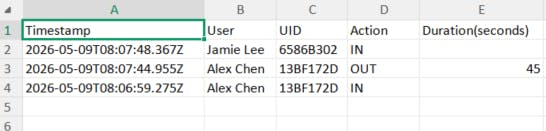
- CSV export – download all records for external analysis.
- Connect the hardware – XIAO RP2040 plugged into USB, RYRR30D powered and wired correctly.
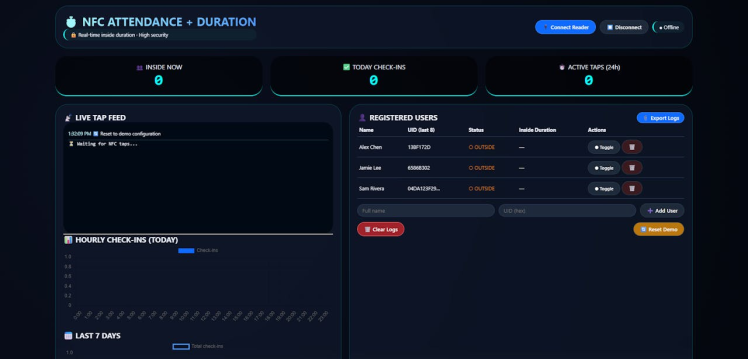
- Open
attendance.htmlin Chrome or Edge.
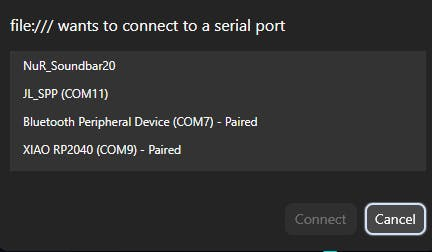
- Click “Connect Reader” – a browser dialog will appear. Select the serial port of your XIAO RP2040 (usually
COM3on Windows,/dev/ttyACM0on Linux,/dev/cu.usbmodem...on Mac).
- Once connected, the status turns to connected.

- If the UID is unknown, a popup asks you to assign a name.
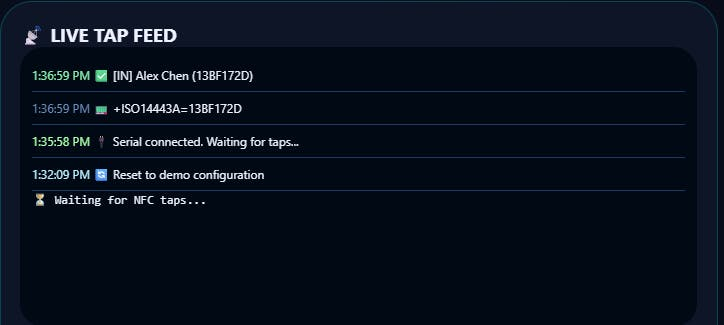
- After registration, the same tap toggles check‑in / check‑out
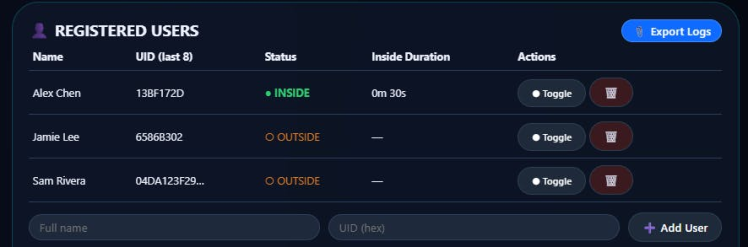

- While a user is checked in, the “Inside Duration” column counts up in real time.
- Check the Live Feed for immediate feedback.
- Export CSV anytime to keep an offline record.
The system works with any ISO14443A tag – the same ones that produce +ISO14443A=XXXXXXXX in your Serial Monitor. You can:
- Use cheap NTAG213 stickers (cost ~$0.50 each).
- Reuse old Mifare Classic cards (like hotel keycards).
- Even emulate a tag with your phone (some Android apps allow that for testing).
To add a new user manually: Type name and UID in the right panel, click “Add User”.
To delete a user: Click the trash icon next to their name – all their logs are also removed.
📈 Advanced CustomizationChange debounce timing- In Arduino code: adjust
DEBOUNCE_MS(1500 ms works well). - In web code: adjust
DEBOUNCE_MS(2000 ms backup).
You now have a fully functional, high‑security attendance system that:
- Runs on a 5microcontroller+5microcontroller+25 NFC reader.
- Uses any cheap NFC tag as a “badge”.
- Provides real‑time check‑in/out with duration tracking.
- Requires no internet after the HTML is loaded.
- Stores all data locally – privacy friendly.
Imagine using this for:
- Office / makerspace attendance.
- Event check‑in (print NFC stickers for participants).
- Time tracking for freelancers (tap in/out with a personal tag).
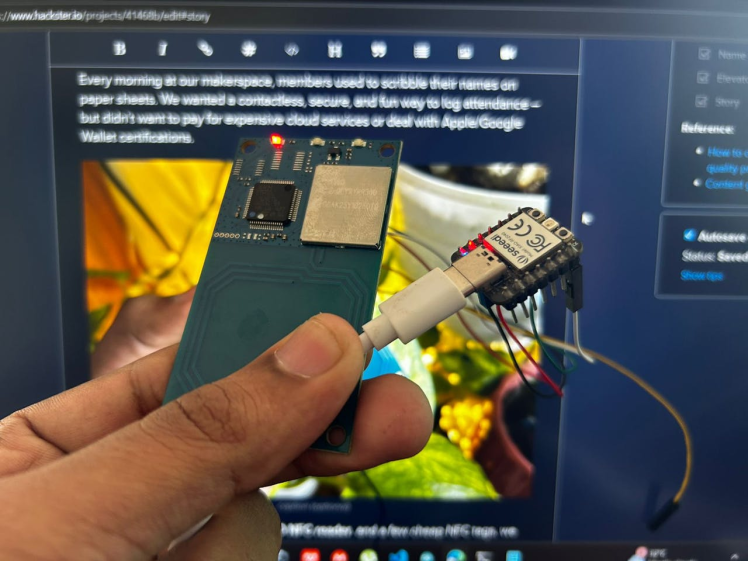
- Reads any standard NFC tag (UIDs like
13BF172D). - Uses a XIAO RP2040 + RYRR30D reader.
- Connects to a web dashboard via Web Serial (Chrome/Edge only).
- Toggles check‑in / check‑out with each tap.
- Shows real‑time inside duration for every user.
- Stores all data locally in your browser (no cloud needed).
- Provides analytics charts and CSV export.
No Apple/Google Wallet credentials, no Wi‑Fi, no subscription – just a USB cable and your NFC tags. Perfect for office attendance, event check‑in, or time tracking. Tap and go! 🚀
Credits
Related products







Leave your feedback...